11

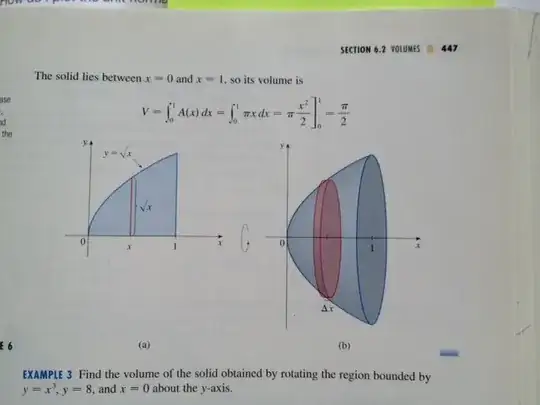
All, In calculus I have to do images such as the following in helping explain technique to students. This one is by rotating $y=\sqrt x$ about the x-axis, an image copied from Stewart's Calculus textbook.
enter image description here

I am wondering if anyone has experience in doing this and has any links to share, some sample files, etc., which would give me an idea on how to best make the image on the right.

Thanks.

Close to what I need:

Consider:

Show[Plot[{-Sqrt[x], Sqrt[x]}, {x, 0, 1},
  PlotRange -> {{-0.25, 1.25}, {-1.5, 1.5}},
  PlotStyle -> Black,
  Filling -> True, FillingStyle -> Directive[LightBlue],
  AxesStyle -> Directive[Thin, Arrowheads[0.03]],
  Ticks -> {{1}, {-1, 1}},
  AxesLabel -> {"x", "y"},
  AspectRatio -> Automatic
  ],
 Graphics[{
   GrayLevel[0.7], EdgeForm[Black],
   Disk[{1, 0}, {.1, 1}],
   Pink,
   Rectangle[{0.47, -Sqrt[0.5]}, {0.53, Sqrt[0.5]}],
   Disk[{0.47, 0}, {.07, Sqrt[0.5]}],
   Disk[{0.53, 0}, {.07, Sqrt[0.5]}],
   Text[Style["\[CapitalDelta]x", Black], {0.5, -Sqrt[0.5]}, {0, 2}]
   }]
 ]

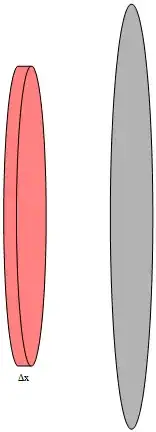
Which produces this image.

enter image description here

If I can come up with a way of joining (taking the union of) the first rectangle and first circle, so that the edge form only marks the exterior of the joined form, then I might have a solution. Any suggestions on how I might do that?

Final Update:

Thanks to @kguler's amazing answer, I learned an exceptional amount of material and possibilities. I made a few adjustments to his code. Here is my final example.

curve = Line@
   Table[{.53, 0} + {.07, Sqrt[0.5]} {Cos[t], Sin[t]}, {t, Pi/2, 
     3 Pi/2, Pi/20}];

poly = Polygon[
   Join[
    Table[{.53, 0} + {.07, Sqrt[0.5]} {Cos[t], Sin[t]}, {t, -Pi/2, 
      Pi/2, Pi/20}], 
    Table[{.47, 0} + {.07, Sqrt[0.5]} {Cos[t], Sin[t]}, {t, Pi/2, 
      3 Pi/2, Pi/20}]
    ]
   ];

g1 = Plot[{-Sqrt[x], Sqrt[x]}, {x, 0, 1}, 
   PlotRange -> {{-0.25, 1.25}, {-1.5, 1.5}}, PlotStyle -> Black, 
   Filling -> True, FillingStyle -> Directive[LightBlue], 
   AxesStyle -> Directive[Thin, Arrowheads[0.03]], 
   Ticks -> {{1}, {-1, 1}}, AxesLabel -> {"x", "y"}, 
   AspectRatio -> Automatic];

g2 = Graphics[{GrayLevel[0.7], EdgeForm[Black], Disk[{1, 0}, {.1, 1}],
     Pink, EdgeForm[Black], poly, Black, curve, 
    Text[Style["\[CapitalDelta]x", Black], {0.5, -Sqrt[0.5]}, {0, 
      2}]}];

Show[g1, g2, Graphics[{
   Blue, Line[{{0.5, 0}, {0.5, Sqrt[0.5]}}],
   Text[Style["\!\(\*SqrtBox[\(x\)]\)", Black, Bold], {0.5, 
     Sqrt[0.5]/2}, {-1.5, 0}],
   PointSize[Medium], Point[{0.5, 0}],
   Text[Style["x", Black, Bold], {0.5, 0}, {0, 1.5}]
   }]
 ]

And the resulting image:

enter image description here

David
  • 14,883
  • 4
  • 44
  • 117

2 Answers2

13

Update:

a way of joining (taking the union of) the first rectangle and first circle, so that the edge form only marks the exterior of the joined form

p = 100; 
curve = Line@ Table[{.53, 0} + {.07, Sqrt[0.5]} {Sin[-2 Pi k /p], 
   Cos[-2 Pi k /p]}, {k, -1 + p/2}];
poly = Polygon[Join[t1 = Table[{.47, 0} + {.07, Sqrt[0.5]} {Sin[-2 Pi k /p], 
        Cos[-2 Pi k /p]}, {k, -1 + p/2}], 
   Reverse@Table[{.53, 0} + {.07, Sqrt[0.5]} {Sin[2 Pi k /p], Cos[2 Pi k /p]}, 
   {k, -1 + p/2}], {t1[[1]]}]]; 

g1 = Plot[{-Sqrt[x], Sqrt[x]}, {x, 0, 1}, 
  PlotRange -> {{-0.25, 1.25}, {-1.5, 1.5}}, PlotStyle -> Black, 
  Filling -> True, FillingStyle -> Directive[LightBlue], 
  AxesStyle -> Directive[Thin, Arrowheads[0.03]], 
  Ticks -> {{1}, {-1, 1}}, AxesLabel -> {"x", "y"}, AspectRatio -> Automatic];

g2 = Graphics[{GrayLevel[0.7], EdgeForm[Black], 
  Disk[{1, 0}, {.1, 1}], Pink, EdgeForm[Black], poly, Black, curve, 
  Text[Style["\[CapitalDelta]x", Black], {0.5, -Sqrt[0.5]}, {0, 2}]}]

Mathematica graphics

Show[g1, g2]

Mathematica graphics


Original post:

RevolutionPlot3D[{{x, Sqrt[x]}, {.5, Min[Sqrt[.55], Sqrt[x]]}, 
   {.6, Min[Sqrt[.55], Sqrt[x]]}, {1., Sqrt[x]}, 
   {ConditionalExpression[x, .5 <= x <= .6], Sqrt[.55]}}, 
 {x, 0, 1}, RevolutionAxis -> {1, 0, 0}, 
 PlotStyle -> {Opacity[.5, Blue], Opacity[.9, Red], Opacity[.9, Red], 
   Opacity[.7, Cyan], Opacity[1, Red]}, Mesh -> None, 
 BoundaryStyle -> None, Axes -> {True, False, True},
 AxesOrigin -> {0, 0, 0}, Boxed -> False]

Mathematica graphics

kglr
  • 394,356
  • 18
  • 477
  • 896
11

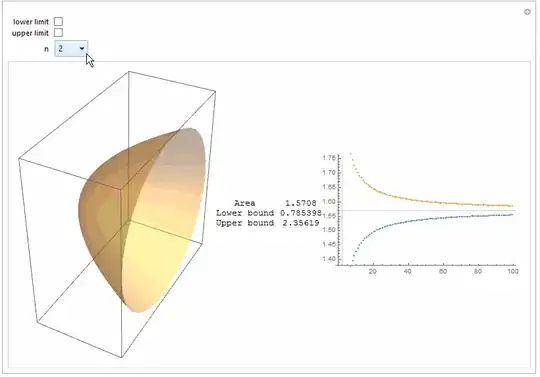
Just purely for fun: to illustrate approximation of volume integral.

Manipulate[
 Module[{dp, dpl, dpu, r = Range[0, 1, 1/n], f, cc, lb, la, ub, ua, 
   ll, ul},
  dp = Range[0, 1, 1/#] & /@ Range[2, 100];
  dpl = Total[Pi Most[#]/(Length@# - 1)] & /@ dp;
  dpu = Total[Pi Rest[#]/(Length@# - 1)] & /@ dp;
  f = Sqrt /@ r;
  cc = Partition[{#, 0, 0} & /@ r, 2, 1];
  {lb, la} = 
   Transpose@MapThread[{Cylinder[#1, #2], Pi #2^2/n} &, {cc, Most@f}];
  {ub, ua} = 
   Transpose@MapThread[{Cylinder[#1, #2], Pi #2^2/n} &, {cc, Rest@f}];
  ll = Graphics3D[{Opacity[0.2], lb}];
  ul = Graphics3D[{Opacity[0.2], ub}];
  Row[{
    Show[If[c == 1, ll, Graphics3D[]], If[d == 1, ul, Graphics3D[]], 
     ParametricPlot3D[{u, Cos[v] Sqrt[u], Sin[v] Sqrt[u]}, {u, 0, 
       1}, {v, 0, 2 Pi}, PlotStyle -> Opacity[0.4], Mesh -> False], 
     ImageSize -> 300],
    Grid[{{"Area", N[Pi/2]}, {"Lower bound", 
       N[Total@la]}, {"Upper bound", N[Total@ua]}}], 
    ListPlot[{dpl, dpu}, GridLines -> {{n}, {Pi/2}}, 
     ImageSize -> 300]}]]
 , {{c, 0, "lower limit"}, {0, 1}}, {{d, 0, "upper limit"}, {0, 
   1}}, {n, Range[2, 100, 2]}]

enter image description here

ubpdqn
  • 60,617
  • 3
  • 59
  • 148
  • Also a nice answer. – Daniel Lichtblau Jun 02 '15 at 15:22
  • @DanielLichtblau thank you...it was just fun to illustrate the limiting procedure...and I thought fit in with educational spirit of question :) – ubpdqn Jun 03 '15 at 01:44
  • @ubpdqn: I will definitely be examining this closely before the fall term starts. Very nice application. I just needed something different for what I was working on at the moment. I appreciate your help. – David Jun 03 '15 at 21:31