17

Context

I am interested in converting surfaces into solids (so I can make a 3D mesh out of them using ToElementMesh)

Say I have the following cool surface

f[t_] := With[{s = 3 t/2}, {(2 + Cos[s]) Cos[t], (2 + Cos[s]) Sin[t], Sin[s]} - {2, 0, 0}]
v1[t_] := Cross[f'[t], {0, 0, 1}] // Normalize
v2[t_] := Cross[f'[t], v1[t]] // Normalize
g[t_, θ_] := f[t] + (Cos[θ] v1[t] + Sin[θ] v2[t])/2
gr = ParametricPlot3D[Evaluate @ g[t, θ], {t, 0, 4 Pi}, {θ, 0, 2 Pi}, 
                      Mesh -> None, MaxRecursion -> 4, Boxed -> False, Axes -> False];

which I pinched from this answer.

Mathematica graphics

Question

How would like to make a solid out of what is in it?

I have a hint that there is a simple answer to this problem in the context of the new computational geometry tools of Mathematica 10 but I have not found it.

In some sense I am after the opposite of BoundaryMesh

user21
  • 39,710
  • 8
  • 110
  • 167
chris
  • 22,860
  • 5
  • 60
  • 149
  • Try DiscretizeGraphics – user21 Jun 11 '15 at 16:23
  • In[491]:= gr // DiscretizeGraphics Out[491]= EmptyRegion[3]; so its a bit disapointing – chris Jun 11 '15 at 16:23
  • 3
    You could convert it to a ParametricRegion and then use ToElementMesh - some examples are in the documentation, see also the tutorial to element mesh generation. – user21 Jun 11 '15 at 16:33

3 Answers3

17

Method 1: Construct mesh elements manually

We can triangulate a periodic quad-lattice on the surface:

n = {180, 20};  (* number of points in each direction *)
pts = Table[
   g[4. Pi/n[[1]] t, 2. Pi/ n[[2]] θ], {t, n[[1]]}, {θ, n[[2]]}];

idcs = {{{1, 2, 4}, {1, 4, 3}}, {{1, 2, 3}, {2, 4, 3}}}; (* for a diamond pattern *) tri = 1 + Array[Function[quad, quad[[#]] & /@ idcs[[Mod[+##, 2, 1]]]][Tuples[ {Mod[#1 + {-1, 0}, Dimensions[pts][[1]]], Mod[#2 + {-1, 0}, Dimensions[pts][[2]]]}].{Length[First@pts], 1}] &, Most@Dimensions[pts]];

Needs["NDSolveFEM"]. bmesh = ToBoundaryMesh[ "Coordinates" -> Flatten[pts, 1], "BoundaryElements" -> {TriangleElement[Flatten[tri, 2]]} ]

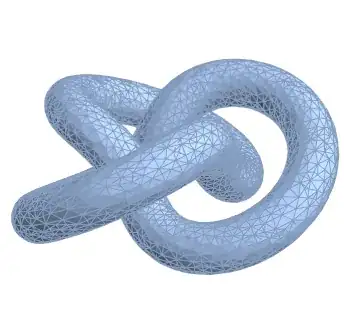
emesh = ToElementMesh[bmesh] (* ElementMesh[{{-4.86396, 1.5}, {-3.32664, 3.32664}, {-1.5, 1.5}}, {TetrahedronElement["<" 21544 ">"]}] *)

MeshRegion@emesh

Mathematica graphics

Notes:

Tuple generates the indices of the quadrilaterals in each row (#1) & column (#2`), wrapping around at the end of the domain to close up the tube:

Tuples[{Mod[#1 + {-1, 0}, Dimensions[pts][[1]]],
        Mod[#2 + {-1, 0}, Dimensions[pts][[2]]]}]

The dot product with {Length[First@pts], 1} converts a {row, column} pair to the index of the corresponding point in pts.

We triangulate the quadrilaterals by alternating which diagonal is used. The variable idcs contains two lists of two triangles, representing both ways. The integers themselves are indices of the quadrilateral (given by Tuples[..].{Length[..], 1} above).

idcs = {{{1, 2, 4}, {1, 4, 3}},   (* 1-4 diagonal *)
        {{1, 2, 3}, {2, 4, 3}}};  (* 2-3 diagonal *)

Method 2: Mesh the domain and apply parametrization

This takes more advantage of FEM/ElementMesh capabilities. First mesh the domain. Then apply g to map domain mesh coordinates onto to the surface. Use these coordinates and the domain mesh to construct a boundary mesh on the surface. Finally, use ToElementMesh to construct a mesh of the solid.

 Needs["NDSolve`FEM`"]

tscale = 4; θscale = 0.5; (* scale roughly proportional to speeds ) dom = ToElementMesh[FullRegion[2], {{0, tscale}, {0, θscale}}, ( domain ) MaxCellMeasure -> {"Area" -> 0.001}]; coords = g[4 Pi #1/tscale, 2 Pi #2/θscale] & @@@ dom["Coordinates"]; ( apply g ) bmesh2 = ToBoundaryMesh[ "Coordinates" -> coords, "BoundaryElements" -> dom["MeshElements"] ]; emesh2 = ToElementMesh@ bmesh2 ( ElementMesh[{{-4.86407, 1.5}, {-3.32362, 3.32362}, {-1.49991, 1.49991}}, {TetrahedronElement["<" 5581 ">"]}] *)

MeshRegion@ emesh2
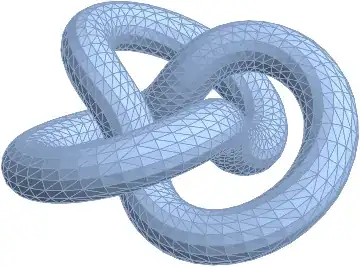
Mathematica graphics

Note: I thought I would have to glue the boundaries together by hand, but ToBoundaryMesh seems to handle it for me. :D

Michael E2
  • 235,386
  • 17
  • 334
  • 747
  • Thanks! I like method 2 better. – chris Jun 12 '15 at 07:02
  • 1
    @MichaelE2...learned such a lot from this +1, of course...thanks :) – ubpdqn Jun 12 '15 at 07:24
  • @chris You're welcome. I like method 2 better, too. But I came up with it second and after some time had passed. I was afraid I'd have to remap coordinates & indices to glue the boundaries together. – Michael E2 Jun 12 '15 at 14:36
  • Is there a way to achieve the same thing if there's no known equation of the surface? – RunnyKine Jul 10 '15 at 21:43
  • @RunnyKine If the surface is not given by equations, how is it given? (If it's already a valid boundary mesh, then you're in business, aren't you? If it's self-intersecting, then you're in trouble. If it's not closed, then perhaps you could stick on a patch. The ParametricPlot3D has the last problem and maybe the first.) – Michael E2 Jul 11 '15 at 00:34
  • Thanks. My problem is mainly with self-intersecting regions, but I guess there's no easy way around it. – RunnyKine Jul 11 '15 at 01:23
  • What is the easiest way to change this code in order to work with non-closed curve tubes. For example, if the function f in the question definitions is f = BezierFunction[#[[{1, 2, 3}]] & /@ {{-1, 0, 1}, {-2, 0, 2}, {2, 0, 3}, {1, 0, 1}}] and gr is gr = ParametricPlot3D[Evaluate@g[t, \[Theta]], {t, 0, 1}, {\[Theta], 0, 2 Pi}] . – Anton Antonov Apr 23 '16 at 22:05
  • @AntonAntonov I don't know about the "easiest" way. Add caps, correct the local coordinate frame for making the tube, reduce diameter of tube so it doesn't self-intersect. It's a little long to fit in a comment: http://i.stack.imgur.com/qNr2T.png (http://pastebin.com/CMKeppVa) -- A more robust way might be to "integrate" the coordinate frame as t moves from 0 to 1. – Michael E2 Apr 24 '16 at 01:46
  • @MichaelE2 Thank you very much for the code! It is what I was looking for. And I will consider the ideas you mention. – Anton Antonov Apr 24 '16 at 13:08
  • @AntonAntonov You're welcome. I should have mentioned that I reduced the mesh order to 1, to make it easy to get the caps to fit exactly. I didn't want to figure out how to make quadratic-order mesh caps. It certainly should be possible. I mention it in case your end use is to solve a PDE. – Michael E2 Apr 24 '16 at 13:23
  • @MichaelE2 I have meshes that come by a long route from Blender, through Autodesk's MeshMixer, to me as .OBJ files. MMA's FindMeshDefects finds no problems, so MeshMixer does an ostensibly good job. Mathematica's SolidRegionQ does not think they're solid, even though other tools find them watertight (e.g., https://github.com/mikedh/trimesh). I'm not sure of the difference between 'watertight' and 'solid', but I wanted to point out a case of ostensibly defect-free surface meshes that aren't solid. I'll probably formulate an MVE and another SE question on this topic. – Reb.Cabin Jul 16 '17 at 20:43
8

Here is an attempt to use MichaelE2's method 2 but only using built-in functions with no need to load the FEM package.

tscale = 4; θscale = 0.5;
domain = DiscretizeRegion[FullRegion[2], {{0, tscale}, {0, θscale}}, 
                          MaxCellMeasure -> {"Area" -> 0.0005}]
coords = g[4 Pi #1/tscale, 2 Pi #2/θscale] & @@@ MeshCoordinates[domain];  
         (* This is the same g defined in the question *)
mr = MeshRegion[coords, MeshCells[domain, 2]];

Here is where it gets tricky with built-in functions. I first convert the MeshRegion mr to a Graphics3D object using Show then discretize the boundary and finally use TriangulateMesh to get a solid. BoundaryMeshRegion seems to fail here, hence, the workaround.

tm = TriangulateMesh @ BoundaryDiscretizeGraphics @ Show @ mr

Mathematica graphics

MeshCellCount[tm, 3] > 0    (* check that there are 3D cells *)

True

RunnyKine
  • 33,088
  • 3
  • 109
  • 176
  • 1
    Nice! FEM has become a bit like black magic between undocumented functions, failing ones etc… :-) – chris Jul 21 '15 at 06:36
  • @user21 Why does BoundaryMeshRegion[coords, MeshCells[domain, 2]] complain about a boundary not being closed? – RunnyKine Jul 21 '15 at 11:02
  • @RunnyKine This is the message I get : BoundaryMeshRegion::bsuncl: "The boundary surface is not closed because the edges Line[{{719,1},{97,719},{1,97}}] only come from a single face." – Anton Antonov Apr 03 '16 at 14:11
  • @AntonAntonov. I'm guessing you're using a much newer version of Mathematica. A lot of things that worked with these region functions in previous versions are now broken. If you check this site you'll see I've found quite a few. – RunnyKine Apr 05 '16 at 04:06
  • @RunnyKine Yes, I am using the newest version. Thank you for your clarification. I like that you programmed Michael E2's approach with built-in functions. – Anton Antonov Apr 05 '16 at 04:31
  • @AntonAntonov. Thanks, I always try to avoid non built-in functions whenever possible. – RunnyKine Apr 05 '16 at 04:57
  • I feel this morning FEM deserves a little defense: First FEM is built-in (as a standard package); it is, imo, better documented than Mesh* functionality; and, this will change no doubt, its reliability, in terms of how often it behaves as documented, has been greater. OTOH, it's narrower in scope, which limits its usefulness (and is probably connected to its reliability). – Michael E2 Jun 23 '16 at 14:26
6

For a closed surface such as this one, a slight modification of the function MakeTriangleMesh[] in this answer can be used:

MakeTriangleMesh[vl_List, {closedu : (True | False) : False,
                           closedv : (True | False) : False}, opts___] := 
       Module[{dims = Most[Dimensions[vl]], v = vl, idx},
              idx = Partition[Range[Times @@ dims], Last[dims]];
              If[TrueQ[closedu],
                 v = Most[v]; idx = Append[Most[idx], First[idx]]];
              If[TrueQ[closedv],
                 v = Most /@ v; idx = Composition[Append[#, First[#]] &, Most] /@ idx];
              BoundaryMeshRegion[Apply[Join, vl], 
                                 Triangle[Flatten[Apply[{Append[Reverse[#1], Last[#2]], 
                                                         Prepend[#2, First[#1]]} &, 
                                 Partition[idx, {2, 2}, {1, 1}], {2}], 2]], opts]] /;
       ArrayQ[vl, 3]

With[{m = 101, n = 31},
     MakeTriangleMesh[N[Table[Evaluate @ g[t, θ],
                              {t, 0, 4 π, 4 π/(m - 1)}, {θ, 0, 2 π, 2 π/(n - 1)}]],
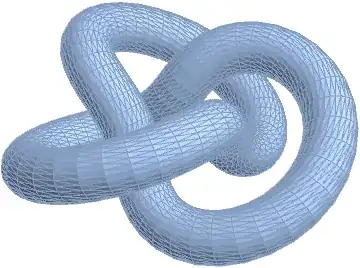
                      {True, True}]]

meshed tube

Compute the volume:

Volume[%]
   24.674785447032324
J. M.'s missing motivation
  • 124,525
  • 11
  • 401
  • 574