4

Suppose that I use Frame -> True in Plot. Then I can use FrameLabel -> {"x (nm)", "y (nm)"} to label the frame (i.e., "pseudo-axes"). For example, I have done the following:

Plot[Sin[x], {x, 0, 2 Pi}, PlotRange -> All, 
 Frame -> True, FrameLabel -> {"x (nm)", "y (nm)"}, 
 BaseStyle -> {FontFamily -> "Arial", 20}]
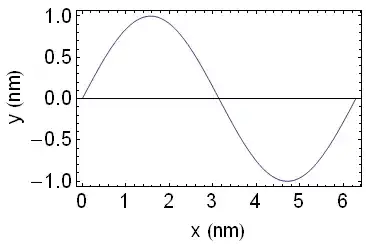
FrameLabel

Now, however, I would like the characters "x" and "y" to be italicized in FrameLabel. Is this possible?

I would like my labels to look like this:

x (nm)

y (nm)

where x and y are italicized, but (nm) is not.

Do I need to use Style, or is there a simpler solution?

Also, in the future, I may need to create FrameLabel directives that are more complicated, such as:

Phi(z) (V)

where, for example, z is italicized, but Phi( and ) (V) are not.

Andrew
  • 10,569
  • 5
  • 51
  • 104

3 Answers3

9

The simplest way would be to select x and y and press CmdI on a mac to make those letters italic before evaluating it (CtrlI on Windows/Linux). It will also appear italicized in your input cell.

enter image description here

If you want to do it programmatically, you can use Row and Style the letters you want appropriately.

Plot[Sin[x], {x, 0, 2 Pi}, PlotRange -> All, Frame -> True, 
    BaseStyle -> {FontFamily -> "Arial", 20}, FrameLabel -> {
        Row[{Style["x", FontSlant -> Italic], " (nm)"}], 
        Row[{Style["y", FontSlant -> Italic], " (nm)"}]
    }
]

Both of these apply to your Phi(z)(V) example too.

rm -rf
  • 88,781
  • 21
  • 293
  • 472
6

One possibility is to enter your labels in box representation and use the option setting SingleLetterItalics -> True (which is actually the default for Plot, but here we give it explicitly just to be clear):

Plot[
 Sin[x], {x, 0, 2 Pi}, PlotRange -> All,
 Frame -> True, FrameLabel -> {"\!\(x (nm)\)", "\!\(y (nm)\)"}, 
 BaseStyle -> {FontFamily -> "Arial", 20, SingleLetterItalics -> True}
]

This gives exactly the same output as shown in @R.M's answer, so I won't duplicate it again.

If you want to have an upright single letter, you could embed a StyleBox to override the base style. For example (here we just use Style to introduce the option value; these strings can be used directly as labels without the enclosing Style):

Style[
 "\!\( Phi(z) ( \*StyleBox[V, SingleLetterItalics -> False] ) \)", 
 SingleLetterItalics -> True
]

Or, you can enter upright symbols as string literals embedded within the boxes (as these aren't subject to styling):

Style["\!\( Phi(z) ( \"V\" ) \)", SingleLetterItalics -> True]

Probably the simplest way, though, is to use a FormBox to display certain parts of the string in TraditionalForm as needed (which is also useful in this case for imparting correct spacing to the RowBox):

"\!\( \(TraditionalForm\`Phi(z)\) (V) \)"

I admit string representations of boxes are an acquired taste, so this approach might not be for everyone--but it's wholly equivalent to building things up using functions like Row and Style, while being a bit more compact in most cases.

Oleksandr R.
  • 23,023
  • 4
  • 87
  • 125
2

I have this same issue as well. I would like my axis labels to look as close to the LaTeX font that I use in the body of my paper.

The easiest way to do this is to simply italicize the letters in the AxesLabel command. While this is not visible in the code below, I simply italicized the "x" and "P(x)" using Command+I in the Mathematica notebook itself. For example:

binom1[n_, x_, p_, q_] = Binomial[n, x]*(p^x)*(q^(n - x))

plotn40p5q5 = ListPlot[Table[{x,binom1[40,x,.5,.5]},{x,0,40}],
PlotStyle->RGB[.059,.302,.573],
AxesLabel->{"x", "P(x)"},
AxesOrigin-> {0,0},
Joined->True,
Mesh->All,
BaseStyle-> {FontSize -> 16, FontFamily -> "Latin Modern Roman"}
]

This produces the following:

enter image description here

G. Khanna
  • 131
  • 3