9

I would like to draw a protractor with Mathematica. I hope this is a fun question. Here is some start codes I tried:

r1 = 0.95; r2 = 0.98; r3 = 0.9; R = 1;
Show[{ParametricPlot[{{Cos[x], Sin[x]}, {2 x/Pi - 1, 0}}, {x, 0, Pi}, 
   PlotStyle -> Black], 
  Table[ParametricPlot[{{Cos[i Degree] x, x Sin[i Degree]}}, {x, r2, 
     R}, PlotRange -> {-R, R}], {i, 0, 180}], 
  Table[ParametricPlot[{{Cos[i Degree] x, x Sin[i Degree]}}, {x, r1, 
     R}, PlotRange -> {-R, R}], {i, 0, 180, 5}], 
  Table[ParametricPlot[{{Cos[i Degree] x, x Sin[i Degree]}}, {x, r3, 
     R}, PlotRange -> {-R, R}], {i, 0, 180, 10}]}, Axes -> False]

start figure

I draw this protractor just for fun. I hope someone may be interested in this question. As advice from @shrx, the skeleton of the protractor is drawn. However, the labels are not easy for me to add, the alignment and direction are not easy task to do. Any suggestion on this part?

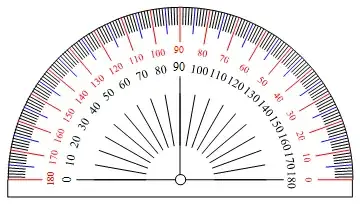
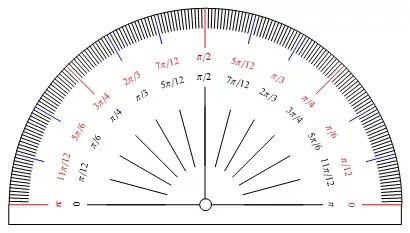
Here are some protractor designs from wiki:

wiki

wiki 1

Thanks for @george2079's answer

The correct way to draw this kind object is directly draw each part, not as in the question using parametric equations to draw. I slightly modified @george2079's answer based on @wxffles's suggestion.

Graphics[{{Thickness[.003], Circle[{0, 0}, 1, {0, Pi}], 
   Circle[{0, 0}, .03], 
   Line[{{1, 0}, {1, -.1}, {-1, -.1}, {-1, 0}}]},
  {Thickness[.001], Line[{{-0.015, 0}, {0.015, 0}}], 
   Line[{{0, -0.015}, {0, 0.015}}]},
  Rotate[{Thickness[.003], Line[{{.03, 0}, {.6, 0}}]}, #, {0, 
      0}] & /@ {0, Pi/2, Pi},
  GeometricTransformation[
     Piecewise[{{{Red, Line[{{.8, 0}, {1, 0}}], Black, 
         Line[{{.2, 0}, {.5, 0}}], 
         Rotate[{Red, 
           Text[Style[#, FontSize -> Scaled[0.028], 
             FontFamily -> "Times"], {.75, 0}, {0, 0}]}, -Pi/2], 
         Rotate[{Black, 
           Text[Style[180 - #, FontSize -> Scaled[0.026], 
             FontFamily -> "Times"], {.65, 0}, {0, 0}]}, -Pi/2]}, 
        Mod[#, 10] == 0}, {{Blue, Line[{{.85, 0}, {1, 0}}]}, 
        Mod[#, 5] == 0}, {Line[{{.9, 0}, {1, 0}}], True}}], 
     RotationTransform[# Degree]] & /@ (Range[0, 180])}]

from answer

Thank you all for your answers and comments!

Kattern
  • 2,561
  • 19
  • 35

2 Answers2

22
Graphics[{Circle[{0, 0}, 1, {0, Pi}], Circle[{0, 0}, .03], 
     Line[{{1, 0}, {1, -.1}, {-1, -.1}, {-1, 0}}],
     Rotate[ Line[{{.03, 0}, {.6, 0}}] , #, {0, 0}] & /@ {0, Pi/2, Pi},
  GeometricTransformation[
     Piecewise[{
       {{Red, Line[{{.8, 0}, {1, 0}}], Black, 
         Line[{{.2, 0}, {.5, 0}}], 
          Rotate[{Red, Text[#, {.75, 0}, {0, 0}]}, -Pi/2], 
          Rotate[{Black, 
             Text[Style[180 - #, Larger], {.65, 0}, {0, 0}]}, -Pi/2]}, 
            Mod[#, 10] == 0},
       {{Blue, Line[{{.85, 0}, {1, 0}}]}, 
            Mod[#, 5] == 0},
       {Line[{{.9, 0}, {1, 0}}], True}}], 
           RotationTransform[# Degree]] & /@ (Range[0, 180])}]

enter image description here

the mathematicians version...

formpi[v_] := Module[ { frac = v/Pi,num,den },
   num = If[Numerator[frac] == 1, Unevaluated[Sequence[]], 
                                  Numerator[frac]];
   den = If[Denominator[frac] == 1, Unevaluated[Sequence[]],
               {"/", Denominator[frac]}];
   Switch[
     frac, 1, Pi , 0, 0,
         x_Integer, Row[{frac, Pi}],
         x_Rational, Row[{num, Pi}~Join~den], __, Row[ {v/Pi, Pi}  ] ]]
  Graphics[{Circle[{0, 0}, 1, {0, Pi}], Circle[{0, 0}, .03], 
  Line[{{1, 0}, {1, -.1}, {-1, -.1}, {-1, 0}}], 
  Rotate[Line[{{.03, 0}, {.6, 0}}], #, {0, 0}] & /@ {0, Pi/2, Pi}, 
  GeometricTransformation[Piecewise[{
    {{Red, Line[{{.8, 0}, {1, 0}}], Black, 
      Line[{{.2, 0}, {.5, 0}}], 
       Rotate[{Red, Text[Style[formpi[#]], {.75, 0}, {0, 0}]}, -Pi/2],
       Rotate[{Black, 
       Text[Style[formpi[Pi - #]], {.65, 0}, {0, 0}]}, -Pi/2]}, 
         Mod[#, Pi/4 ] == 0},
     {{Blue, Line[{{.85, 0}, {1, 0}}], Black, 
             Line[{{.2, 0}, {.5, 0}}], 
           Rotate[{Red, Text[Style[formpi[#]], {.75, 0}, {0, 0}]}, -Pi/2],
        Rotate[{Black, 
            Text[Style[formpi[Pi - #]], {.65, 0}, {0, 0}]}, -Pi/2]}, 
          Mod[#, Pi/12] == 0}, {Line[{{.9, 0}, {1, 0}}], True}}], 
       RotationTransform[# ]] & /@ (Range[0, Pi  , Pi/180])}]

enter image description here

george2079
  • 38,913
  • 1
  • 43
  • 110
10

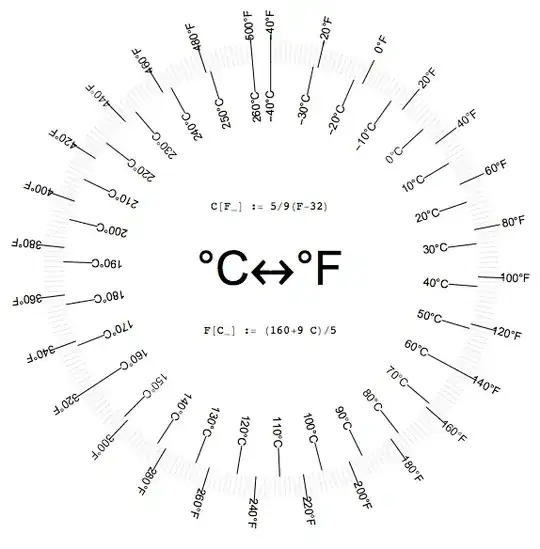
This is not a protractor, but it is a related application that that serves as an example of rotated text which is the only thing missing in the protractor shown in the question.

I did it a while a go and keep it near the kitchen oven:

c[f_]:=5/9 (-32+f)

f[c_]:=1/5 (160+9 c)

cToAngle[c_]:=(c+40)/300*(2\[Pi]-5Degree)

fToAngle[f_]:=(f+40)/540*(2\[Pi]-5Degree)

Module[{k1=0.86,k2=1.128},
  Graphics[
    {Style[Text["\[Degree]C\[LeftRightArrow]\[Degree]F",{0,0}],FontSize->50],
     Style[Text["C[F_] := 5/9(F-32)",{0,.3}],FontFamily->"Courier"],
     Style[Text["F[C_] := (160+9 C)/5",{0,-.3}],FontFamily->"Courier"],
     Table[{Line[{k1{Sin[cToAngle@c],Cos[cToAngle@c]},{Sin[cToAngle@c],Cos[cToAngle@c]}}],
            Text[ToString[c]<>"\[Degree]C",k1{Sin[cToAngle@c],Cos[cToAngle@c]},{1,0},{Sin[cToAngle@c],Cos[cToAngle@c]}]},
           {c,-40,260,10}],
     Table[{Line[{{Sin[fToAngle@f],Cos[fToAngle@f]},k2*{Sin[fToAngle@f],Cos[fToAngle@f]}}],
            Text[ToString[f]<>"\[Degree]F",(k2+0.125){Sin[fToAngle@f],Cos[fToAngle@f]},{1,0},{Sin[fToAngle@f],Cos[fToAngle@f]}]},
           {f,-40,500,20}],
     AbsoluteThickness[0.1],
     Table[{Line[{{Sin[fToAngle@f],Cos[fToAngle@f]},(1.1)*{Sin[fToAngle@f],Cos[fToAngle@f]}}]},
           {f,-40,500,2}],
     White,Point[{0,0}]},BaseStyle->{FontSize->Larger}
  ]
]

enter image description here

Gustavo Delfino
  • 8,348
  • 1
  • 28
  • 58