2

This question is a continuation to [this other one][1]

I am creating polymers (where each monomer is of equal length) using this method:

num = 50;
angles = Table[RandomVariate[NormalDistribution[0, 0.2], 80], {i, 1, num}];
a1 = 1;
anglePath1[angles_, a_] := FoldList[# + a {Cos@#2, Sin@#2} &, {0, 0}, Accumulate@angles]
p1 = Table[anglePath1[angles[[i]], a1], {i, 1, num}];

Then, I use SplineFit

Needs["Splines`"];
spt = Table[SplineFit[p1[[i]], Cubic], {i, num}];
lt = Table[spt[[i]][[2, -1]], {i, num}];

Then, I break the polymer into monomers of equal length. To do so, I calculate the arc length of the polymer:

dz = .0000001;
arc = Table[
  NIntegrate[
   Norm[(spt[[i]][z + dz] - spt[[i]][z])/dz], {z, 0, lt[[i]]}, 
   MaxRecursion -> 12], {i, num}]

mesh = Table [Solve [arc[[i]]/a1 == div], {i, 1, Length[arc]}]; meshf = Flatten[Round[div /. mesh]]

After this I extract co-ordinates:

plot = Table[ParametricPlot[spt[[i]][t], {t, 0, lt[[i]]}, 
       MeshFunctions -> {"ArcLength"}, Mesh -> {meshf[[i]]}, 
       MeshStyle -> {PointSize[0.01], Red}], {i, num}];

coord = Table[ Sort@Cases[Normal@plot[[i]], Point[p_] :> p, Infinity], {i, num}];

Now I am trying to calculate angles:

1. Using Coordinates p1

vecp = Table[Differences@p1[[i]], {i, 1, num}];
vecp2 = Table[Partition[vecp[[i]], 2, 1], {i, 1, num}];
angp = Table[VectorAngle @@@ vecp2[[i]], {i, 1, num}];
angp2 = Flatten[angp];

2.Using Coordinates coord

vecc = Table[Differences@coord[[i]], {i, 1, num}];
vecc2 = Table[Partition[vecc[[i]], 2, 1], {i, 1, num}];
angc = Table[VectorAngle @@@ vecc2[[i]], {i, 1, num}];
angc2 = Flatten[angc];

Both of these angles should have Normal Distribution (similar to the distribution of angles):

Histogram[Flatten[angles], {0.1}]

But I don't get similar distribution.
[1]: Why are these methods giving me different results? (Trying to test SplineFit)

sra
  • 717
  • 4
  • 15
  • @belisarius I checked using ListPlot[coord[[1]]] and I got plots that looked good. Using ListPlot it was looking good before sorting and I guess it was so because it was just showing me the coordinates. When I used, ListPlot with lines option it wasn't good at all. Is there a sequential way of extracting the co-ordinates? Even though the p1 is in sequential the angles calculated from it does not have the same distribution as angles – sra Jun 19 '15 at 16:23
  • But please try to explain why you are doing all that.You are starting with points at equal distances, then you're fitting them to a Spline and then you try to recover those (more or less) same points. Why?? – Dr. belisarius Jun 19 '15 at 16:26
  • @belisarius The reason, I am doing this is to see if SplineFit is introducing some artifact of not. By testing SplineFit on artificially created polymer ( of which I know almost everything about (e.g. arc length, persistence length)), I can be sure about robustness of SplineFit and then I can use it on some experimental data. When I tried to use SplineFit on my experimental data I was getting some weird answer. – sra Jun 19 '15 at 16:31
  • @belisarius I am getting this Part::partd: "Part specification cc[[{9,3,4,5,46,75,30,6,35,67,50,39,17,36,68,64,12,57,29,47,18,13}]] is longer than depth of object." when I tried coord = Table[ cc[[First@ FindCurvePath[ cc = Cases[Normal@plot[[i]], Point[p_] :> p, Infinity]]]] , {i, num}]; – sra Jun 19 '15 at 16:33

1 Answers1

5

The following is (I believe) a better implementation for at least two reasons. First, it doesn't use the old Splines package, but Interpolation[..., Method -> "Spline"] instead. Second, if uses an algorithmic arc length parametrization to get the equispaced points instead of relying on the mesh generated by ParametricPlot which is nice for displaying but not designed for extracting the points' coordinates from the plot.

I also modified the way you are measuring the inter-monomer angles, for the better, I think.

ClearAll[setMonomerPoints, getInterpolatingCurve, 
         getEquispacedPointsOnCurve, arcLenReparametrization];

setMonomerPoints[numberOfMonomers_, monomerLength_, angleSigma_] := 
 Module[{angles, anglePath},
  anglePath[angles_, a_] := FoldList[#+ a {Cos@#2,Sin@#2} &, {0,0}, Accumulate@angles];
  angles = RandomVariate[NormalDistribution[0, angleSigma], numberOfMonomers];
  anglePath[angles, monomerLength]
  ]

getInterpolatingCurve[pts_, interpOrder_] := Module[{prepList},
  prepList = MapIndexed[{#2[[1]], #1} &, pts];
  Interpolation[prepList, Method -> "Spline", InterpolationOrder -> interpOrder]
  ]

getEquispacedPointsOnCurve[fun_InterpolatingFunction, numberOfpoints_] :=
 Module[{cLen, dom = First@fun["Domain"], z, arcLenReparametrization, 
        eqNewCoords, eqParmRange},

  arcLenReparametrization[f_, len_] := arcLenReparametrization[f, len] =
    Module[{t, s}, NDSolveValue[{t'[s] == 1/Norm[f'[t[s]]], t[0] == dom[[1]]}, 
                                 t, {s, 0, len}]];

  (* Calculate total curve arc length *)
  cLen = NIntegrate[Norm[fun'[z]], Evaluate@{z, Sequence @@ dom}, MaxRecursion -> 12];
  (* generate numberOfpoints+1 points along the interval {0, cLen} *)
  eqParmRange = Rescale[Range[0, 1, 1/numberOfpoints], {0, 1}, {0, cLen}];
  (* Calculate the value of the function's parameter in those points *)
  eqNewCoords = arcLenReparametrization[fun, cLen][eqParmRange];
  (* calculate the position for the equispced points *)
  fun /@ eqNewCoords]

A test drive:

SeedRandom[42];
nMonomers = 80;
ss = setMonomerPoints[nMonomers, 1, .2];
f = getInterpolatingCurve[ss, 3];
eqsp = getEquispacedPointsOnCurve[f, nMonomers];
ListPlot[{ss, eqsp}, AspectRatio -> Automatic, 
         PlotStyle -> {{PointSize[.01], Green}, {PointSize[.005], Black}}]

Mathematica graphics

The points look the same because the curve is smooth but it "follows" the segmented line quite well. But despite the look, they aren't the same:

ListPlot[EuclideanDistance @@@ Transpose[{ss, eqsp}]]  
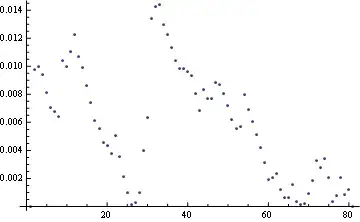
Mathematica graphics

Please note that if you change in the code above

eqsp = getEquispacedPointsOnCurve[f, nMonomers];

by

eqsp = getEquispacedPointsOnCurve[f, nMonomers / 2];

You'll get:

Mathematica graphics

Let's generate and check the angle's statistic you're worried about. We will use the Cross product instead of VectorAngle to preserve the signs:

SeedRandom[42];
nMonomers = 80;
sigma = .2;
p1 = Table[setMonomerPoints[nMonomers, 1, sigma], {100}];
p2 = getEquispacedPointsOnCurve[#, nMonomers] & /@ (getInterpolatingCurve[#, 3] & /@ p1);
vecc2 = Partition[#, 2, 1] & /@ Differences /@ p2;
vecc3 = vecc2 /. {x : _?NumericQ, y_?NumericQ} :> {x, y, 0};
angc = ArcSin[Flatten[Map[Cross @@ #/Times @@ Norm /@ # &, vecc3, {2}][[All, All, 3]]]];
GraphicsRow[{Histogram[angc, {.01}], 
             ProbabilityPlot[angc, NormalDistribution[0, sigma]]}]
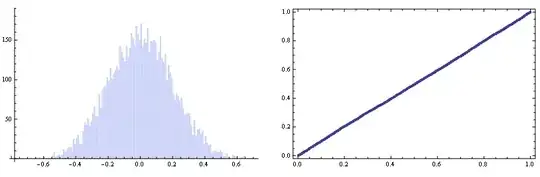
Mathematica graphics So everything looks fine enough :)


Finally a warning note: If you have a good fit for the interpolating curve but you can't estimate well the number of monomers, the statistics may go astray. Just look;

SeedRandom[42];
nMonomers = 80;
sigma = .2;
p1 = Table[setMonomerPoints[nMonomers, 1, sigma], {100}];
(* Note the "2" in the line below *)
p2 = getEquispacedPointsOnCurve[#, nMonomers/2] & /@ (getInterpolatingCurve[#, 3]&/@ p1);
vecc2 = Partition[#, 2, 1] & /@ Differences /@ p2;
vecc3 = vecc2 /. {x : _?NumericQ, y_?NumericQ} :> {x, y, 0};
angc = ArcSin[Flatten[Map[Cross @@ #/Times @@ Norm /@ # &, vecc3, {2}][[All, All, 3]]]];
GraphicsRow[{Histogram[angc, {.01}], 
             ProbabilityPlot[angc, NormalDistribution[0, sigma]]}]
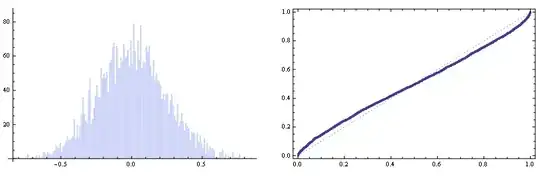
Mathematica graphics

Dr. belisarius
  • 115,881
  • 13
  • 203
  • 453
  • First of all thanks a lot for taking time to address this problem. I am new to mathematica so I try to stick with Table. However, it's good learn the way you prettified the code. I tried to plot coord and p1 , and found that they look different. Could you please explain how coord = Module[{cc = Cases[Normal@#, Point[p_] :> p, Infinity]}, cc[[First@FindCurvePath[cc]]]] & /@ plot; works? I have never used module before. – sra Jun 19 '15 at 18:31
  • Ok. I tired to plot and check polymer and some the polymers look way different than the original polymer. – sra Jun 19 '15 at 18:53
  • If they are different then how can they have same statistics. I am looking at this : Graphics@Line@p1[[6]] and Graphics@Line@coord[[6]]. I get that we are looking at an ensemble when we are taking about the statistics but the way the polymers are transformed I am having hard time to accept it. Did you find a link to that nice alternative in v10? – sra Jun 19 '15 at 19:11
  • As mentioned earlier I am new to Mathematica, so I was suggested to use SplineFit at first and I got stuck with it. I did try Interpolation for a fit but without Spline option, which wasn't that helpful. – sra Jun 19 '15 at 20:00
  • @psimeson Ok, Let me try an alternative. I'm working on it. – Dr. belisarius Jun 19 '15 at 20:01
  • ok. let me know – sra Jun 20 '15 at 18:46
  • There you have it – Dr. belisarius Jun 21 '15 at 05:39
  • I more or less (mathematically) understand what you did here but I am not used to mathematica implementation with all these pure functions and shortcut. I am trying to figure out how you implemented it. It would be nice to have some comments along the code to know what you were thinking. – sra Jun 22 '15 at 14:18
  • What is reason for using preplist for Interpolation ? Could you please explain getEquispacedPointsOnCurve function? What does arcLenReparametrization[f_, len_] := arcLenReparametrization[f, len] mean? – sra Jun 22 '15 at 15:44
  • @psimeson preplist is a trick to force Interpolation[ ] to return a vector valued function of a scalar parameter. Interpolation when used with preplist returns a function f:R -> R^2 – Dr. belisarius Jun 22 '15 at 15:51
  • 1
    The other thing with arcLenReparametrization is called memoization – Dr. belisarius Jun 22 '15 at 15:53
  • why do we need "scalar" parameter? I didn't understand NDSolveValue[{t'[s] == 1/Norm[f'[t[s]]], t[0] == dom[[1]]}, t, {s, 0, len}] cLen = NIntegrate[Norm[fun'[z]], Evaluate@{z, Sequence @@ dom}, MaxRecursion -> 12] and eqParmRange = Rescale[Range[0, 1, 1/numberOfpoints], {0, 1}, {0, cLen}] . Basically, I don't understand how you extracted equispaced coordinates. – sra Jun 22 '15 at 16:04
  • @psimeson I added some comments in the getEquispacedPointsOnCurve. Hope that helps you. As for the arc length reparametrization I am using a standard coding already discussed several times in this site. For example here – Dr. belisarius Jun 22 '15 at 16:12