Note
This answer was meant for a bit of fun but instead does a good job of managing expectations for Entity in the WL at present.
Image Identify and Google Image Search
Wolfram have heavily promoted their ImageIdentify project (http://blog.wolfram.com/2015/05/13/wolfram-language-artificial-intelligence-the-image-identification-project/) which might be a good way to categorise your terms. But we need images first.
@Szabolcs provides a method for obtaining Google Image Search results in their answer here https://mathematica.stackexchange.com/a/20485/1952
googImageSearch[term_] :=
 With[{json = Import["https://ajax.googleapis.com/ajax/services/search/images?v=1.0&q=" <> StringReplace[term, " " -> "%20"], "JSON"]},
  Import["url" /. ("results" /. ("responseData" /. json))[[1]]]]
Unfortunately, this API is deprecated and occasionally returns html instead of an image, which was terrifying when returned in the middle of a list of images:
StringTake[googImageSearch["lion"], 45]
(*"All you need to know about your night dreams."*)
In lieu of a better option (I don't want a Custom Google Search which is limited to 100 hits a day), I'll restrict googImageSearch to a specific domain (wikipedia):
googImageSearch[term_, site_] :=
 With[{json =
    Import["https://ajax.googleapis.com/ajax/services/search/images?v=\
1.0&q=site:" <> site <> "+" <> StringReplace[term, " " -> "%20"],
     "JSON"]},
  Import["url" /. ("results" /. ("responseData" /. json))[[1]]]];
words = {"zebra", "lion", "car", "park ranger", "teacup",
   "badger honey", "lake"};
wikiImages = Map[googImageSearch[#, "en.wikipedia.org"] &, words];
These images are now ready for classification by ImageIdentify, I convert the Entity returned to its FullForm representation:
identifyImages = ImageIdentify /@ wikiImages;
Multicolumn[
 MapThread[
  Labeled[#1, #2, Top] &, {wikiImages,
   FullForm /@ identifyImages}], 4, Alignment -> Center]

These Entity["Concept",_] have a number of "Properties" that might be useful to us:
FullForm /@ identifyImages[[1]]["Properties"]
{EntityProperty["Concept","AlternateNames"],EntityProperty["Concept","BroaderConcepts"],EntityProperty["Concept","Definition"],EntityProperty["Concept","EquivalentEntity"],EntityProperty["Concept","Name"],EntityProperty["Concept","NarrowerConcepts"],EntityProperty["Concept","SimilarEntities"],EntityProperty["Concept","SubsetConcepts"],EntityProperty["Concept","SupersetConcepts"],EntityProperty["Concept","WordDataSenses"],EntityProperty["Concept","WordNetID"]}
The Entity["Concept","EquivalentEntity"] property is the most promising, but alas provides less use than @Picket's suggested use of SemanticInterpretation:
Multicolumn[
 MapThread[
  Labeled[#1, #2, Top] &, {wikiImages,
   FullForm /@
    Map[#[EntityProperty["Concept", "EquivalentEntity"]] &,
     identifyImages]}], 4, Alignment -> Center]

SemanticInterpretation
@Pickett mentioned in the comments that SemanticInterpretation provides disappointing results, which it does but they can (sometimes) be improved by restricting the Entity classes within which you look.
EntityValue provides all Entity classes available, excluding "Word" is a logical choice and can be done as follows:
allEntities = EntityValue[];
allEntities$nowords = DeleteCases[allEntities, "Word"];
semanticInterp = (SemanticInterpretation[#1,Alternatives @@ (Entity[#1, __] & ) /@ allEntities$nowords] &) /@ words;
semanticInterp = FullForm /@ semanticInterp
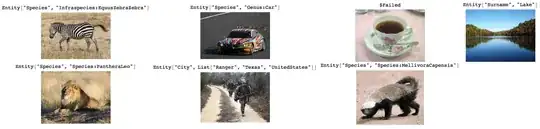
We can now group these words by the class of Entity returned using GroupBy:
GroupBy[Transpose[{words, semanticInterp /. Entity[a_, _] :> a}], Last]
(*<|Species->{{zebra,Species},{lion,Species},{car,Species},{honey badger,Species}},
City->{{ranger,City}},$Failed->{{teacup,$Failed}},Surname->{{lake,Surname}}|>*)


SemanticInterpretation[#, AmbiguityFunction -> All] & /@ {"zebra", "lion", "car", "ranger", "teacup", "honey badger", "lake"}the results aren't very promising. – C. E. Jun 20 '15 at 17:45Classify(the built-in classifierClassify["FacebookTopic", list]has too few categories unfortunately). You may also findWordData[word, "BroaderTerms"]useful. – Simon Woods Jun 20 '15 at 19:46