Here's a way that takes advantage of the undocumented PlotPoints form that allows specific sample points to be included. See Specific initial sample points for 3D plots for more.
Test function
I'll construct a function with five maxima of the same height.
SeedRandom[0];
ncp = 5;
cp = RandomReal[{0, 2}, {ncp, 2}];

f[x_, y_] = Simplify[     (* set up with unknown coefficients C[1], C[2],... *)
   Sum[C[i]/(1/4 + EuclideanDistance[{x, y}, cp[[i]]]), {i, ncp}],
   {x, y} ∈ Reals];
f[x_, y_] = f[x, y] /.    (* solve for the coefficients *)
    First@Solve[Equal @@@ Partition[f @@@ cp, 2, 1], Array[C, ncp - 1]] /.
     C[ncp] -> 1;

f @@@ cp
(*  {7.25243, 7.25243, 7.25243, 7.25243, 7.25243}  *)
Discretizing RegionPlot
Sometimes it's just easier to build things up from plots that to use the region functionality. (I expect this to improve, since WRI does pay attention to how users use Mathematica and adapts its interfaces to suit common usage.)
max = f @@ First[cp] - 0.001;
reg = DiscretizeGraphics@
   RegionPlot[f[x, y] > max, {x, 0, 2}, {y, 0, 2}, PlotPoints -> {Automatic, cp}];
The regions are minuscule, so I made the boundaries thick enough to see.
HighlightMesh[reg, Style[1, Red, Thick]]

A check. I had to exaggerate the max level to max - 0.2 to get a visible result. The regions are just too small for screen resolution.
Plot3D[f[x, y], {x, 0, 2}, {y, 0, 2}, MeshFunctions -> {#3 &},
 Mesh -> {{max - 0.2}}, MeshShading -> {Automatic, Red},
 PlotPoints -> {Automatic, cp}, MaxRecursion -> 3]

Alternative for higher quality
I'm not sure what the use-case is. The regions produced above, if you zoom in on them, are very blocky and often square. If high-resolution regions are required, then RegionPlot is an expensive way to go. An alternative is to use implicitCurve from my answer to Getting an InterpolatingFunction from a ContourPlot to get a parametrization of the curve f[x, y] == max and use it to construct a polygon. We can also adapt periodicEvent from my answer to Plotting implicitly-defined space curves to 2D to detect when we've traced the entire loop around each maximum. Beware: Region functionality is as yet only available at MachinePrecision. Even though, implicitCurve can be used with high WorkingPrecision, there are limits to how far it can be used to create high-precision regions.
The function
nbhdBoundaries[fn, level, cps]
uses implicitCurve to solve the equation fn == level in the neighborhood of each critical point in the list cps. It returns a list of parameterizations of the boundaries. Each parametrization is a pair of the form
{x -> InterpolatingFunction[<>], y -> InterpolatingFunction[<>]}
The function
discretizeParametricLoop[{x -> InterpolatingFunction[<>], y -> InterpolatingFunction[<>]}]
takes such a pair and returns a MeshRegion of the region contained by the parameterization. (Code at bottom.)
Here are the functions applied to the example above:
reg = RegionUnion @@
   DiscretizeRegion /@ discretizeParametricLoop /@ nbhdBoundaries[f[x, y], max, cp];
HighlightMesh[reg, Style[1, Red, Thickness[0.01]]],

Here are the individual regions:
Show /@ DiscretizeRegion /@
   discretizeParametricLoop /@
    nbhdBoundaries[f[x, y], max, cp] // GraphicsRow
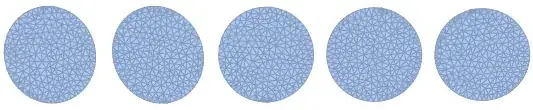
Code dump:
Note that the starting value for the point in implicitCurve is neither checked nor adjusted for satisfying the equation eqn. If it is not on the curve, what will happen is that a different level curve will be returned. (Checking is not hard to add; adjusting and finding can in general be tricky.)
ClearAll[implicitCurve, periodicEvent]

variableQ = Quiet@ListQ@Solve[{}, #] &;

(* creates a WhenEvent to stop integration when variables return to their initial values *)
periodicEvent[
   vars : {x_?variableQ, ___?variableQ},
   p0 : {x0_?NumericQ, ___?NumericQ},
   tolerance_: 0.01] :=
  WhenEvent[x == x0 && Norm[vars - p0] < tolerance, "StopIntegration"];

Options[implicitCurve] = Join[{"Events" -> {}}, Options[NDSolve]];
implicitCurve[
   eqn_,                                                (* equation to paramterize *)
   {x_?variableQ, x0_?NumericQ},                        (* x & starting value *)
   {y_?variableQ, y0_?NumericQ},                        (* y & starting value *)
   {tmin_?NumericQ, tmax_?NumericQ | tmax : Infinity},  (* integration interval *)
    opts : OptionsPattern[]] := Module[{t, ode},
   ode = {x'[t]^2 + y'[t]^2 == 1,     (*unit speed*)
     {x[0], y[0]} == {x0, y0},        (*starting point*)
     {x'[0], y'[0]} ==
      Normalize@                      (*starting direction*)
       Cross[D[eqn /. Equal -> Subtract, {{x, y}}] /.
         Thread[{x, y} -> {x0, y0}]]};
   First@NDSolve[{eqn /. {x -> x[t], y -> y[t]}, ode,
      OptionValue["Events"] /. {x -> x[t], y -> y[t]}}, {x, y}, {t,
      tmin, tmax}, FilterRules[{opts}, Options[NDSolve]]]];
In nbhdBoundaries we have to knock the initial search point for FindRoot off of the critical point, probably because the gradient is singular; in any case, FindRoot did not work reliably using the critical point as the initial point. The offset dy assumes the function does not vary wildly, as in the test function. I used the minimum distance between the critical points as a scale. The secant line method (replace {y, Last[cp] + dy} by {y, Last[cp], Last[cp] + dy}) might be more robust or the scale might need to be adjusted in some cases.
ClearAll[nbhdBoundaries, discretizeParametricLoop];
nbhdBoundaries[fn_, level_, cps_] := Module[{x0, y0, dy},
   dy = Min[EuclideanDistance @@@ Subsets[cp, {2}]]/100;
   Function[{cp},
     x0 = First[cp];      (* find starting point on curve *)
     y0 = y /. FindRoot[fn == level /. x -> x0, {y, Last[cp] + dy}];
     implicitCurve[       (* integrate the parametrization *)
      f[x, y] == level,
      {x, x0},
      {y, y0},
      {0, Infinity},
      "Events" ->         (* stops the integration after one loop *)
        {periodicEvent[{x, y}, {x0, y0}, EuclideanDistance[cp, {x0, y0}]/10]}
      ]
     ] /@ cps];

discretizeParametricLoop[{_ -> xif_, _ -> yif_}] :=
  Polygon[Transpose[{xif["ValuesOnGrid"], yif["ValuesOnGrid"]}]];
An alternative discretizeParametricLoop, that uses ParametricPlot to give a smoother boundary:
discretizeParametricLoop[{_ -> xif_, _ -> yif_}] := Block[{t},
   First@Cases[
     ParametricPlot @@ {{xif[t], yif[t]}, Flatten@{t, xif["Domain"]}},
     Line[p_] :> Polygon[p],
     Infinity]
   ];


RegionBoundsof the previous region to set the bounds onxandy, instead of fixing them to{{x, 0, 2}, {y, 0, 2}}? – Jun 22 '15 at 23:00RegionBoundsalong withConnectedMeshComponentsso I can now get done what I need to do but I would not call it a good solution. – c186282 Jun 23 '15 at 22:02