18

I do not know what happened. But when I rebooted my PC, now Mathematica comes up orange colored. I shut down the PC and tried again, it is still orange. Here is screen shot:

Mathematica graphics

I also did a reset. Holding down the ctrl-shift key. And it is still orange colored
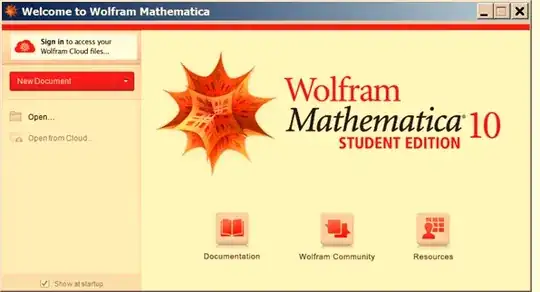
Mathematica graphics

I also deleted C:\Users\<user_name>\AppData\Roaming\Mathematica and started, and it is still orange.

All pop-ups and help now is also orange

Mathematica graphics

Also the little + thing on the start of the cell is orange:

enter image description here

I am not expecting someone to just know the cause of this, but may be someone else had this problem and can suggest what to do.

Windows 7 did large update on my PC last night, so it might have something to do with it, not sure. Here is the list of the updates

enter image description here

I did not do anything to Mathematica itself or change anything configuration with it. I just turned orange. No other app I am using has turned orange as well.

specs: Version 10.1, 64 bits, windows 7, 64 bits.


Update

I found something interesting: When I take image of the cell using SEUploader, then it comes up in the image with orange background. While in the notebook itself, it is still white. So SEPloader is picking up the orange color from somewhere. Here is screen shot:

enter image description here

Maybe the above will give a clue to the problem.

per request below, here is the color setting on my PC. I never touch this stuff as I do not understand colors.
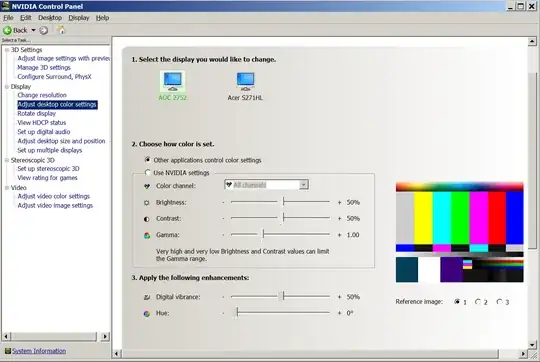
enter image description here

But I turned the option above to "use NVIDIA setting" from the "Other applications control color settings" and restarted Mathematica, and it is still orange.

Added result of

FileNames["C:\\Program Files\\Wolfram \
Research\\Mathematica\\10.1\\SystemFiles\\Data\\ICC\\*"]

Mathematica graphics

Nasser
  • 143,286
  • 11
  • 154
  • 359
  • 4
    Is it just me or do the desktop icons in the background of the first picture look orange as well? That reminds me of what it looked like when a CRT monitor I had was dying. Yuck. I hope your problem is fixed soon. – Mr.Wizard Jun 28 '15 at 18:52
  • @Mr.Wizard No, the monitor is fine. I have 2 monitors, new, and they all bright and working fine. Mathematica remain orange on both monitors. All my others apps are not orange. Well, it is not a huge problem for now, as the notebook interface has the white background still. So I can live with it. But thought to check in case it is a know issue or someone can suggest something. – Nasser Jun 28 '15 at 18:57
  • 7
    Hey guys you must be kidding, Nasser is showing a screendump. Any problems with a CRT or a plug would not show in a digital image. – Sjoerd C. de Vries Jun 28 '15 at 18:57
  • My impression is that there is something with the color temperature. It looks like there is some problem with the color profile that is being used. – Sjoerd C. de Vries Jun 28 '15 at 19:00
  • @Sjoerd Not kidding but also not implying it's an actual monitor problem; just that I remember how icky that is to work under! However I think you might be on to something; maybe the some weird display profile is being loaded? How might this be related to Mathematica? – Mr.Wizard Jun 28 '15 at 19:06
  • @nasser Could you examine the Color Management control panel to see whether you see something unusual? – Sjoerd C. de Vries Jun 28 '15 at 19:06
  • The display driver updates certainly seem relevant; try rolling them back. – ilian Jun 28 '15 at 19:10
  • @ilian well, ok, but I am afraid to break something, it is only Mathematica which turned orange after the windows update. But if there is no other solution, then will try to do this later on. thanks for the suggestion. – Nasser Jun 28 '15 at 19:14
  • 1
    What do you get when you evaluate FileNames["C:\\Program Files\\Wolfram Research\\Mathematica\\10.1\\SystemFiles\\Data\\ICC\\*"] ? – Sjoerd C. de Vries Jun 28 '15 at 19:23
  • @SjoerdC.deVries added result to my question. – Nasser Jun 28 '15 at 19:25
  • You added the NVidia control panel, but that is not the Color Management control panel I was talking about. That is a standard Windows control panel. – Sjoerd C. de Vries Jun 28 '15 at 19:27
  • 1
    @SjoerdC.deVries I just did. I run the control panel->Calibrate color-> and clicked next to all options (did not actually change anything) and then clicked apply. Then I restarted Mathematica. And now the color orange has gone ! and it is now turned back to the way it was. If you like to post this as an answer, so I can accept it. This might be useful if it happens to someone in the future. – Nasser Jun 28 '15 at 19:44
  • Actually I don't believe I really gave an answer, just some clues to look at. BTW did you mean the "Calibrate display" button in the Color Management control panel? I don't have a "Calibrate color" control panel. – Sjoerd C. de Vries Jun 28 '15 at 19:52
  • @SjoerdC.deVries added screen shot. It is under display->Calibrate color. If you can answer this, so I can accept and close this. Your hint made me try this. – Nasser Jun 28 '15 at 20:02
  • OK I see. You have your control panel view setting on categories. You can see the Color Management control panel only if you have selected the icons option. I believe the calibration option in both panels to do similar things in the end. – Sjoerd C. de Vries Jun 28 '15 at 20:27
  • 1
    Hmm, this made me think of the f.lux app to aid sleep ... http://nerdsmagazine.com/apps-like-flux-for-android/ by reducing the blue component of radiated light from your display. Is this an undocumented feature in MMA? :) – image_doctor Jun 28 '15 at 23:15
  • Nasser, you should put your solution section in a self-answer, or edit Sjoerd's answer to include it. Keep the question clean and the example of the problem at the top. – Mr.Wizard Jun 29 '15 at 07:57

1 Answers1

17

In either the Display or the Color Management control panel navigate to the calibration option and change some settings and revert back. Click Apply to see if it helps.


Pasted from question:

Problem resolved. Thanks to suggestion by SjoerdC.deVries in comments. I run the windows color calibration and clicked apply, then restarted Mathematica, and now the orange color has gone:

Mathematica graphics

It looks like the windows 7 monitor updates caused Mathematica to get little confused. Running windows control panel->Calibrate color->Apply fixed whatever the problem was. Here is the button to click on:

Mathematica graphics

Nasser
  • 143,286
  • 11
  • 154
  • 359
Sjoerd C. de Vries
  • 65,815
  • 14
  • 188
  • 323
  • 3
    This is a very bizarre feature of M10. I encountered the same issue with Windows 8 and recalibrating the display color did the trick. – bobthechemist Jun 28 '15 at 20:36
  • 1
    So, now we have to find out under which circumstances it happens (I have not encountered this yet). – Sjoerd C. de Vries Jun 28 '15 at 20:39
  • 1
    ...and after using this solution, my Mathematica (10.0.2) suddenly needs extra time "Formatting Notebook Contents". A very bizarre bug indeed. – bobthechemist Jun 29 '15 at 12:34
  • Are you sure it's related? Many people get this message (myself included) though we haven't changed this setting or suffer from the orange bug. – Sjoerd C. de Vries Jun 29 '15 at 12:36
  • I won't go so far as to say I'm certain; however I didn't have the problem beforehand, calibrated the color via the control panel, observed the "formatting notebook contents issue" and had my white background returned. – bobthechemist Jun 29 '15 at 14:15
  • 1
    @bobthechemist without a doubt, Mathematica (even version 9, which takes a long time to start) has some odd problems with monitors on Windows 7 and 8. I managed to fix my laptop using the monitor driver replacement suggested elsewhere, but for my multiple-monitor desktop, it made no difference. The same problems are not observed on Windows 2003. Someone surely needs to have a serious look at what the FE is doing here. (Hoping for the best with 10.2!) Thanks to your comment, in the mean time, I will try uncalibrating my color and see if it helps. – Oleksandr R. Jun 30 '15 at 00:38
  • @bobthechemist it worked! Unfortunately, it had the side effect of turning my Mathematica orange as well... – Oleksandr R. Jun 30 '15 at 14:13
  • @OleksandrR. This is actually quite comical (on second thoughts, make it tragicomical) – Sjoerd C. de Vries Jun 30 '15 at 14:18
  • @SjoerdC.deVries I set the sRGB color profile that comes with Mathematica as the default. My colors look rather washed out, but at least Mathematica starts quickly and without the annoying "Formatting notebook contents" messages. And without being orange! So, thanks for your hint that Mathematica comes with ICC profiles. – Oleksandr R. Jul 01 '15 at 11:27
  • @OleksandrR. To be sure: You set the color profile using the Windows Color Management control panel to the SystemFiles\Data\ICC files I mentioned above, or did you do something from within Mathematica? – Sjoerd C. de Vries Jul 01 '15 at 13:16
  • @SjoerdC.deVries Yes, that's right. I tried some of Windows's built in ones as well but it did not succeed in removing the orange color. I wonder if Mathematica's profile is faulty (i.e. causes the orange) but when the monitor and the application both have the faulty profile, this cancels out? Further experiments would be needed. It is interesting that Mathematica 9 also starts up much faster now. – Oleksandr R. Jul 01 '15 at 14:20