Both are directed. The arrows are there but they're too small to be visible.
This is because the arrowhead sizes are by default given as a fraction of the image width. Your image is very narrow (and would be even narrower for just Graph[{1 -> 2}]), so the arrowheads become tiny.
Yes, this is not very good design and it's very annoying.
Unfortunately in Mathematica there's no good way to accurately specify the arrowhead size independently of the image width. Here's the relevant question:
The only way is through specifications such as Large, Small, etc., but these are not numeric, and it's sometimes limiting not being able to give more precise values.
So the workaround is:
Graph[{1, 2, 3}, {1 -> 2, 3 -> 3, 3 -> 1}, EdgeStyle -> Arrowheads[Medium]]
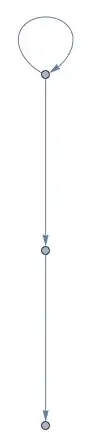
You can reliably check if a graph is directed using DirectedGraphQ and UndirectedGraphQ, but note that graphs with no edges are considered both directed and undirected at the same time in Mathematica. Mixed graphs are considered to be neither.


