6

If one uses a stand-alone locator and needs it to only be movable along a curve, say, defined by a function f[x], one can use a simple construct:

Graphics@Locator[Dynamic[pt, (pt = {#[[1]], f[#[[1]]]}) &]]

If one, instead uses a Manipulatestatement with the Locator as a control:

Manuipulate[expression,{{pt, {0.5, 0.5}, {0, 0}, {1, 1}}, Locator}]

where expressionis some graphics and the initial point {0.5,0.5} lies somewhere inside it, the locator may be moved unrestricted between the points {0, 0} and {1, 1}.

My question: how to restrict the motion of the Locator along the line, when using the Locator generated within the Manipulate statement?

To be precise, let it be the line f[x_]:=x?

Comment: I understand that this may be easily done by means of a slider or alike. I would like, however, to have it controlled by a locator.

Comment 2: My question gave rise to a suspect of being a duplicate. Indeed, there were several related questions discussing how to restrict the locator behavior, and solutions are known. The difference is that those solutions always treated the Locators as stand-alone graphics objects. In contrast my question addresses the situation when Locator is fixed as a control in the Manipulate statement. Astonishingly it appears that in this case no solution was so far available.

Alexei Boulbitch
  • 39,397
  • 2
  • 47
  • 96

1 Answers1

9

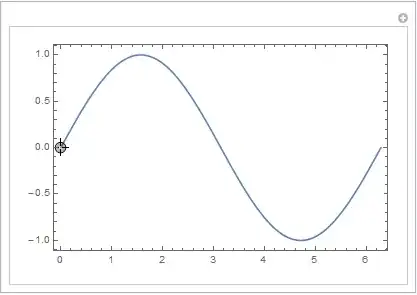
The option for a Manipulate control, that mimics the functionality of the second argument to Dynamic is TrackingFunction.

f[x_] := Sin[x]

Manipulate[
 Column[{Show[Plot[f[x], {x, 0, 2 Pi}, Axes -> False, Frame -> True]], p}], 
 {{p, {0, 0}}, Locator, TrackingFunction -> (p = {First@#, f@First@#}; &)}]

enter image description here


Using only Manipulate and no Dynamic

f[x_] := Sin[x]

Manipulate[
 Show[Plot[f[x], {x, 0, 2 Pi}, Axes -> False, Frame -> True], 
  Graphics[{Locator[{First@p, f[First@p]}]}]], 
 {{p, {0, 0}}, Locator, Appearance -> None}]

Out

If the position of the displayed Locator is needed in several parts of the code inside Manipulate, the following implementation is more convenient

Manipulate[
 Module[{locatorPos},
  locatorPos = {First@p, f[First@p]}; 
  Column[{Show[Plot[f[x], {x, 0, 2 Pi}, Axes -> False, Frame -> True],
      Graphics[{Locator[locatorPos]}]], locatorPos}]], 
 {{p, {0, 0}}, Locator, Appearance -> None}]

Two more implementations, that do use Dynamic to restrict the Locator position to the line given by f.

Manipulate[
 Column[{Show[{Plot[f[x], {x, 0, 2 Pi}, Axes -> False, Frame -> True],
      Graphics[Locator[Dynamic[p, (p = {First@#, f[First@#]}) &]]]}], p}],
 {{p, {0, 0}}, None}]

Manipulate[
 Column[{Show[Plot[f[x], {x, 0, 2 Pi}, Axes -> False, Frame -> True]], pPos}],
 {{p, {0, 0}}, {0, Last@pPos}, {2 Pi, Last@pPos}, Locator},
 {{pPos, {Dynamic@First@p, Dynamic@f[First@p]}}, None}]
Karsten7
  • 27,448
  • 5
  • 73
  • 134
  • Thank you, that' s sly. So, you draw a stand-alone locator, (just as I described above), while making the Manipulate one invisible. Smart, thank you. – Alexei Boulbitch Jul 03 '15 at 13:00
  • It is unfortunately not the intended functionality, since such a locator picks up an wrong coordinate, cf. f[x_] := Sin[x]; Manipulate[ Column[{ Show[Plot[f[x], {x, 0, 2 Pi}, Axes -> False, Frame -> True], Graphics[{Locator[{First@p, f[First@p]}]}]], p }], {{p, {0, 0}}, Locator, Appearance -> None}] – Alexei Boulbitch Jul 03 '15 at 13:09
  • @AlexeiBoulbitch Please see my edit. You chose the coordinates of the wrong Locator to be displayed as a part of your Column. – Karsten7 Jul 03 '15 at 14:07
  • @ Karsten 7 Should I understand that Manipulate itself contains no such a simple mechanism that would allow that? Is it at least you vision? – Alexei Boulbitch Jul 03 '15 at 14:34
  • 1
    @AlexeiBoulbitch I just stumbled upon a Manipulate controls option introduced in v. 10.0, that does exactly what you asked for. – Karsten7 Jul 05 '15 at 23:50
  • 7 The latter looks, indeed, what I was looking for. I never have met such a possibility. Could you give a hint of where have you seen its mentioning? – Alexei Boulbitch Jul 06 '15 at 08:16
  • @AlexeiBoulbitch I think, Options & Styling for Interactive Manipulation was, where I discovered it. – Karsten7 Jul 06 '15 at 08:22