9

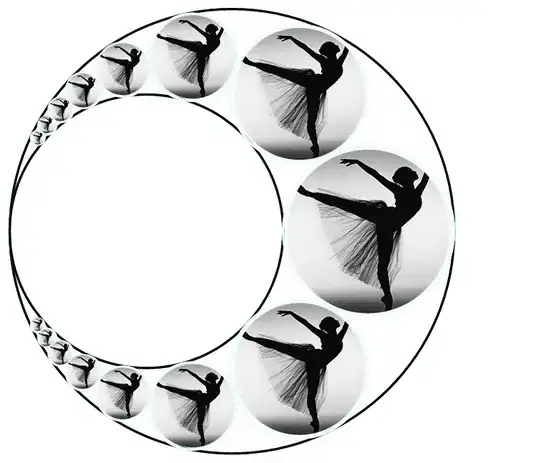
The image below contains various ( lightblue filled ) circles ( made with the Disk function ), I want to fill them with an external image ( for example of a face ) such that each circle contains the entire image as if it was cut out in circle shape ( the smaller circles cut out from an image where the size is reduced. )

How can this be done in Mathematica?

EDIT: Image below now contains the result after the accepted answer has been implemented.

Target image

nilo de roock
  • 9,657
  • 3
  • 35
  • 77
  • 2
    I suggest that including code for your graphic may improve the speed and/or quality of the answers you receive. – Mr.Wizard Jul 07 '15 at 07:06
  • 1
    Possible duplicates and/or related: (1332), (3723), (7657) – Mr.Wizard Jul 07 '15 at 07:07
  • @Mr.Wizard An image in Disk[]//Graphics would suffice. Sadly 1332, 3723, 7657 dont solve the problem. Imagine importing the image of a face. I will edit this in the question. I worked with Textures before which works but I would not know how to do this with Circle or Disk. – nilo de roock Jul 07 '15 at 08:49
  • @Mr.Wizard I thought about overlaying and transparent colors but I am stuck at that route. I feel like I am missing the obvious. – nilo de roock Jul 07 '15 at 09:02

3 Answers3

9

Disk is less convenient. You can define your own disk as a polygonial approximation (here with a default value of a 50-points polygon):

myDisk[n_: 50] := Module[{ps},
   ps = Table[{Cos[t], Sin[t]}, {t, Range[0, 2 \[Pi], 2 \[Pi]/n]}]; 
   Polygon[ps, VertexTextureCoordinates -> Rescale[ps]]
   ];

Edit -- changed the picture

Then everything works:

jeb=Import["https://upload.wikimedia.org/wikipedia/commons/thumb/2/25/Jebcropped.jpg/187px-Jebcropped.jpg"];
Graphics[{Texture[jeb], myDisk[]}]
Graphics[{Texture[jeb], myDisk[3]}]

enter image description here

yohbs
  • 7,046
  • 3
  • 29
  • 60
9

You can use your Disk (or any grayscale image) as an alpha channel:

img = ExampleData[{"TestImage", "F16"}];

disk = Graphics[Disk[]];

diskImg = 
  ColorConvert[Rasterize[disk, ImageSize -> ImageDimensions[img]], 
   "Grayscale"];

circleImg = ColorCombine[{img, ColorNegate@diskImg}, "RGB"]

enter image description here

Then you can use Inset to place it like other graphics primitives:

Graphics[{
  Table[
   Inset[circleImg, {Cos[i*10 \[Degree]], 
      Sin[i*10 \[Degree]]}*50, {256, 256}, 5 + i*1], {i, 10}]}]

enter image description here

Niki Estner
  • 36,101
  • 3
  • 92
  • 152
  • Everytime I think that I -somewhat- master Mma programming I am blown out by really great programming and new ideas ( for me ) in the answers I receive on this site. - Thanks. – nilo de roock Jul 07 '15 at 15:32
2

This is not really anywhere near a reasonable answer but perhaps it will motivate better answers. I have upvoted the Texture approach by use of polygons.

img = (* pick your desired graphics*)

g = Graphics[{}, ImageSize -> {400, 400}, Background -> Black];
Manipulate[
 Row[{ic = ImageCompose[g, img, Scaled[{x, y}]], 
   ia = ImageAdd[ic, 
     msk = Graphics[Disk[{0, 0}, r], PlotRange -> Table[{-5, 5}, {2}],
        ImageSize -> {400, 400}]], 
   ImageAdd[ic, 
    Rasterize[
     Plot[x, {x, -5, 5}, GridLines -> Automatic, 
      GridLinesStyle -> Red, AspectRatio -> Automatic,
      ImageSize -> {400, 400}, 
      Epilog -> {EdgeForm[{Orange, Thickness[0.02]}], 
        Disk[{0, 0}, r]}]]]}], {x, 0, 1}, {y, 0, 1}, {r, 0.1, 3}]

I just picked a picture of Apollo 11 crew so adapt to whatever image dimensions of graphic and figure that is being overlayed. There are obvious issues with image adding of color images but in the event this can be framed out or as mentioned improved I present.

enter image description here

Again just an idea that I do not have time (or expertise) to refine at present but perhaps OP or others will find helpful.
ubpdqn
  • 60,617
  • 3
  • 59
  • 148