4

Consider:

f = Sqrt[9 - x^2 - y^2];
ContourPlot[f, {x, -4, 4}, {y, -4, 4},
 Contours -> {0, 1, 2, 3},
 ContourLabels -> All,
 ContourShading -> None]

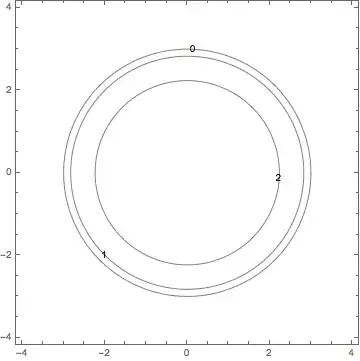
Which produces this image:

enter image description here

Now, I understand that the contour f=3 is just the point (0,0) and maybe that's why it's not drawn. But I don't understand why the contour f=0, which should be a circle of radius 3, is missing?

Any thoughts?

J. M.'s missing motivation
  • 124,525
  • 11
  • 401
  • 574
David
  • 14,883
  • 4
  • 44
  • 117

2 Answers2

6

It appears to be a problem with the square root:

f = 9 - x^2 - y^2;
ContourPlot[f, {x, -4, 4}, {y, -4, 4}, Contours -> {0, 1, 4, 9}, 
 ContourLabels -> (Text[Sqrt[#3], {#1, #2}] &), ContourShading -> None]

enter image description here

My guess is that the algorithm used by ContourPlot implicitly relies on the function having a smooth gradient in some neighborhood of each contour, which the function $f = \sqrt{9 - x^2 - y^2}$ does not have in the neighborhood of the level set $f = 0$.

Michael Seifert
  • 15,208
  • 31
  • 68
6
f = Sqrt[9 - x^2 - y^2];

Reduce[f == 0, {x, y}, Reals]

-3 <= x <= 3 && (y == -Sqrt[9 - x^2] || y == Sqrt[9 - x^2])

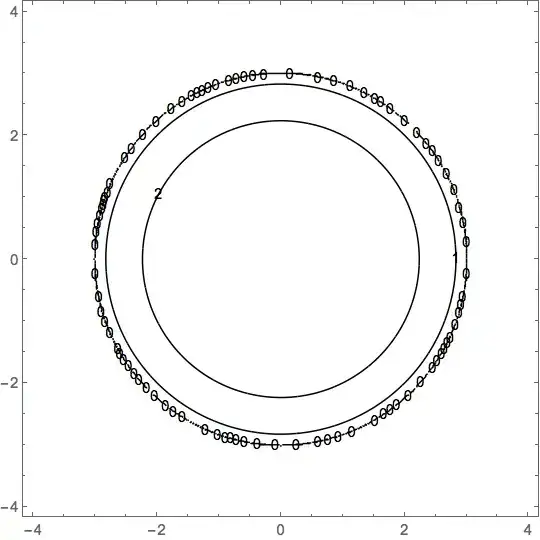
Mathematica has a hard time finding a real solution for f == 0. Using a large number of PlotPoints and forcing the result to be real using Re produces a highly segmented plot (multiple labels for 0)

ContourPlot[Re[f], {x, -4, 4}, {y, -4, 4}, Contours -> {0, 1, 2, 3},
 ContourLabels -> All,
 ContourShading -> None,
 PlotPoints -> 201]

enter image description here

For a workaround use RegionPlot:

Row[{
  RegionPlot[
   ImplicitRegion[
      Reduce[
       Sqrt[9 - x^2 - y^2] == #, {x, y}, Reals],
      {x, y}] & /@
    Range[0, 3],
   PlotRange -> {{-4, 4}, {-4, 4}},
   ImageSize -> 360],
  LineLegend[
   {Red, Darker[Green], Orange, Blue},
   Range[3, 0, -1]]}]

enter image description here

Bob Hanlon
  • 157,611
  • 7
  • 77
  • 198