12

There are many built-in functions that contain AccuracyGoal, PrecisionGoal and WorkingPrecision.
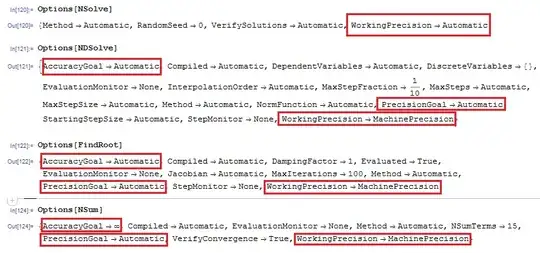
enter image description here

For instance

NSolve

NSolve[x^3 + 2 x + 7 == 0, x, WorkingPrecision -> 40]
 {{x -> -1.568946403052382267352334751687751405502}, 
  {x -> 0.784473201526191133676167375843875702751 - 
     1.961171744579820388573529019015063895809 I}, 
  {x -> 0.784473201526191133676167375843875702751 + 
     1.961171744579820388573529019015063895809 I}}

FindRoot

FindRoot[Sin[x - 10] - x + 10, {x, 0}, AccuracyGoal -> 4, PrecisionGoal -> 4]
 {x -> 9.99852}
FindRoot[Cos[x^2] - x, {x, 1}, WorkingPrecision -> 40]
 {x -> 0.8010707652092183662168678540865655855422}

Here, I have a function Newton that using Newton method to find a numerical root of a equation.

Options[Newton] = {MaxIterations :> $RecursionLimit};

Newton::noconv = "Iteration did not converge in `1` steps.";

Newton::usage = "Newton[func, x0] finds a zero of the function func 
  using the initial guess x0 to start the iteration. "

Newton[func_, x0_, opts : OptionsPattern[]] :=
 Module[{res, maxIter, extraPre = 10},
  maxIter = OptionValue[MaxIterations];
  With[{prec = Precision[x0], fp = func'},
   Block[{$MaxPrecision = prec + extraPre},
    res = FixedPoint[(# - func[#]/fp[#]) &, x0, maxIter]
   ];
  If[! TrueQ[Abs@func[res] < 10^-prec],
    Message[Newton::noconv, maxIter]];
  res
 ]
]

Newton[expr_, x_, x0_, opts : OptionsPattern[]] :=
 Newton[Function[x, expr], x0, opts]

Newton Test

Newton[#^3 + 4 #^2 - 10 &, 1.2]
1.36523
Newton[x (x + 1), x, -1.2]
-1. 

Question

  • How to add the options AccuracyGoal, PrecisionGoal and WorkingPrecisionto Newton. Namely,

    Options[Newton] = {MaxIterations :> $RecursionLimit, AccuracyGoal -> Automatic, PrecisionGoal -> Automatic, WorkingPrecision ->Automatic}

  • Is there a general strategy for implementing the options AccuracyGoal, PrecisionGoal and WorkingPrecision in a numerical function?

However, I have no idea to achieve this.

In addition,

enter image description here


Update

As Jens said

This could also be done for precision instead. But right now I don't know how to write a general answer that would be applicable for all cases.

So is it possible to know how WRI implement these options(PrecisionGoal and AccuracyGoal ,and WorkingPrecision) in their built-ins?

Or how to add these options in my Newton function?

Mr.Wizard
  • 271,378
  • 34
  • 587
  • 1,371
xyz
  • 605
  • 4
  • 38
  • 117
  • What happens when you do FindRoot[Cos[x^2] - x, {x, 1.}, WorkingPrecision -> 40]? In particular, what is the result of Precision[x /. First[%]]? – J. M.'s missing motivation Jul 14 '15 at 08:11
  • Precision[x /. First[%]] returns 40. @Guesswhoitis. – xyz Jul 14 '15 at 08:14
  • Even with the machine precision 1. in the input? – J. M.'s missing motivation Jul 14 '15 at 08:21
  • @Guesswhoitis., Maybe I have some mistakes of the understanding about N[] or Precision. Now, I would like to know the reason that the input 1. that has MachinePrecison ,but the output x has the precison 40. In addition, $MachinePrecision=15.9546< 40 – xyz Jul 14 '15 at 08:28
  • It seems reasonable. You've asked Mathematica to find a result to 40 digits, starting the search at 1.`16 ish. It's succeeded: it's found such a result. – Patrick Stevens Jul 16 '15 at 11:54
  • @PatrickStevens, As J.M said here for exact input, it will give exact output; for inexact input, it will (or is supposed to) give output of (nearly) the same precision – xyz Jul 16 '15 at 12:05
  • 1
    I see you have added a bounty so I assume this is important to you. I saw this question earlier but I did not attempt an answer because it seemed to me that an implementation would be specific to one function rather than a general method. I suppose it would serve as an example at least. Is that really what you desire or are you after something more universal? – Mr.Wizard Jul 16 '15 at 12:42
  • @Mr.Wizard, I have thought this question for long time. For example, in the Numeric Analysis course, there are many algorithm(such as Newton method, Runge-Kutta algorithm,etc.) I can implement these algorithm with W-Language, but I cannot add the main options like AccuracyGoal, PrecisionGoal and WorkingPrecision in my function. Although I attempt to add WorkingPrecision in this answer, I am not sure whether the WRI implement this option in this way. – xyz Jul 16 '15 at 13:18
  • @Mr.Wizard, So my question is how to add AccuracyGoal, PrecisionGoal and WorkingPrecision in the functions that user defined like the built-in such as FindRoot, NDSolve,.etc. – xyz Jul 16 '15 at 13:22
  • Would you not code your function to increase the precision of its input, or continue iteration, or whatever else was needed in that particular case, until the desired accuracy or precision was met? Would this not be done on a case by case basis uniquely for each function? – Mr.Wizard Jul 16 '15 at 13:27
  • Also, it is well-known that the N*[] functions all have different uses for PrecisionGoal and AccuracyGoal; the only constant is WorkingPrecision, and one just uses SetPrecision[] or N[] as needed for that. – J. M.'s missing motivation Jul 16 '15 at 13:31
  • 1
    Your use of FixedPoint reminded me of what I did here. In that answer, I use SameTest to stop when a desired accuracy is met. This could also be done for precision instead. But right now I don't know how to write a general answer that would be applicable for all cases. – Jens Jul 17 '15 at 00:05
  • @Jens, Maybe you are right, a general answer maybe difficult. So is it possible to know how WRI implement thes options(PrecisionGoal and AccuracyGoal ,and WorkingPrecision) – xyz Jul 17 '15 at 03:02
  • Part 1: Have you read, and do you understand, the "Details" section at http://reference.wolfram.com/language/ref/AccuracyGoal.html and all of http://reference.wolfram.com/language/tutorial/ControllingThePrecisionOfResults.html ? – Eric Towers Jul 17 '15 at 04:42
  • 2
    Part 2: If so, given the courses you mention taking, then you should understand that the answer to your question is "By careful numerical analysis of each step of the implemented algorithm to ensure (a) the algorithm does not foolishly lose precision or accuracy, (b) the precision and accuracy of the output is known in terms of the inputs and their precisions and accuracies, and (c) that you switch algorithms or implementations when the desired goals cannot be met with the current algorithm." – Eric Towers Jul 17 '15 at 04:42
  • 1
    Part 3: With your background, you should already understand that this is far too much work to ask strangers to do. If you must know how WRI implements their internals, you will have to go to WRI and ask. (They won't tell you.) – Eric Towers Jul 17 '15 at 04:43

1 Answers1

11

I'll mimic the precision/accuracy handling for FindRoot as indicated in its documentation:

  • The default settings for AccuracyGoal and PrecisionGoal are WorkingPrecision/2.
  • The setting for AccuracyGoal specifies the number of digits of accuracy to seek in both the value of the position of the root, and the value of the function at the root.
  • The setting for PrecisionGoal specifies the number of digits of precision to seek in the value of the position of the root.

With both FindRoot and the OP's Newton there are two ways to measure the error, how close x is to the root and how close f[x] is to zero. Other functions, such as NIntegrate and NDSolve, have other notions of error.

The standard measure of error is indicated in the documentation for PrecisionGoal and AccuracyGoal.

With PrecisionGoal -> p and AccuracyGoal -> a, the Wolfram Language attempts to make the numerical error in a result of size x be less than 10^-a + |x| 10^-p.

With these hints we can construct a termination condition errortest for Newton. Note that since the size of the "result" func[x] is supposed to be zero, PrecisionGoal does not enter into its error measure; only AccuracyGoal is used, as indicated in the documentation for FindRoot.

I include a function checkopts to check the option settings and issue standard error messages. I also substituted the standard nonconvergence warning for the OP's Newton::noconv and reduced the default for MaxIterations.

ClearAll[Newton, checkopts];

Options[Newton] = {MaxIterations -> 100, AccuracyGoal -> Automatic, 
   PrecisionGoal -> Automatic, WorkingPrecision -> MachinePrecision};

Newton::usage = "Newton[func, x0] finds a zero of the function func 
    using the initial guess x0 to start the iteration. ";

checkopts[o : OptionsPattern[Newton]] :=
 With[
  {wp = OptionValue[WorkingPrecision],
   pg = OptionValue[PrecisionGoal],
   ag = OptionValue[AccuracyGoal],
   maxIter = OptionValue[MaxIterations]}, 
  If[! MatchQ[wp, Automatic | _?Positive],
   Message[Newton::wprec, wp]; Return[False]];
  If[! MatchQ[pg, Automatic | Infinity | _?Positive], 
   Message[Newton::precg, pg]; Return[False]];
  If[! MatchQ[ag, Automatic | Infinity | _?Positive], 
   Message[Newton::accg, ag]; Return[False]];
  If[! MatchQ[maxIter, Automatic | Infinity | _Integer?Positive], 
   Message[Newton::ioppfa, MaxIterations, maxIter]; Return[False]];
  True
]

Newton[func0_, x0_, opts : OptionsPattern[]] /; checkopts[opts] := 
  Module[{func, res, maxIter, ag, pg, wp, errortest, lasterror},

   (* initialization *)
   wp = OptionValue[WorkingPrecision] /. Automatic -> MachinePrecision;
   If[Precision[func] < wp,
    Message[Newton::precw, func, wp];
    func = SetPrecision[func0, wp],
    func = func0;
    ];
   pg = OptionValue[PrecisionGoal] /. Automatic -> wp/2;
   ag = OptionValue[AccuracyGoal] /. Automatic -> wp/2;
   maxIter = OptionValue[MaxIterations] /. Automatic -> 100;

   (* construct error test: False => goals are met *)
   errortest[x1_, x2_] := 
    lasterror = Abs[x1 - x2] >= 10^-ag +  x1 10^-pg || (* prec/acc of root *)
                Abs@func[x1] > 10^-ag;                 (* acc of function val *)

   (* iteration *)
   With[{fp = func'}, 
    res = NestWhile[
      (# - func[#]/fp[#]) &[
        SetPrecision[#, wp]] &,  (* reset precision of input at each step *)
      x0, 
      errortest, 2, maxIter]];

   (* check result and return *)
   If[lasterror, Message[Newton::cvmit, maxIter]];
   res
   ];

Examples:

FindRoot returns a solution with precision 20; this loses a slight amount of precision on the last calculation. I wasn't sure if this was worth fixing, or how exactly FindRoot fixes it, other than with SetPrecision. If you compare it to FindRoot[x^2 - 2, {x, 1.}, WorkingPrecision -> 20], Newton gives a more accurate answer.

Newton[#^2 - 2 &, 1., WorkingPrecision -> 20]

(*  1.4142135623730950488016896235025302436152453362821936500148`19.698970004335283  *)

Nonconvergence:

Newton[Exp, 1.]

Newton::cvmit: Failed to converge to the requested accuracy or precision within 100 iterations.

(*  -99.  *)

Bad option value:

Newton[Cos, 1., MaxIterations -> Pi]

Newton::ioppfa: Value of option MaxIterations -> π should be a positive integer, Infinity, or Automatic.

(*  Newton[Cos, 1., MaxIterations -> π]  *)

This cannot converge to the precision/accuracy goals with a working precision of only MachinePrecision (unless by accident).

Newton[Cos, 1., PrecisionGoal -> 17, AccuracyGoal -> 17, MaxIterations -> 1000]
Cos[%]

Newton::cvmit: Failed to converge to the requested accuracy or precision within 1000 iterations.

(*  1.5707963267948966`  *)    
(*  6.12323*10^-17  *)        (* <-- Cos[x] greater than accuracy goal 10^-17 *)
xyz
  • 605
  • 4
  • 38
  • 117
Michael E2
  • 235,386
  • 17
  • 334
  • 747
  • Dear Michael E2 ,Very excited to see your perfect answer. Thanks a lot. I can learn many details(like adding options, argument style checking and messaging error-information ) about programming with Mathematica. – xyz Jul 18 '15 at 01:03
  • 1
    I found this informative as well. FYI you can replace opts : OptionsPattern[] /; checkopts[opts] with OptionsPattern[]?checkopts – Mr.Wizard Jul 18 '15 at 10:15