What is the best way to comment a long Module?
For linear flowing calculations that need not be organised in modules, I usually mix text and math. But how can I do that inside a module, or block, or any other scoping construct?
What is the best way to comment a long Module?
For linear flowing calculations that need not be organised in modules, I usually mix text and math. But how can I do that inside a module, or block, or any other scoping construct?


Not sure it's good practice, but in a notebook you can format the text inside the (* *) comment designators to your liking. Here's an example module with "Text" style used with inline comments:
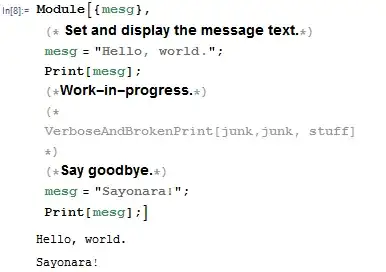
Additionally, it's possible to disable evaluation for individual cells (from the menu: "Cell"-->"Cell Properties"-->"Evaluatable"), and one can use Inactive to prevent evaluation of whole blocks or modules.
Also, as @Mr.Wizard mentioned in his comment, it is often better practice to refactor your modules into more manageable pieces--subfunctions that work together. These smaller pieces are easier to document with explanatory text and divisions in the notebook interface, and short inline comments.

(* like this *). – J. M.'s missing motivation Jul 14 '15 at 12:11(* inline comments *)a fair bit and I am not sure I understand your complaint about "convenience and look." For an sample of my style, though it changes from time to time, please see: Optimal Code Layout in Mathematica? – Mr.Wizard Jul 14 '15 at 12:52