9

In my notebook, I have the following cells, which I tried to put around a single frame with a light blue background color.
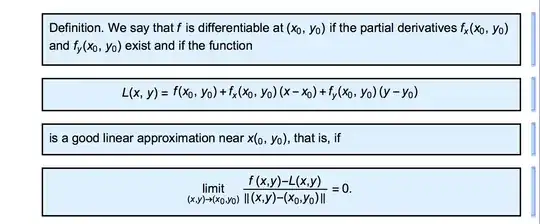
enter image description here

After entering the cells, I selected all four, then clicked the frame button in the Writing Assistant palette. Unfortunately, I did not get a single frame.

Can some suggest how I can get just a single frame around all four cells? The centered cells are from the Writing Assistant, Math Cells, Centered Math Cell.

They do not match what I want:

Perhaps I should ask how can put all of my writing in one cell.

Thank you, Mr. Wizard:

I selected the four cells, then used Mr. Wizard's Frame Multiple Cells button, which was created by his code, and here is the result:
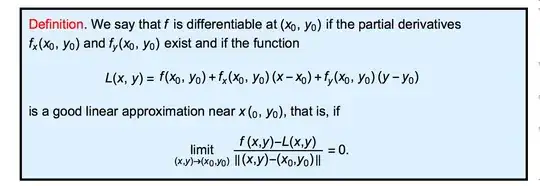
enter image description here

I added the red color to the word definition after using Mr. Wizard's button.

Using the Writing Assistant Pallete:

It turns out that if I select my four cells, then click on the Merge Cells icon on the Writing Assistant tablet, it's done! Then use the Writing Assistant tablet to add a frame and color the background.

David
  • 14,883
  • 4
  • 44
  • 117

1 Answers1

9

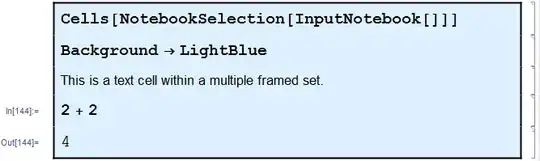
This question is closely related to Automatically use InputOnly style and it can also be done with CellFrame and CellMargins. Here is a Button to automate the process.

Button["Frame Multiple Cells",
  With[{cells = Cells[NotebookSelection[InputNotebook[]]]},
   MapThread[
    Function[{frame, pos},
     MapAt[
      SetOptions[#,
        CellMargins -> {{66, 10}, {0, 0}},
        CellFrame   -> {{2, 2}, frame},
        Background  -> LightBlue] &,
      cells,
      pos
     ]
    ],
    {{{0, 2}, {0, 0}, {2, 0}}, {1, 2 ;; -2, -1}}
   ]
  ]
] // CreatePalette

enter image description here

Notes:

  • Setting a Background color affects the spacing of the cells; without it they squeeze together.

  • To keep the frame continuous to the Output cell I had to disable automatic grouping.

Mr.Wizard
  • 271,378
  • 34
  • 587
  • 1,371
  • Wow! It worked beautifully. See my update to my original post. – David Jul 16 '15 at 02:37
  • Automatic grouping? Not sure what that is or if its disabling will affect what I normally do? – David Jul 16 '15 at 02:41
  • This is so good, I'd like to add it to my Palettes menu or my writing assistant. Is that possible? – David Jul 16 '15 at 02:42
  • Does disabling automatic grouping slow down printing of the notebook? – David Jul 16 '15 at 05:01
  • 1
    Note that setting the option CellGroupingRules -> "NormalGrouping" (in the button) overrides the automatic grouping so that the frame is continuous. – Michael E2 Jul 16 '15 at 05:38
  • @David (1) Grouping can be controlled via the menu Cell > Grouping. Normally output cells are grouped with input cells automatically, as one example. These groups are indented differently therefore the frame has step or jump in it. As Michael just posted turning off grouping can be added to the button if that is desired. (2) Yes, at least to the first. Try the menu File > Install... and select Palette. Theoretically you could also modify (a copy of) the built-in palettes but I don't think I've ever actually done that. (3) I rarely print Notebooks but I don't think so. – Mr.Wizard Jul 16 '15 at 05:44
  • @Michael Thanks for that. I didn't attempt it as I wasn't sure it was desired. – Mr.Wizard Jul 16 '15 at 05:45
  • @Mr.Wizard et al, I just realized that the Writing Assistant allows me to group cells together. I selected the four cells, opened the Writing Assistant palette, then under Cell Modifications, clicked Merge Cells button. Done. I was then able to Frame and provide Background Color using the Writing Assistant. I can't believe I didn't see the Merge Cells tool on the Writing Assistant earlier. But thanks for the wonderful help. – David Jul 16 '15 at 19:39
  • @David Too often we forget to include the simple answers. In this case I assumed that you were aware of merging cells and did not want that. Sorry. Nevertheless there may be reasons to keep the individual cells. As shown in my answer they can be of different types. Also cell icons and numbering should be preserved, though I didn't actually test that. – Mr.Wizard Jul 17 '15 at 03:11
  • @Mr.Wizard. No worries Mr. Wizard. Your help is greatly appreciated and you have helped me learn a lot of things. – David Jul 18 '15 at 06:20