6

Documentation here shows a nice example of interdependent Slider controls in Manipulate:

Manipulate[If[m > n, m = n];
 Row[{"(", Column[{n, m}, Center], ") = ", Binomial[n, m]}], {n, 1, 
  10, 1}, {m, 1, n, 1}]

Mathematica graphics

Now, I'd like the controls to be setters instead of Sliders. The first one goes without a hitch:

Manipulate[If[m > n, m = n];
 Row[{"(", Column[{n, m}, Center], ") = ", Binomial[n, m]}], {n, 1, 
  10, 1, Setter}, {m, 1, n, 1}]

Mathematica graphics

But the second one kills the expression, and the error-message tooltip is empty (no message in the gray box when I float over the pink death box)

Manipulate[If[m > n, m = n];
 Row[{"(", Column[{n, m}, Center], ") = ", Binomial[n, m]}], {n, 1, 
  10, 1, Setter}, {m, 1, n, 1, Setter}]

Mathematica graphics

I can work around by nesting the Manipulates, but this is super ugly:

Manipulate[
 Manipulate[If[m > n, m = n];
  Row[{"(", Column[{n, m}, Center], ") = ", Binomial[n, m]}], {m, 1, 
   n, 1, Setter}], {n, 1, 10, 1, Setter}]

Mathematica graphics

EDIT:

Reversing the orders of the Setters, as hinted by the workaround, does not help:

Manipulate[If[m > n, m = n];
 Row[{"(", Column[{n, m}, Center], ") = ", Binomial[n, m]}], {m, 1, n,
   1, Setter}, {n, 1, 10, 1, Setter}]
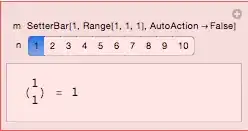
Mathematica graphics

Is this a known limitation (feature)? Documented somewhere? Bug? Or pilot error (i.e., I misunderstand)? Is there a better way than my workaround to get the effect I want?

Reb.Cabin
  • 8,661
  • 1
  • 34
  • 62
  • 1
    The error message that should be in the empty box is Range specification in Range[1,n$$,1] does not have appropriate bounds. >>. – Karsten7 Jul 18 '15 at 16:48

2 Answers2

8

You could use

Manipulate[If[m > n, m = n];
 Row[{"(", Column[{n, m}, Center], ") = ", Binomial[n, m]}], 
 {n, 1, 10, 1, Setter}, {{m, 1}, Range[1, n, 1], SetterBar}]

Out

To me it seems to be just a limitation to what kind of input syntax Manipulate is able to interpret correctly. Your {m, 1, n, 1, Setter} is correctly transformed into a SetterBar with a Range, but due to the interconnection n is wrapped into Dynamic, which causes Range to produce the error.

Your input results in something similar to

{SetterBar[Dynamic[a], Range[5]], Range[1, Dynamic[a], 1]}

or

{SetterBar[Dynamic[a], Range[5]], Dynamic@Range[1, Dynamic[a], 1]}

which both produces an error, as the correct input syntax would be

{SetterBar[Dynamic[a], Range[5]], Dynamic@Range[1, a, 1]}

The InputForm of your input

Manipulate[If[m > n, m = n];
  Row[{"(", Column[{n, m}, Center], ") = ", Binomial[n, m]}], {n, 1, 
   10, 1, Setter}, {m, 1, n, 1, Setter}] // InputForm

reveals that Dynamic[n] is used, whereas the InputForm of my code

Manipulate[If[m > n, m = n];
  Row[{"(", Column[{n, m}, Center], ") = ", Binomial[n, m]}], {n, 1, 
   10, 1, Setter}, {{m, 1}, Range[1, n, 1], SetterBar}] // InputForm

shows that Dynamic[Range[1, n, 1]] is used instead.

Karsten7
  • 27,448
  • 5
  • 73
  • 134
3

This is an aside. You might want to use

Row[{{{m}, {n}} // MatrixForm, " = ", Binomial[n, m]}]

It displays better. For example,

With[{m = 2, n = 6}, Row[{{{m}, {n}} // MatrixForm, " = ", Binomial[n, m]}]]

binomial

m_goldberg
  • 107,779
  • 16
  • 103
  • 257