10

We can restrict the movement of locators in a LocatorPane as follows:

locator movement

In the following example, the first locator's movement is confined to the x-axis and the second locator's movement is confined to the y-axis.

Manipulate[LocatorPane[Dynamic[pts], 
 Graphics[{}, PlotRange -> max, Axes -> True, ImageSize -> 350],
 {{{-max, 0}, {max, 0}},
 {{0, -max}, {0, max}}}],
{{pts, {{9, 0}, {0, 11}}}, ControlType -> None}, Initialization :> {max = 25}]

enter image description here

However, a locator can be dragged without necessarily being selected. You can begin dragging a locator by clicking down on just about any point in the four quadrants and dragging from there.

I would like to have the locator respond only to drags that are initiated by "mousedown"ing on the locator itself.

Any ideas as to how I might achieve this?


Addendum In my the more complicated example I've been working with, I've made use of jump parameters to confine locators to integer values:

{{{-maxX, 0}, {maxX, 0}, {1, 0}},
{{0, -maxY}, {0, maxY}, {0, 1}}}

I'm not sure whether such constraints (to integers) can be imposed on locators outside of LocatorPanes.

VividD
  • 3,660
  • 4
  • 26
  • 42
DavidC
  • 16,724
  • 1
  • 42
  • 94

2 Answers2

9

That is the default (and expected) behaviour of LocatorPane. This is useful in implementing things like colour pickers, for example, where it is convenient to simply click on any point to select that colour and have the locator move there automatically to indicate selection.

To create locators that move only when explicitly clicked and dragged, use a Locator. Here's an example for the scenario in the question:

DynamicModule[{pt1 = {-5, 0}, pt2 = {0, 5}},
    With[{max = 25},
        Graphics[{
            Locator[Dynamic[pt1, (pt1 = {First@#, 0}) &]], 
            Locator[Dynamic[pt2, (pt2 = {0, Last@#}) &]]
            }, PlotRange -> max, Axes -> True, ImageSize -> 350
        ]
    ]
]
rm -rf
  • 88,781
  • 21
  • 293
  • 472
  • They behave very nicely! – DavidC Jul 30 '12 at 21:31
  • The LocatorPane doc says: "LocatorPane[pts,back,range] by default directs any click to the nearest locator." It makes you wonder if there is a non-default setting. I couldn't find anything about that. I also note that this behaviour is the same in a Locator in a Manipulate. It is actually strange that a Locator in a Graphics has a different behaviour. – Sjoerd C. de Vries Jul 30 '12 at 21:46
  • There is one minor drawback with R.M.'s otherwise excellent solution: if you click away from the Locator, a graphics boarder will appear and remain visible. This does not occur with LocatorPane. – DavidC Jul 30 '12 at 21:49
  • @SjoerdC.deVries The next sentence says what the non-default option is — it creates new locators where you clicked, instead of moving the nearest one. So "default" in that context refers to some other behaviour – rm -rf Jul 30 '12 at 21:56
  • Not in my help docs, or at least not in the same location where I found the above sentence (the "More Information" part). – Sjoerd C. de Vries Jul 30 '12 at 22:01
  • @SjoerdC.deVries See the sentence here and the one below it – rm -rf Jul 30 '12 at 22:05
  • One thing I failed to mention earlier, thinking it was not relevant. In my LocatorPane, I was restricting values to integers by making use of the parameters for jumps. I'm not sure this can be done with Locators. – DavidC Jul 30 '12 at 22:06
  • @DavidCarraher Surely you should be able to add functionality to the function in the second argument of Dynamic, no? How about something like Round@First@# and so on? – rm -rf Jul 30 '12 at 22:09
  • 1
    @DavidCarraher issue with frame can be fixed with Style[Graphics[...], Selectable -> False] – Vitaliy Kaurov Jul 30 '12 at 22:10
  • @VitaliyKaurov Thanks for the tip. I tried it and it worked. I didn't know that Graphics could be assigned a Style. – DavidC Jul 30 '12 at 22:12
  • @VitaliyKaurov Ah! That's very useful. I was trying different combinations to get that to work, but didn't get anywhere – rm -rf Jul 30 '12 at 22:15
  • @R.M Yes, Round works like a charm. Thanks. – DavidC Jul 30 '12 at 22:17
  • @R.M If you look closely (both my original comment and the 2nd one) you'll see that that was not the sentence I was citing. But this is all nitpicking... – Sjoerd C. de Vries Jul 30 '12 at 22:27
  • @SjoerdC.deVries I know where you were citing from... I was just pointing to a place where they expand on it. I've found several times that for subtle behaviour (and not explicit ones like list of options, etc.) they just give you a gist in the "More info" link and the remainder is hidden somewhere in the documentation – rm -rf Jul 30 '12 at 22:29
  • @VitaliyKaurov -- Deploy[Graphics[...]] might be a better solution. – Federico Mar 26 '13 at 17:22
3

This is the bare bone implementation with direct control of mouse events:

DynamicModule[{p = {0, 0}}, EventHandler[Framed@Dynamic[Style[
  Graphics[{Red, Disk[p, 0.2]}, PlotRange -> 2], Selectable -> False]], 
      {"MouseDragged" :> (p = MousePosition["Graphics"])}]]

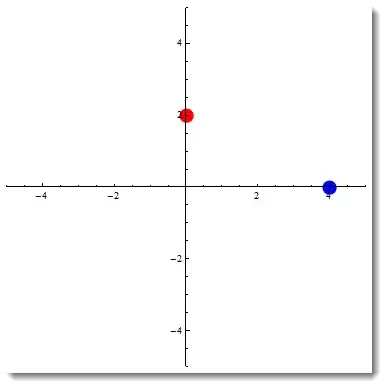
And this is more or less what you need:

DynamicModule[{p1 = {0, 2}, p2 = {2, 0}}, EventHandler[
  Dynamic[Style[Graphics[{{Red, Disk[{0, Round@p1[[2]]}, .2]}, {Blue, 
       Disk[{Round@p2[[1]], 0}, .2]}}, PlotRange -> 5, Axes -> True], 
    Selectable -> False]],{"MouseDragged" :> (If[
       EuclideanDistance[p1, MousePosition["Graphics"]] < 
        EuclideanDistance[p2, MousePosition["Graphics"]], 
       p1 = MousePosition["Graphics"], p2 = MousePosition["Graphics"]];)}]]

enter image description here

It is a bit hacky, but because of integer settings it works.

Vitaliy Kaurov
  • 73,078
  • 9
  • 204
  • 355
  • This code selects which locator is closer to the mouse position. It's a nice approach, but unfortunately it doesn't solve my problem. In a more complex implementation that I am designing, there are other graphics objects on the screen (points that look somewhat like the locators). The locators affect, for instance the slope of a line going through the origin. I want to leave it unambiguous about which object,i.e. a particular locator (and not a nearby point) is "responding" to the actions of the mouse. – DavidC Aug 01 '12 at 13:39