47

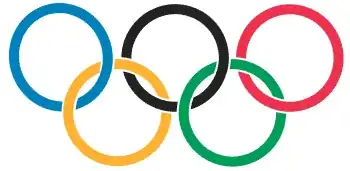
How can I draw the 5 interlocking Olympic rings with Mathematica?

Olympic rings

(SVG version)


Edit

Hard choice, but some pretty cool answers here. I didn't have 3D answers in mind when I posted the question, but without a doubt, they look much better than the 2D. Very subjective choice for the selected answer, but I do like @cormullion's answer.

J. M.'s missing motivation
  • 124,525
  • 11
  • 401
  • 574
Mike Honeychurch
  • 37,541
  • 3
  • 85
  • 158

7 Answers7

69

A rather crude way of accomplishing this is just to draw multiple shapes layered such that the rings interlock.

ringSegment[mid_, deg_, color_] := {
  Thickness[0.05],CapForm["Butt"], White, Circle[mid, 1, deg], Thickness[0.03],
  RGBColor @@ (color/255), Circle[mid, 1, deg + {-0.1, 0.1}]}

olblue   = {0, 129, 188};
olyellow = {255, 177, 49};
olBlack  = {35, 34, 35};
olGreen  = {0, 157, 87};
olRed    = {238, 50, 78};

Graphics @ GraphicsComplex[
  {{2.5, 0}, {1.3, -1}, {0, 0}, {5, 0}, {3.8, -1}},
  ringSegment @@@
   {{1, {0, 5/4 π}, olBlack},
    {2, {0, π}, olyellow},
    {3, {0, 2 π}, olblue},
    {2, {-π 9/8, 1/4 π}, olyellow},
    {4, {0, 5/4 π}, olRed},
    {5, {0, 7/8 π}, olGreen},
    {1, {5/4 π, 5/2 π}, olBlack},
    {5, {7/8 π, 2 π}, olGreen},
    {4, {-3/4 π, 1/4 π}, olRed}}
 ]

OL ring computed using the given code

jVincent
  • 14,766
  • 1
  • 42
  • 74
34

Why not create the 3D model of which this is a stylized representation?

To do so, we need to construct a 3D ring. Let's thicken a polygonal approximation to a circle:

ring[center_, normal_] := 
  With[{a = axes[normal], radius = 1, thickness = 0.25}, 
   Tube[center + radius {Cos[#], Sin[#]}.a & /@ Range[0, 2 Pi, 2 Pi / 72], thickness/2]];

The auxiliary function axes is a quick-and-dirty way to obtain two orthonormal axes perpendicular to a particular direction. (It will not work in directions parallel to the y axis.) This makes it simpler and more natural to describe a 3D circle in terms of its center and a vector perpendicular to its plane:

axes[normal_] := 
  Module[{x = {-normal[[3]], 0, normal[[1]]}, y},
   y =  Cross[normal, x]; {x / Norm[x], y / Norm[y]}];

Specify the positions of the centers and tilt the top row one way, the bottom row another:

dy = 2.4; offset = 0.25;
rings = Join[
   ring[#, {0, -offset, 1}] & /@ {{0, 0, 0}, {0, dy, 0}, {0, 2 dy, 0}},
   ring[#, {0, offset, 1}] & /@ {{Sqrt[3]/2, dy/2, 0}, {Sqrt[3]/2, 3 dy/2, 0}}];

Oh yes, the colors:

colors = {Cyan, Black, Red, Yellow, Green};

Render the rings:

Graphics3D[Riffle[colors, rings], Boxed -> False, 
 PlotRange -> {{-2, 4}, {-2, 3 dy}, {-2 offset, 2 offset}}]

Olympic rings

Now you can play with them in three dimensions!

Olympic rings 2

whuber
  • 20,544
  • 2
  • 59
  • 111
31

3 D approach

It would be possible to do this using ParametricPlot3D, very slight variation in the $z$-direction, and a suitable ViewPoint:

Stealing jVincent's colors:

olblue = RGBColor[{0, 129, 188}/255.];
olyellow = RGBColor[{255, 177, 49}/255.];
olBlack = RGBColor[{35, 34, 35}/255.];
olGreen = RGBColor[{0, 157, 87}/255.];
olRed = RGBColor[{238, 50, 78}/255.];

olyrings = 
 ParametricPlot3D[{{Cos[t], Sin[t], 0.325 Sin[t + Pi/4] - 0.035},
 (* blue *){Cos[t], Sin[t], 0.325 Sin[t + Pi/4]},
   {3/4 Pi + Cos[t], Sin[t], 0.04 Sin[t + Pi/4] - 0.005},
 (*  black *){3/4 Pi + Cos[t], Sin[t], 
    0.04 Sin[t + Pi/4]}, {3/8 Pi + Cos[t], 
    Sin[t] - 9/8, -0.12 Sin[Pi/4 - t] - 0.05},
 (* yellow *){3/8 Pi + Cos[t], 
    Sin[t] - 9/8, -0.12 Sin[Pi/4 - t]}, {3/2 Pi + Cos[t], Sin[t], 
    0.005 Sin[t - Pi/4] - 0.001},
 (* red *){3/2 Pi + Cos[t], Sin[t], 
    0.005 Sin[t - Pi/4]}, {9/8 Pi + Cos[t], Sin[t] - 9/8, 
    0.01 Sin[t - Pi/4] - 0.001},
 (* green *){9/8 Pi + Cos[t], Sin[t] - 9/8, 0.01 Sin[t - Pi/4]}}, 
 {t, 0, 2 Pi}, Axes -> False, BaseStyle -> AbsoluteThickness[10], 
  PlotStyle -> {Directive[AbsoluteThickness[14], White], olblue, 
    Directive[AbsoluteThickness[14], White], olBlack, 
    Directive[AbsoluteThickness[14], White], olyellow, 
    Directive[AbsoluteThickness[14], White], olRed, 
    Directive[AbsoluteThickness[14], White], olGreen}, 
  ViewPoint -> Top, ImageSize -> 350, Boxed -> False, 
  PlotRangePadding -> 0.15]

enter image description here

Verbeia
  • 34,233
  • 9
  • 109
  • 224
27

I tried to resist answering, but couldn't...

(* perturbed circle *)
circ = Cases[ParametricPlot3D[{Cos[t], Sin[t], Cos[3 t]},
                              {t, 0, 2 Pi}], _Line, Infinity][[1, 1]];

Graphics3D[MapThread[{Directive[Black, Glow[#3]], 
    Tube[Composition[TranslationTransform[#1], RotationTransform[#2, {0, 0, 1}]] /@
         circ, 1/8]} &,
     {PadRight[{{0, 9}, {12, 0}, {24, 9}, {36, 0}, {48, 9}}/10, {5, 3}], (* centers*)
     {0, Pi/3, 0, Pi/3, 0}, (* rotations *)
     RGBColor @@@ ({{0, 129, 188}, {255, 177, 49}, {35, 34, 35},
                    {0, 157, 87}, {238, 50, 78}}/255)}], (* colors *)
     Boxed -> False, Method -> {"TubePoints" -> 30}, ViewPoint -> {0, 0, Infinity}]

Olympic logo

J. M.'s missing motivation
  • 124,525
  • 11
  • 401
  • 574
23

I thought I'd better have a go at these 'sports-related celebratory circular hollow loops', despite the risk, but I couldn't get the rings to overlap properly - the brain starts to hurt after a while. Looking for shiny rings, but black doesn't shine very well...

ring = ParametricPlot3D[{Cos[t] (8 + Cos[u]), Sin[t] (8 + Cos[u]), 
     Sin[u]/8}, {t, 0, 2 Pi}, {u, 0, 2 Pi}, Mesh -> None][[1]];
col = {Blue, Yellow, Black, Green, Red};
pts = {{0, 2, 0}, {2, 0, 0}, {4, 2, 0}, {6, 0, 0}, {8, 2, 0}};
rotations = {{.1, 0, 0}, {0, 0.1, 0}, {-0.2, 0.2, 0}, {.1, 0.5, 
    0.5}, {0.1, -0.2, 0}};
Graphics3D[{
  Specularity[White, 30],
  Table[{col[[i]],
    Translate[
     Rotate[
      ring ,
      Pi/16, 
      rotations[[i]]],
      3 pts[[i]]]}, {i, 1, 5}]}, Boxed -> False, Background -> Gray, 
 ViewAngle -> 0.4, ViewPoint -> {0, 0, 3}, 
 ViewVertical -> {0, 1.5, 6}]
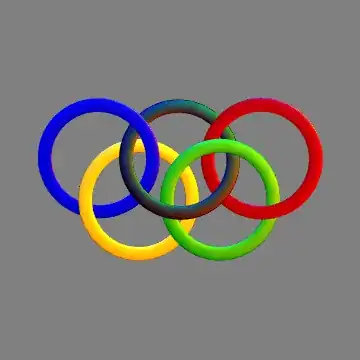
olympic rings

Edit: Better do it properly, I suppose:

ring = ParametricPlot3D[{Cos[t] (8 + Cos[u]), Sin[t] (8 + Cos[u]), 
     Sin[u]/8}, {t, 0, 2 Pi}, {u, 0, 2 Pi}, Mesh -> None][[1]];
col = {Blue, Yellow, Black, Darker[Green], Red};
pts = {{0, 1.5, 0}, {2, 0, 0}, {4, 1.5, 0}, {6, 0, 0}, {8, 1.5, 0}};
rotations = {{0, 0, 1}, {-.3, .5, 1}, {-0.1, -3, 1}, {-1, 1, 
    1}, {-1, -4, 1}};
Graphics3D[{
  Specularity[White, 20],
  Table[{col[[i]],
    Translate[
     Rotate[
      ring ,
      0.1, 
      rotations[[i]]],
     5 pts[[i]]]}, {i, 1, 5}]}, Boxed -> False, Background -> Gray, 
 ViewAngle -> 0.5, ViewPoint -> {0, 0, 3}, ViewVertical -> {0, 1, 6}]

rings better linked

cormullion
  • 24,243
  • 4
  • 64
  • 133
  • Aargh - just looked at the others more closely and I seem to have tried too hard to link the rings together... Idiot! – cormullion Jul 31 '12 at 15:24
  • You could use Glow[] on your colors, you know... – J. M.'s missing motivation Aug 01 '12 at 03:13
  • @J.M. I had a look, but it didn't do what I was expecting, which was like the neon lit effect in Illustrator. – cormullion Aug 01 '12 at 16:30
  • Hmm, good point. Glow[] tends to make things look flat, but if you wanted your colors to be a bit more textured, then your route is best. – J. M.'s missing motivation Aug 01 '12 at 17:01
  • Is there a syntax error in your second version with the less-blended colors? entering exactly is returning something about missing closing brackets, and then it doesn't produce any output. – Thomas Ward Aug 01 '12 at 17:24
  • @Lord, there shouldn't be a syntax error. Did you copy everything within the gray box? – J. M.'s missing motivation Aug 01 '12 at 17:30
  • Yes. Then i went and retyped exactly as it shows, system's still returning an error. Lemme retry and get back to you. – Thomas Ward Aug 01 '12 at 17:35
  • @J.M. maybe its a regression in the program, but what happened is that the system was complaining because of the extra line breaks. Removing them allows it to execute, but I say its a regression because this system isn't generating any actual graphical output... :/ – Thomas Ward Aug 01 '12 at 17:43
23

I already did a refactor for jVincent's answer, and rather than edit whuber's too I feel like posting something myself; besides my style is controversial. Here is my refactor of his answer in my own style and with my own tweaks.

ring[
  {x_, y_, z_: 0},
  {u_: 0, v_, w_: 1},
  {dy_, offset_, r_}
 ] :=
 With[{ axes = Normalize /@ {#, {u, v offset, w}\[Cross]#} &@{-w, 0, u} },
  Tube[{x, y dy, z} + {Cos@#, Sin@#}.axes & /@ Range[0, 2 Pi, 2 Pi/72], r]
 ]

param = {2.4, 0.25, 0.17};

rings =
  Join[
   ring[{0, #}, {-1}, param] & /@ {0, 1, 2},
   ring[{Sqrt[3]/2, #/2}, {1}, param] & /@ {1, 3}
  ];

colors = {Cyan, Darker@Gray, Red, Yellow, Green};

Graphics3D[
 Riffle[colors, rings],
 Boxed -> False,
 ViewPoint -> {0, 0, ∞},
 ViewVertical -> {-1, 0, 0}
]

Olympic rings

Condensed code for this specific problem. (Less flexible than above; hard coded parameters.)

ring[x_, y_, v_] := 
  Table[
    {1.2 y, -v x, 0} + {Cos@i, Sin@i}.{{0, -1, 0}, {1, 0, 1/4 - v/2}},
    {i, 0, 2 π, π/200}
  ] ~Tube~ 0.17

Graphics3D[
  Riffle[
    {Cyan, Yellow, Darker @ Gray, Green, Red},
    Array[ring[Sqrt@3/2, #, # ~Mod~ 2] &, 5, 0] ],
  Boxed -> False,
  ViewPoint -> {0, 0, ∞}
]
Mr.Wizard
  • 271,378
  • 34
  • 587
  • 1,371
7
ParametricPlot3D[{
  {4 + (3 + Cos[v]) Sin[u], 4 + (3 + Cos[v]) Cos[u], 
   4 + Sin[v]}, {8 + (3 + Cos[v]) Cos[u], 3 + Sin[v], 
   4 + (3 + Cos[v]) Sin[u]}, {12 + (3 + Cos[v]) Sin[u], 
   4 + (3 + Cos[v]) Cos[u], 4 + Sin[v]}, {16 + (3 + Cos[v]) Cos[u], 
   3 + Sin[v], 4 + (3 + Cos[v]) Sin[u]}, {20 + (3 + Cos[v]) Sin[u], 
   4 + (3 + Cos[v]) Cos[u], 4 + Sin[v]}
  }, {u, 0, 2 Pi}, {v, 0, 2 Pi}, 
 PlotStyle -> {Red, Green, Blue, Yellow, Black}, Mesh -> None, 
 Axes -> None, Boxed -> False]

enter image description here

matrix42
  • 6,996
  • 2
  • 26
  • 62