5

I am trying to plot a electric field: vec = 1/(16 π ) Abs[{ex, ey, ez}]^2;

ex = -I A (Subscript[I, 0] + Subscript[I, 2 ] Cos[ϕ]);
ey = -I A Subscript[I, 2] Sin[2 ϕ];
ez = -2 A Subscript[I, 1 ] Cos[ϕ];  

with my A=141.20 and Intensities:

Subscript[I, 0] = NIntegrate[Sqrt[Cos[θ]] Sin[θ] (1 + Cos[θ]) 
                            BesselJ[0, (v Sin[θ])/Sin[α]] 
                            Exp[I  u Cos[θ]/Sin[α]^2], {θ, 0, α}, 
                            PrecisionGoal -> 2, MaxRecursion -> 20];

Subscript[I, 1] = NIntegrate[ Sqrt[Cos[θ]] Sin[θ]^2 
                               BesselJ[1, (v Sin[θ])/Sin[α]] 
                               Exp[I u Cos[θ]/Sin[α]^2], {θ, 0, α}, 
                               PrecisionGoal -> 2, MaxRecursion -> 20];

Subscript[I, 2] = NIntegrate[Sqrt[Cos[θ]] Sin[θ] (1 - Cos[θ]) 
                             BesselJ[2, (v Sin[θ])/Sin[α]] 
                             Exp[I u Cos[θ]/Sin[α]^2], {θ, 0, α}, 
                             PrecisionGoal -> 2, MaxRecursion -> 20];

then I turned it into :

tablevecxy = ParallelTable[ vec /. {ϕ -> ArcTan[x, y], u -> 0, v -> Sqrt[x^2 + y^2]}, 
                          {x, 0, 20, 0.5}, {y, 0, 20, 0.5}];

and tried to plot it with ListVectorPlot[tablevecxy[[All, All, {1, 3}]]]

I only get 3 arrows and the others are dots. How can I make the other arrows clearer? I tried it with VectorScale and MaximumModulus. But it does not work.

J. M.'s missing motivation
  • 124,525
  • 11
  • 401
  • 574
donut
  • 149
  • 5
  • I'm having trouble running your code. Is alpha a constant? But I have run into this sort of problem before. The only solution I found was with VectorScale and maximumModulus, which I know you said you tried. You may have to adjust the value of maximumModulus to find one that works. The idea is to remove the largest arrows so that the others appear bigger. I would look at Jens answer on this post http://mathematica.stackexchange.com/questions/20081/what-is-wrong-with-my-vectorplot – BenP1192 Jul 22 '15 at 16:58
  • yes alpha is 45 Degrees. I bumped into the other post and tried to vary the values in VectorScale and MaximumModulus, but I couldnt figure it out. So I thought I should ask. – donut Jul 23 '15 at 10:19
  • Please learn how to upvote. Read the following message: – Dr. belisarius Jul 23 '15 at 16:17
  • Welcome to Mathematica.SE! I suggest the following: 0) Browse the common pitfalls question 1) As you receive help, try to give it too, by answering questions in your area of expertise. 2) Read the [faq]! 3) When you see good questions and answers, vote them up by clicking the gray triangles, because the credibility of the system is based on the reputation gained by users sharing their knowledge. Also, please remember to accept the answer, if any, that solves your problem, by clicking the checkmark sign! – Dr. belisarius Jul 23 '15 at 16:17

1 Answers1

8

First things first, you made quite a mess with your definitions. Let's straighten them a bit:

bes[n_, v_, θ_, α_, u_] := BesselJ[n, v Sin@θ/Sin@α]  Exp[I u Cos@θ/Sin@α^2]

cs[n_, θ_] := {(1 + Cos@θ), Sin@θ , (1 - Cos@θ)}[[n +1]] Sqrt@Cos@θ Sin@θ 

i[n_, u_, v_, α_]:= i[n,u,v,α]= NIntegrate[cs[n, θ] bes[n, v, θ, α, u], {θ, 0, α}]

ex[A_, u_, v_, α_, ϕ_] := -I A (i[0, u, v, α] + i[2, u, v, α] Cos[ϕ]);
ey[A_, u_, v_, α_, ϕ_] := -I A  i[2, u, v, α] Sin[2 ϕ];
ez[A_, u_, v_, α_, ϕ_] := -2 A  i[1, u, v, α] Cos[ϕ];

vec[A_, u_, v_, α_, ϕ_] := 1/(16 π) Abs[Through[{ex, ey, ez}[A, u, v, α, ϕ]]]^2

You haven't specified a value for Alpha, so I'll take Pi/2.Replace at will. Also, I'll exclude the {0,0} point, where there seems to be a singularity (but I haven't explored it).

t = Table[vec[141.20, 0, Norm[{x, y}], Pi/2, ArcTan[x, y]], 
          {x, 0.1, 19.1, 1}, {y, 0.1, 19.1, 1}];
tr = t[[All, All, {1, 3}]];

Now, this should be similar to the result you're having:

ListVectorPlot@tr

Mathematica graphics

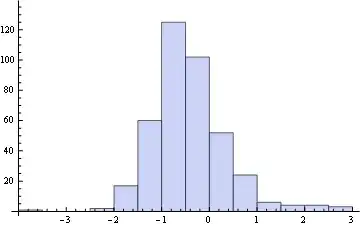
The problem is that the vector moduli spans many orders of magnitude so it can't be represented in a linear scale easily. See:

Histogram@Flatten@Map[Log[10, Norm@#] &, tr, {2}]

Mathematica graphics

Now you have at least two alternatives. You may establish a cutoff and stop viewing "large" vectors to be able to represent the finer grain:

ListVectorPlot[tr, VectorScale -> {Automatic, Automatic, If[#5 > .5, 0, #5] &}]

Mathematica graphics

Or you may represent the vectors' directions along with a background showing (for example) the Log of the modulus:

Show[
 ListDensityPlot[Map[Log@Norm@# &, tr, {2}],PlotLegends -> Automatic],
 ListStreamPlot@tr]

Mathematica graphics


Edit

Note that if you give it some time Mathematica can cope with your functions without resorting to lists:

vecXY[A_?NumericQ, u_?NumericQ, v_?NumericQ, α_?NumericQ, ϕ_?NumericQ] := 
                           1/(16 π) Abs[Through[{ex, ez}[A, u, v, α, ϕ]]]^2

dp = DensityPlot[Log@Norm@vecXY[141.20, 0, Norm[{x, y}], Pi/2, ArcTan[x, y]], 
                 {x, 0, 20}, {y, 0, 20}, PlotLegends -> Automatic];
sp = StreamPlot[vecXY[141.20, 0, Norm[{x, y}], Pi/2, ArcTan[x, y]], 
                 {x, 0, 20}, {y, 0, 20}];

Show[dp, sp]

Mathematica graphics

Dr. belisarius
  • 115,881
  • 13
  • 203
  • 453
  • 2
    Very nice (+1) - but I still voted to close the question as a duplicate... this one contains too much extraneous info that dilutes the issue. – Jens Jul 22 '15 at 17:57
  • @Jens Thanks. I started wishing to show the last plot, but I had to rework the code due to many inconsistencies. You may well be right voting to close. – Dr. belisarius Jul 22 '15 at 18:03
  • @Dr.belisarius Excuse me for not fully understanding this very useful answer: the last plot in the `Edit' part, what do you mean to "give it some time" to let Mathematica cope with the function so that one can do direct VectorPlot or StreamPlot and not the List version? – Lee David Chung Lin Nov 03 '16 at 06:19