Bug introduced in 10.1 and fixed in 11.3
Context
In relation to this question
I have would like to use splines to define a ParametricRegion
and DiscretizeRegion
I proceed as follows:
pts = {{1, 0}, {1.8, 3}, {0, 2}};
 {xu, yu} = Transpose[pts];
n = 2;m = Length[pts];
knots = {ConstantArray[0, n + 1], Range[m - n - 1]/(m - n),
         ConstantArray[1, n + 1]} // Flatten;
fx[t_] = xu.Table[ BSplineBasis[{n, knots}, i - 1, t], {i, Length[pts]}];
fy[t_] = yu.Table[ BSplineBasis[{n, knots}, i - 1, t], {i, Length[pts]}];
So that
ParametricPlot[{fx[t], fy[t]}, {t, 0, 1}, Axes -> None, Frame -> True,
  Epilog -> {Directive[AbsolutePointSize[5], Red], Point[pts]}]
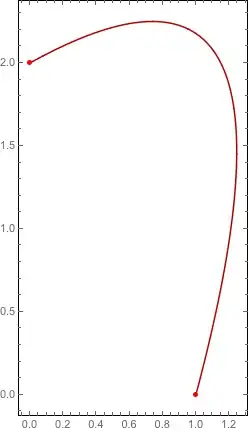
Now I would like to Discretize this BSpline as follows:
  dpr = ParametricRegion[{{ fx[t], fy[t]}, 0 <= t <= 1}, t];
  δΩ = DiscretizeRegion[dpr, MaxCellMeasure -> 0.001];
This seems to produce a buggy region. Indeed
Show[δΩ, Axes -> True]

presents some defect in the triangulation.
Note in particular the two points at the origin and at coordinate (0.9,-0.2).
Question
Is this a bug in DiscretizeRegion?
Can anyone reproduce this problem?
I am using mathematica 10.1 on macos X.
Thanks!
Update
In mathematica 10.2 is works better but not always. For instance let us define
 << NDSolve`FEM`
Jet0[pts_: {{1, 0}, {1.8, 1.8}, {0, 2}}] :=
 Module[{xu, yu, n, m, knots, fx, fy, pr, mesh, t, r},
  {xu, yu} = Transpose[pts];
  n = 2; m = Length[pts];
  knots = {ConstantArray[0, n + 1], Range[m - n - 1]/(m - n),
     ConstantArray[1, n + 1]} // Flatten;
  fx[t_] =
   xu.Table[BSplineBasis[{n, knots}, i - 1, t], {i, Length[pts]}];
  fy[t_] =
   yu.Table[BSplineBasis[{n, knots}, i - 1, t], {i, Length[pts]}];
  pr = ParametricRegion[{{r fx[t], r fy[t]}, 0 <= t <= 1 &&
      0 <= r <= 1}, {t, r}];
  mesh = ToElementMesh[pr, "MaxBoundaryCellMeasure" -> 0.1];
  mesh["Wireframe"]]
so that
Jet0[]
produces
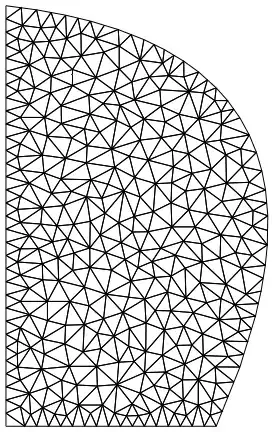
but on the other hand
Jet0[{{1, 0}, {1.8, 1.8}, {0, 3}}]
produces
$Failed[Wireframe]


ParametricRegionas anImplicitRegionyou may have better chances. For some reason, Mathematica doesn't know how to handleParametricRegionproperly. – RunnyKine Jul 26 '15 at 20:42ImplicitRegion[]" - should be doable viaPiecewiseExpand[]and a few other functions, but since it's piecewise polynomial, you will have to tack on not a few inequalities to restrict the domain. Just describing the route makes me shudder… – J. M.'s missing motivation Jul 27 '15 at 18:57DiscretizeRegion[pr, MaxCellMeasure -> {"Length" -> 0.1}]works in V10.2. -- This also works,ToElementMesh[BoundaryDiscretizeRegion[pr, MaxCellMeasure -> {"Length" -> 0.1}]]and gives a warning that might be significant. – Michael E2 Jul 27 '15 at 19:54Jet0: Should it read0 <= t <= 1instead of-1 <= t <= 1inParametricRegion? (Doesn't fix problem, though, it seems.) – Michael E2 Jul 27 '15 at 20:26BSplineBasis[]zeroes out outside $[0,1]$, but it's better that you corrected @chris. ;) – J. M.'s missing motivation Jul 27 '15 at 20:36