When you evaluate a ContourPlot3D expression, it will become a Graphics3D expression containing a collection of graphics primitives like Point, Line, and (more complicated) GraphicsComplex.
In your case the expression looks something like this:
Graphics3D[
  GraphicsComplex[ ... ],
  <options>
]
And your color Orange is in the GraphicsComplex, in the second argument:
GraphicsComplex[
  <list of points>,
  <list of graphics directives and primitives>
]
Specifically, this second argument of GraphicsComplex contains this graphics directive:
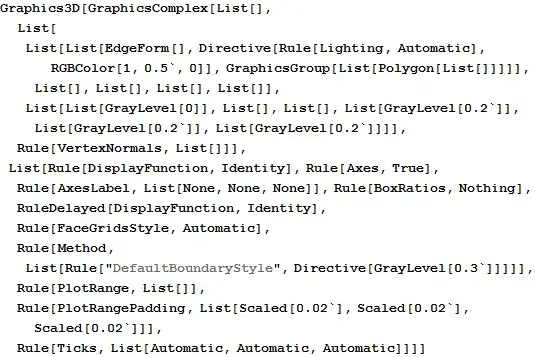
Directive[Rule[Lighting, Automatic], RGBColor[1, 0.5`, 0]]
This means that the graphics primitives that come after it are to be rendered with 'Automatic' lighting and Orange (RGBColor[1,0.5`,0] face colors. In this case there is only one 'Orange' color, so the replacement rule by @george2079 will work fine. In the more general case you will need to seek out the part of the Graphics3D expression you wish to modify. Functions that help looking at Graphics3D expressions in their unrendered form are:
InputForm[x]
FullForm[x]
This will spit out a lot of data, mostly numbers, which you can condense a bit by replacing lists of numbers (integers or reals) with 'Nothing' (a 10.2 function):
FullForm[x /. {{_Real ..} :> Nothing, {_Integer ..} :> Nothing, _Line :> Nothing}]
This gives the output below, which is still a lot of data to look at, but you can double/triple/etc click on any part of the expression to see what belongs where:


x /. Orange-> Red. I'm sure you want something more general though. – george2079 Jul 29 '15 at 21:09