22

I have a curve that is defined as f[x] and what I'm attempting to do is to divide the curve into equal straight lengths for a number of segments of my choosing that I've defined as nSeg.

I've created a sheet that can work through and determine the (x,y) co-ordinates for each segment, but I'm having to manually manipulate the equations to create a single equation for Mathematica to find the roots for.

The straight length of the curve I've defined as;

chordL = Table[
            Sqrt[(Subscript[x, i + 1] - Subscript[x,i])^2 + 
                 (f[Subscript[x, i + 1]] - f[Subscript[x, i]])^2
            ], {i, 1, nSeg}
         ]

This creates a list of equations for the length of each segment. What I would like to do is make each part of the list equal to each other so that I can feed this into FindRoot later in the sheet so that if I decide to change the number of segments from 8 to 10, the sheet can be refreshed from a single variable.

FindRoot[*combined equations*, {Subscript[x, 2], 1}, {Subscript[x, 3], 2}]

The above is an example of how I'm currently doing it and it means I've a sheet for each value of nSeg, which isn't a smart way to work and I'm manually defining which variables to solve independently of the value of nSeg, even though the first and last co-ordinate will always be known.

I'm quite new to Mathematica and would really appreciate a nudge in the right direction to combine the equations in the first part to give the equations to solve in FindRoot (which I'm using instead of Solve for speed) in a flexible manner, and also increment the number of variables to solve given that x1 will always be 0 and x(nSeg+1) will always be known too as these are the start and end points of the curve which are defined by the input at the beginning of the sheet.

J. M.'s missing motivation
  • 124,525
  • 11
  • 401
  • 574
ASBO Allstar
  • 1,106
  • 9
  • 15

2 Answers2

20

Straight segments

I'll assume you want to fix the first and last point and then plot the segments. Quick and dirty approach (I'll fix the first point at $x=0$ and the last at x=upVal; also note that actually nSeg isn't the number of segments here, but never mind):

upVal = 6;
nSeg = 10;
chordL = Table[
   Sqrt[(x[i + 1] - x[i])^2 + (f[x[i + 1]] - f[x[i]])^2], {i, 1, 
    nSeg}];
combEqs = # == d & /@ chordL;

That is, I set the length of all the segments to $d$, for which I will solve. Here's how to define the list of vars (with initial conditions, which are arbitrarily chosen here):

ClearAll[vars, x];
vars = Append[{x[#], #, x[1]+10^-6, upVal-10^-6} & /@ Range[2, nSeg],{d, 1}]

you can see I am adding $d$, the segment length, as a variable to solve for. Let's try for $f(x)=\sin(x)$:

f[x_] := Sin[x];
x[1] = 0;
x[nSeg + 1] = upVal;
sol = FindRoot[combEqs, vars];


points = Table[{{x[i], f[x[i]]}, {x[i + 1], f[x[i + 1]]}}, {i, 1, 
    nSeg}];

Show[
 Plot[f[x], {x, x[1], 1.1 x[nSeg + 1]}],
 Graphics@Line[points /. sol],
 Graphics[{Red, PointSize[Large], Point[Flatten[points, 1] /. sol]}]
 ]

Mathematica graphics

So it seems to work.

Curved segments

If I just want to split up the curve in segments of equal length along the curve, I could do it like this:

ClearAll[findx, length];
findx[ell_, f_] := x /. FindRoot[length[x, f] \[Equal] ell, {x, 1}]
length[xf_?NumericQ, f_] := NIntegrate[Sqrt[1 + f'[z]^2], {z, 0, xf}]

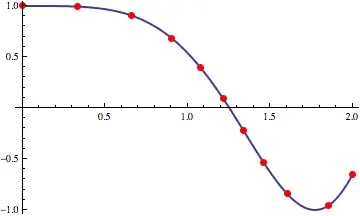
Here, length gives the length of a curve f[x] from x=0 to x=xf, and findx uses that to obtain the coordinate x at which the length from x=0 to x=xf is ell. Then, we find the total length, split it into equal pieces $\delta L$, and use findx to obtain the values $x_n$ at which the length from the starting point is $n\delta L$:

nsegs = 10;
f[x_] := Cos[x^2]
xup = 2;
totalLength = length[xup, f];
dL = totalLength/nsegs;
xvals = Table[findx[n*dL, f], {n, 0, nsegs}];
Show[
 Plot[f[x], {x, 0, xup}],
 Graphics[{Red, PointSize[Large], 
   Point[Transpose[{xvals, f /@ xvals}]]}]
 ]

And here is the result:

Mathematica graphics

Well, unless I messed it up.

ASBO Allstar
  • 1,106
  • 9
  • 15
acl
  • 19,834
  • 3
  • 66
  • 91
  • Thanks for taking the time to explain the logic through this, I've taken it into the workbook and it seems to be working fine, I just need to spend some time unpicking the code so your explanation is invaluable. – ASBO Allstar Aug 01 '12 at 12:25
  • If you have any questions on this code, do ask. It's not very carefully written but it does the job. – acl Aug 01 '12 at 12:52
  • Is it OK if I change the title of the question to "split up a curve into segments" or something similar? At the moment it's not very accurate. – acl Aug 01 '12 at 12:56
  • Sure not a problem, if it makes it easier for future users to search for it. I'm just tinkering now to get the solutions to write to the variables for the list as it can change length. – ASBO Allstar Aug 01 '12 at 13:14
  • I am not sure I understood what you're after. You could try asking in chat so we don't pollute the comments section here – acl Aug 01 '12 at 13:33
  • Having lived with this for a couple of days and tinkered, what I've found is that for some parabolic curves, the code as posted can often give co-ordinates that are beyond the upVal range and then the segments start to fold back on themselves. This is usually a problem with higher values of nSeg. I've tweaked the code a little to constrain the solutions between 0 and upVal. vars = Append[{Subscript[x, #], #, x[1] + 10^-6, upVal - 10^-6} & /@ Range[2, nSeg], {d, 1}]; – ASBO Allstar Aug 10 '12 at 07:40
  • @ASBOAllstar yes, that is a good point. thanks – acl Aug 10 '12 at 23:08
  • The second part of this answer was the subject of this question. – J. M.'s missing motivation Aug 11 '12 at 00:20
  • @J.M. ah! I hadn't seen it(!). let me take a look tomorrow and apportion credit as necessary, I've switched off for today. thanks – acl Aug 11 '12 at 00:30
12

I present here a variation of acl's approach for finding points along a curve with equal Euclidean distances. The most noticeable difference is that this version takes the optimization route, via NArgMax[]:

segmentCurve[ff_?VectorQ, {t_, tmin_, tmax_}, n_, opts___] := Block[{c, lens, vars},
             vars = c /@ Range[n - 1];
             lens = SquaredEuclideanDistance @@@
                    Partition[Function[t, ff] /@ Flatten[{tmin, vars, tmax}], 2, 1];
             NArgMax[{Total[lens], Equal @@ lens, Less @@ Flatten[{tmin, vars, tmax}]},
                     vars, opts]]

I have written the routine so that it takes a parametrically represented curve as input, thus allowing it to be used for both plane and space curves.

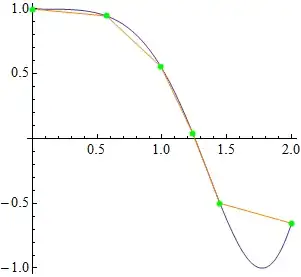
Here's how you might split a function curve like $\cos(x^2)$ into five segments:

vals = segmentCurve[{x, Cos[x^2]}, {x, 0, 2}, 5, WorkingPrecision -> 20]
  {0.57191013658298125958, 0.99139112961697439451,
   1.2387523086033325871, 1.4468296680931848997}

Build the corresponding points:

pts = Function[x, {x, Cos[x^2]}] /@ Flatten[{0, vals, 2}];

Check that they're equidistant:

Differences[EuclideanDistance @@@ Partition[pts, 2, 1]] // Chop
  {0, 0, 0, 0}

Show the points:

Plot[Cos[x^2], {x, 0, 2}, AspectRatio -> 1,
     Epilog -> {{Orange, Line[pts]},
                {Directive[AbsolutePointSize[6], Green], Point[pts]}}]

equidistant points on cos(x^2)

Here's how to apply the function to a space curve:

vals = segmentCurve[{Cos[t], Sin[t], t}, {t, 0, 2 π}, 8];
pts = Function[t, {Cos[t], Sin[t], t}] /@ Flatten[{0, vals, 2 π}];
Show[ParametricPlot3D[{Cos[t], Sin[t], t}, {t, 0, 2 π}], 
     Graphics3D[{{Orange, Line[pts]},
                 {Directive[AbsolutePointSize[6], Green], Point[pts]}}]]

equidistant points on helix

J. M.'s missing motivation
  • 124,525
  • 11
  • 401
  • 574