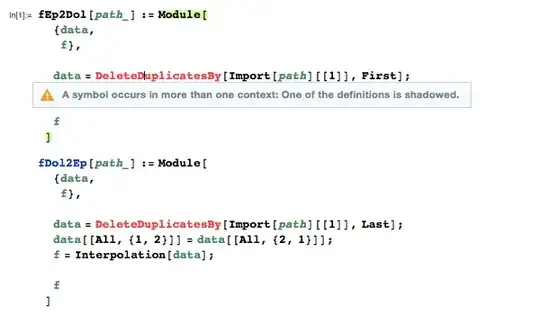
I have been running a function in Mathematica 10 with the command, DeleteDuplicatesBy. The function was working great until one day I started to get an error with the DeleteDuplicatesBy command. When I tried to run it, the command would turn red and say, "A symbol occurs in more than one context: One of the definitions is shadowed."
I have Mathematica 9 and 10 installed on my computer. I am not sure if that could be causing the error. Here is an image of the error in action.


Names["*\DeleteDuplicatesBy"]`.) – Patrick Stevens Aug 17 '15 at 18:25Globalcontext. Was the symbol appearing red there? – Patrick Stevens Aug 17 '15 at 18:36Namescode again? – Patrick Stevens Aug 17 '15 at 18:59DeleteDuplicatesBy[{{a,y},{b,y},{c,z},{d,y}},Last]before doing the more complicated example in your screen shot? Or is there a reason you posted the more complicated example? Maybe it would also help to know your OS. – Jens Aug 17 '15 at 19:00RebuildPacletData[]and see if this fixed the issue. – Stefan R Aug 17 '15 at 21:47{$VersionNumber, $ReleaseNumber})? Try turning off the suggestions bar in Preferences, restart Mathematica, and try again. I'm wondering if it is related to this – Szabolcs Aug 18 '15 at 06:00