0

I have a function, pasted at the bottom, which I would like to encapsulate into a function that can be called, and the program would then run in a popup window, return the values energy, peaklocation and amplitude, then when the user is finished with the manipulate function, they'd press a done button and the popup window would close, returning the created data and the user to the workbook.

The issue is mainly that, while I can get a popup window to appear, I cannot seem to figure out how to get it to include manipulators. Is there any way to run the following as a function in a popup window, or am I better off simply getting it to save results to a file and running it manually?

Here's the code:

SetOptions[InputNotebook[], PrintPrecision -> 10]
filelocation = SystemDialogInput["FileOpen"];
rawfiledata = Import[filelocation, "Table"];
trimmedfiledata = Drop[rawfiledata, {1}, {2, 4}];
Manipulate[moveamt = movelength, {movelength, 1, 25, 1}]
DynamicWrapper["Select the left and right edges of the data", 
 mmdata = MovingAverage[trimmedfiledata, moveamt];]
minx = Min[mmdata[[All, 1]]];
minx = minx - 0.02;
maxx = Max[mmdata[[All, 1]]];
maxx = maxx + 0.02;
miny = Min[mmdata[[All, 2]]];
maxy = Max[mmdata[[All, 2]]];
Manipulate[leftEdge = left, {left, minx, maxx, 0.001}]
Manipulate[rightEdge = right, {{right, maxx}, minx, maxx, 0.001}]
Manipulate[c1 = peak, {peak, minx, maxx, 0.001}]
Manipulate[yoff = floor, {floor, miny, maxy, 0.001}]

(*d1 is edges*)
Dynamic[d1 = Select[mmdata, leftEdge < #[[1]] < rightEdge &];]

Dynamic[Show[
  ListPlot[mmdata, PlotStyle -> Orange, 
   GridLines -> {{{c1, Orange}, leftEdge, rightEdge}, {{yoff, Red}}}],
  ParametricPlot[bsplinedat = BSplineFunction[mmdata][x], {x, -8, 8}],
  ListPlot[d1, PlotStyle -> Purple], ImageSize -> Large]]


Dynamic[f1 = 
  NonlinearModelFit[d1, a Exp[-(b (x - c1))^2] + yoff, {a, b}, x]]
Dynamic[Show[{ListPlot[d1], 
   Plot[f1[x], {x, d1[[1, 1]], d1[[-1, 1]]}, PlotRange -> All]}]]

Dynamic[Show[{ListPlot[mmdata], 
   Plot[f1[x], {x, minx, maxx}, PlotRange -> All, PlotStyle -> Red]}]]

Dynamic[smooth2 = {#[[1]], #[[2]] - f1[#[[1]]]} & /@ mmdata;]
Dynamic[ListPlot[smooth2]]

Dynamic[energy = Integrate[Interpolation[mmdata][x], {x, minx, maxx}];]
Dynamic[peaklocation = c1;]
Dynamic[amplitude = f1[c1];]
b
Dynamic[s = 1/Sqrt[b]]
Dynamic[sd = StandardDeviation[d1]]

And here's some sample data, if needed for whatever reason:

http://www.pastebin.ca/3116443

RNPF
  • 175
  • 6
  • 2
    I wonder if you could post a simple example ... – Dr. belisarius Aug 19 '15 at 23:35
  • Well, the simplest possible example would be Manipulate[moveamt = movelength, {movelength, 1, 25, 1}] just alone. – RNPF Aug 19 '15 at 23:47
  • Im trying to apply any of the many popup schemes to it, from popup window to dialog, and preserve the manipulation within the created dialog, of whatever type. – RNPF Aug 20 '15 at 00:24
  • ... Okay? Im not clear if you dont understand my question, or if you're just being obstinate. If you dont understand: Im trying to put a manipulate. ANY manipulate. Into a popup for a function. Just a general thing, can you put manipulates in popups, and if so, how. If you'd like, ignore the code sample and test data: Any manipulate. Any one. Into any popup. Is it possible? – RNPF Aug 20 '15 at 01:10
  • One of these handy little dudes: https://reference.wolfram.com/language/ref/PopupWindow.html Or any of these https://reference.wolfram.com/language/guide/DialogBoxes.html . My apologies if you are genuinely trying to help, "I wont" sempt to imply otherwise. – RNPF Aug 20 '15 at 01:25
  • Please try to understand that many people come to these sites, dump their code and say "solve it for me". – Dr. belisarius Aug 20 '15 at 01:46
  • 4
    I'm voting to close this question as off-topic because it is too localized; i.e, it applies only to the local situation and needs of its poster and answers will not benefit others. – m_goldberg Aug 20 '15 at 08:58
  • If the actual question is not what stated in the OP then it should be edited. As it is currently, its quite convoluted and hard to follow to me. – rhermans Aug 20 '15 at 10:35

1 Answers1

4

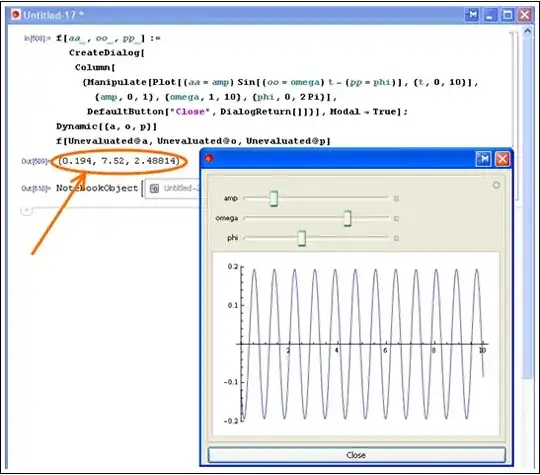
Perhaps:

f[aa_, oo_, pp_] := CreateDialog[
   Column[{Manipulate[
             Plot[(aa = amp) Sin[(oo = omega) t - (pp = phi)], {t, 0, 10}], 
             {amp, 0, 1}, {omega, 1, 10}, {phi, 0, 2 Pi}], 
          DefaultButton["Close", DialogReturn[]]}], Modal -> True];
Dynamic[{a, o, p}]
f[Unevaluated@a, Unevaluated@o, Unevaluated@p]

Mathematica graphics

Dr. belisarius
  • 115,881
  • 13
  • 203
  • 453
  • Awesome. I misjudged you and was rude, and I apologize. This appears to work well, although the unevaluated statements will take some tinkering to understand fully. Thank you for your help. – RNPF Aug 20 '15 at 03:17
  • @RNPF misjudging and loving at first sight are both equally dangerous. Have a nice day. – Dr. belisarius Aug 20 '15 at 03:18