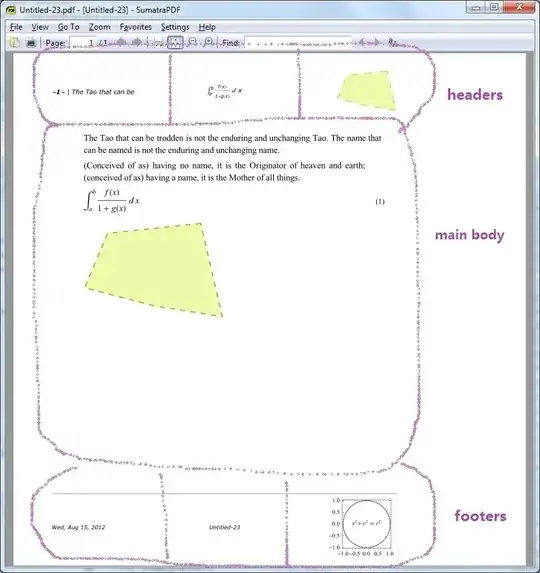
You can adjust page size, page number style, headers, footers, etc from items under File -> Printing Settings menu. Or you can programmatically modify them by manipulating Notebook's options: PrintingCopies, PrintingStartingPageNumber, PrintingPageRange, PageHeaderLines, PageFooterLines, PrintingOptions.
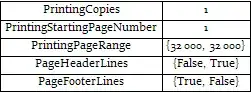

Note: It seems "PaperSize" and "PrintingMargins" are calculated using a DPI value of 72, which I guess is not the DPI of the monitor but that of the default printer.
Graphics, more generally, nearly any Cell expression, can be used in header and footer. One way is copy the entire Cell:
then paste into the Headers and Footers palette:

A Simple Program Example
A sample Notebook(Sorry I didn't find a convenient place to store large texts..):
notebookStr = Uncompress["1:eJztWI1u2zYQ7jvsBTgBA5LN9fRrWd1QoE3qNkOcBLbRYbCMmZYYm4hCGhKVJf\
Xyjnuk3ZGyLdlp063dMAwlAkvi/fB4P9+R+XomB8M/vnry5EwqNpPyarw6Ylk2tkYLRkZUErWgiiRUkBkjKpdpygTh\
BRFSAYkRJtIy52JOqEhJKZIFFXP8BNE2QR2CXrOGEpxIP0YFMratFrFG7FZZkxYxhh0cSZEwfgNK5CWhxSFZ0BvNL7\
VIi3CF6lH1ec5BFVUyR94FozdgPS7DaK4WP5CD5D266J6qvoRfrYZmGcwAV7Fv3Ut5e0wVHcfxwSinKVdcCpr1ZH4d\
x1OYxL9nruu+jONfaRx/M4vjQ2LmLw9uD+Erjr+HD4d8h9Pz9ZxhetYL/SNya2bMHyxsHfNimdE7XKXM6Fl5PWM5S/\
dsep3T5YInBXyPT3mhxq/SOUMh8/WmZGO77dpBc0xbxGnDj90OupHvRB2v0/G8oNPpTmGBESi8EqwoQNS2O7YbBFHQ\
7dih7wWhjxzHtEBfmTX6LOXldYuY5wQtpEttgjWQpdA2/yS52Fpl9bliOfjZbQeBXR/edDJBDT2a7O3CifzGcLe7iP\
xuJ3RDJwg6vhd62sbzJU24ugNBT2ttkQuZ3c2l2LhK/9jtsOmdjta4Mxmhxorfs7tebfhGABzY3Y7IrQm4TnP4WsD3\
GiMIaxJBU8DVAl4zht2gJhBGoVsbZgWvqQXdov0wKDM2flEsWaIGFJJZ79cDDRDq9XO65oPCVEyoIcuAnc4yqJ9RXr\
I1+eSaztkFTVNIh8qayiRtQs3E6nvSkBzyd6zicJ0IeZyOi1wV00UmwUYxZ03dOwkdat1dpxaByK67x214x4lMiOtz\
rlczbbPqZmNnUjBNt07EsgRouG+Rn7lI5W+4A/L0OVmFod8iXTvcUPo0B5wqNHHldFvkRankNTg8AZbV5qNFwnuYuA\
C0VLDWkVxypoWc7eRQAbTB8wJcZqBghwEJ2mK9mudCKbWIfqBqIL5hNGV5ZYxGEIQ4DSGrobrLGFbFEZQrFCa+Wihk\
GX8cMwAilq7JPYBzhECo0upt3HsFhtxQxaZDhaiP5T624ng84lnKJqBnyzGShmc8BC+PHe3ULafJUGu7UUQPiyAm/2\
5Vb3ugDDupo/G3x3cA9DzBfYwk/LKiZuGgFAKWR6GxwfkWCUDzjwB7BTaGQmJzAwK5hBajWIEOJpUYQYnn2pJ2y6oS\
bGJqApIK3iBWIqV5ihbt5foRTRbrXHYcXRT63cO3SJfHpOoBk3vcuYlbtelGRkGATwR0L4DSFBNq81Gfv1/3i020P6\
mj/Y12ZuJZbePD1nzpZV962f+jl3VCZPGj/24nm3wYXGpgYn8AXJD0CLx8Mja/yDIwdZxX+LsBZrgFLBRZguMn/woc\
fyY0Rv/vouC2A7+lWalfrB7P2BlcV6wmfO60wve37t0u+kg3+diAV8eJnoSb5cPHiY1JJt7bHQ0XMgeWu2pXcUwe5O\
hDkS4Mj2ap0UEYJw9bu4Rf4OpnKCbAIzrH2ya+F1VIQVjhgWad/+ANs4nP2FsfC2O1YH3xKiNwkYcy48H4ntJCfczx\
7ASu9QraxuT9a+8U7/75b0cpefac9HKI0CuRTgdwgBWQXyyn2SMO/YvpZfL0lAtzEl71aFZUYN1IwC2HKXjNVztMny\
/RaMNhQR+uTsqFhTNGBCKUG3din9aEU3apGgSzrYdkqoKqkfp0LvglT7AZCU1w2roUlyw/zzlEZEuxLiDfc8oR5gwH\
gpImreCYAqeE2oDLhe+0I/ceeXF/6OSXOU2umGpsSBP7Zab4MmNvZM7fQbxotrdxzTdgc6iOXNsEEbva5wCfVaE0hq\
18OOnAMasb+JVlcO9xwLTQc91ugNHtBm3bi7zQrtm+O3WPsV6n0lvAEswu9Em3bWt87/Mkl4W8VNV1qiAHHf/pjKtD\
cnCeKImXoA4cu2zHOVwj4TG75IJvYr7z7y/DsimrHWYLvil4rS1mUCVg3FtecDgjIK3Kv3/YXKtqg5pWLBjTnZMqDI\
Gx6k/bOjzu"];
nbcontent = notebookStr // ToExpression // InputForm;
Define a function for display the headers and footers setting:
Clear[HeaderFooterSettingView]
HeaderFooterSettingView[nbcontent_] :=
 Function[hf,
    Cases[nbcontent, (hf -> expr_) :> expr, \[Infinity]] //
      If[# === {},
        {{None, None, None}, {None, None, None}},
        #[[1]]] & //
     Column[{
        Style[ToString[hf] <> " Settings:", 20],
        Grid[Prepend[
           Map[If[# === None,
               Item[Spacer[20], Background -> LightBlue],
               Style[InputForm@#, 8]] &, #, {2}]\[Transpose],
           Item[#, Background -> LightYellow] & /@
            {"Right page", "Left Page"}
           ]\[Transpose],
         Dividers -> {
           {False, Black, GrayLevel[.8], GrayLevel[.8]},
           2 -> Directive[Black, Thick]}]
        }] &] /@ {PageHeaders, PageFooters} //
  Column[#, Frame -> All, FrameStyle -> GrayLevel[.8]] &
HeaderFooterSettingView@nbcontent

Here the light-blue cells indicate empty slots for headers/footers.
Now we insert a Graphics at the right corner footer of right pages:
nbcontentNew = nbcontent /.
   (PageFooters -> expr_) :>
    (PageFooters -> ReplacePart[expr,
       {1, 3} ->
        Cell[BoxData[ToBoxes[
           Graphics[{Circle[], Inset[x^2 + y^2 == r^2, {0, 0}]},
            Frame -> True, ImageSize -> 100]
           ]]]
       ]);
nbNew = nbcontentNew[[1]] // NotebookPut
NotebookPrint gave a terrible result on my computer, so I manually selected the virtual pdf printer from Print dialog in the File menu to print the generated Notebook: