15

I'd like to replace all values in a list which obey one or more criteria with another value.

Example: Replace all values>30 by $30$.

data={{3,35},{2,7}}

Afterwards it should be:

{{3,30},{2,7}}

Example #2:

aa= {300., 150., 100., 76.8421, 64.0909, 55.567, 49.1935, 44.2262, 
    40.2247, 36.9355, 34.1667, 31.8138, 29.7887, 28.0087, 26.4537, 
    25.0612, 23.8186, 22.7059, 21.6854, 20.7663, 19.9265, 19.1519, 
    18.4323, 17.7739, 17.1672, 16.6007, 16.0648, 15.5605, 15.098}

If a value of aa is greater than 100 I want to replace it with an arbitrary value, e.g. 50.

LCarvalho
  • 9,233
  • 4
  • 40
  • 96
RMMA
  • 2,710
  • 2
  • 18
  • 33
  • 6
    data /. x_ /; x > 30 -> 30 ? – b.gates.you.know.what Aug 22 '12 at 13:19
  • Alternatively you can write it functionally as,

    Map[Min[#,30]&,data,{2}] or Map[If[#<30,#,30]&,data,{2}]

    – Searke Aug 22 '12 at 13:23
  • 3
    Only for the one criterium: Clip[{{3, 35}, {2, 7}}, {-Infinity, 30}] – Yves Klett Aug 22 '12 at 13:26
  • 3
    ...or data /. x_ -> Min[x, 30]. – J. M.'s missing motivation Aug 22 '12 at 13:26
  • ...thanks for the fast answers and the different solutions. Nice to have a solution using Map as well as one with patterns ;-) – RMMA Aug 22 '12 at 13:43
  • 7
    With all due respect to all involved, why answering in comments? The question is (IMO) borderline RTFM, which is probably why people used comments. But it would IMO be better if one either decides to answer and puts an answer or decides to close and puts a close vote. Comments are generally not intended to replace answers. – Leonid Shifrin Aug 22 '12 at 13:59
  • 1
    @LeonidShifrin I agree. I've voted to close as TL now, but the OP is welcome to use the comments above to write an answer with the different approaches with explanations. It might also be a good learning experience for them (cc: rainer) – rm -rf Aug 22 '12 at 16:31
  • 1
    @R.M. I don't have a strong opinion on whether or not this particular question is TL (RTFM), although I am more inclined to consider it as such. I just think that we should not create a gray area and a precedent for treating such borderline cases in this way (answering in comments), we need to stay sharp. – Leonid Shifrin Aug 22 '12 at 17:10
  • @LeonidShifrin I guess TL might not actually be necessary, in light of open questions like this (which I think should be closed). From a certain point of view, most list-manipulation questions are TL anyway, but we shouldn't be closing them if there's an opportunity to learn something. In any case, I agree that we should be creating gray areas. – rm -rf Aug 22 '12 at 17:18
  • @rainer Please consider answering this question yourself with what you've learnt from the comments above and try to make it comprehensive with examples and commentary – rm -rf Aug 22 '12 at 17:19
  • @R.M. Rather than closing such questions, I would keep them for some time, and then at some point write a meta-question about replacements, providing some general view. Then, those questions can be closed (but not deleted) with links to that meta-question added to them. – Leonid Shifrin Aug 22 '12 at 18:34
  • @LeonidShifrin I'm not advocating closing... I don't think this should be closed, as I mentioned, if the OP (or someone) were to write an answer. The other one that I linked to, probably ought to have been because it is probably found from the first search result in the doc center (although it's too late now to draw any attention and I don't like digging old stuff just for the sake of it). I like the idea of the meta-question covering all bases, but it's all a matter of time and effort and everyone's short of it :) – rm -rf Aug 22 '12 at 18:40

5 Answers5

13

Up front you have a choice between pattern-based and numeric manipulation of an array. Pattern-based is more general; numeric is usually fastest when applicable.

a = {{21, 95, 50}, {39, 32, 76}, {9, 12, 75}};

Examples of pattern based methods:

a /. n_Integer /; n > 30 -> 30

a /. n_?NumericQ /; n > 30 -> 30

Replace[a, n_?(#>30&) -> 30, {2}]

Examples of numeric methods:

Clip[a, {-∞, 30}]

(a - 30) UnitStep[30 - a] + 30

Other, less desirable methods:

If[# > 30, 30, #, #] & //@ a

Map[#~Min~30 &, a, {-1}]

Fast numeric methods for the second example:

Clip[aa, {-∞, 100}, {0, 50.}]

(1 - #) 50. + aa # & @ UnitStep[100 - aa]
Mr.Wizard
  • 271,378
  • 34
  • 587
  • 1,371
10
aa = {300., 150., 100., 76.8421, 64.0909, 55.567, 49.1935, 44.2262, 
   40.2247, 36.9355, 34.1667, 31.8138, 29.7887, 28.0087, 26.4537, 
   25.0612, 23.8186, 22.7059, 21.6854, 20.7663, 19.9265, 19.1519, 
   18.4323, 17.7739, 17.1672, 16.6007, 16.0648, 15.5605, 15.098};

ReplacePart[aa, Position[aa, x_ /; x > 100] -> 50]

Mathematica graphics

Testing results for different size vectors

Summary:

ReplacePart is the slowest. Clip is fastest as well as having linear performance with size of problem (10 times as long a vector, 10 times as much CPU) which is a good thing (TM). It was also faster than Matlab's find.

Report

Since there are timings being done (good thing), I thought I add Matlab's timing for this, on same PC I have to compare. Used Matlab's tic and toc which measures the elapsed time. This corresponds to Mathematica's AbsoluteTiming

EDU>> help tic
 tic Start a stopwatch timer.
    tic and TOC functions work together to measure elapsed time.

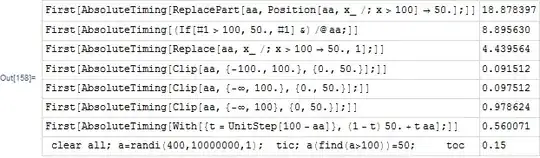
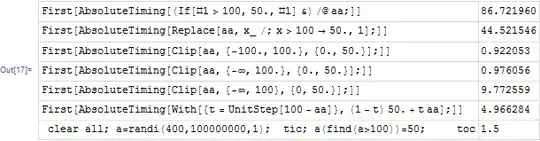
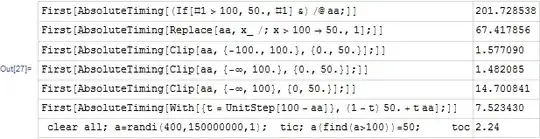
This is full results of all tests (thanks for input from others) for vector sizes of 1,000,000 and 10,000,000 and 100,000,000 (I have lots of RAM and lots of coffee so it is ok :)

This all were done on windows 7, using Mathematica 9.01 on 64 bit OS and PC. 16 GB RAM. Matlab is 2013a version. 32 bit.

Here is the code used to generate all these tables

ClearAll["Global`*"];
size = 1000000; (*change this to change the vector size *)
aa = RandomInteger[400, size];
examples = {HoldForm[
    ReplacePart[aa, Position[aa, x_ /; x > 100] -> 50.]; //AbsoluteTiming // First],
   HoldForm[If[# > 100, 50., #] & /@ aa; // AbsoluteTiming // First],
   HoldForm[Replace[aa, x_ /; x > 100 -> 50., 1]; // AbsoluteTiming // First],
   HoldForm[Clip[aa, {-100., 100.}, {0., 50.}]; // AbsoluteTiming // First],
   HoldForm[Clip[aa, {-\[Infinity], 100.}, {0., 50.}]; // AbsoluteTiming // First],
   HoldForm[Clip[aa, {-\[Infinity], 100}, {0, 50.}]; // AbsoluteTiming // First],
   HoldForm[With[{t = UnitStep[100 - aa]}, (1 - t) 50. + t aa];//AbsoluteTiming//First]
   };
res = {#, ReleaseHold[#]} & /@ examples;
Grid[AppendTo[
  res, {" clear all; a=randi(400,1000000,1);  tic; a(find(a>100))=50; \
toc", 0.0155}], Frame -> All, Alignment -> Left, 
 Spacings -> {0.5, 1}, FrameStyle -> LightGray]

1,000,000

Mathematica graphics

EDU>> clear all; a=randi(400,1000000,1);  tic; a(find(a>100))=50; toc
Elapsed time is 0.015441 seconds.
EDU>> clear all; a=randi(400,1000000,1);  tic; a(find(a>100))=50; toc
Elapsed time is 0.018643 seconds.
EDU>> clear all; a=randi(400,1000000,1);  tic; a(find(a>100))=50; toc
Elapsed time is 0.014538 seconds.

10,000,000
Mathematica graphics

EDU>> clear all; a=randi(400,10000000,1);  tic; a(find(a>100))=50; toc
Elapsed time is 0.149870 seconds.
EDU>> clear all; a=randi(400,10000000,1);  tic; a(find(a>100))=50; toc
Elapsed time is 0.150574 seconds.

100,000,000

After few hrs, the full table was still not completed and all memory was used and with no way to know how long it will take, had to stop the computation so that I can use the PC. Removed the first test, which turned out to be the case of the problem. Now the table builds fast. Here it is
Mathematica graphics

EDU>> clear all; a=randi(400,100000000,1);  tic; a(find(a>100))=50; toc
Elapsed time is 1.496174 seconds.
EDU>> clear all; a=randi(400,100000000,1);  tic; a(find(a>100))=50; toc
Elapsed time is 1.496570 seconds.
EDU>> clear all; a=randi(400,100000000,1);  tic; a(find(a>100))=50; toc
Elapsed time is 1.501019 seconds.

150,000,000
Mathematica graphics

EDU>> clear all; a=randi(400,150000000,1);  tic; a(find(a>100))=50; toc
Elapsed time is 2.240782 seconds.
EDU>> clear all; a=randi(400,150000000,1);  tic; a(find(a>100))=50; toc
Elapsed time is 2.241474 seconds.
EDU>> clear all; a=randi(400,150000000,1);  tic; a(find(a>100))=50; toc
Elapsed time is 2.244419 seconds.
Nasser
  • 143,286
  • 11
  • 154
  • 359
  • Note that some of the results look drastically different for real numbers (at least on my machine). Maybe you could incorporate that too... – sebhofer Aug 06 '13 at 13:40
  • I guess it depends what you call drastic. You have a difference of about a factor 10 for the 2nd version (If) and the 6th version (last Clip). For me the speedup for Clip is even a bit more than a factor 20. – sebhofer Aug 06 '13 at 13:57
  • I have to admit, I didn't take a closer look at the various Clip versions. Just figured out that the difference is just a conversion from integers to reals. That explains the difference of course :) So I guess you are right and it is not so notable after all. – sebhofer Aug 06 '13 at 14:09
  • I my god!. You do not know losing! :) – Murta Aug 06 '13 at 21:20
4

Here are some options:

aa = {300., 150., 100., 76.8421, 64.0909, 55.567, 49.1935, 44.2262, 
   40.2247, 36.9355, 34.1667, 31.8138, 29.7887, 28.0087, 26.4537, 
   25.0612, 23.8186, 22.7059, 21.6854, 20.7663, 19.9265, 19.1519, 
   18.4323, 17.7739, 17.1672, 16.6007, 16.0648, 15.5605, 15.098};

If[# > 100, 50, #] & /@ aa
Replace[aa, x_ /; x > 100 -> 50, {1}]

Some performance tests:

aa=RandomInteger[400,1000000];
nasser01 = ReplacePart[aa,Position[list,x_/;x>100]->50];//AbsoluteTiming//First
murta01  = If[#>100,50,#]&/@aa;//AbsoluteTiming//First
murta02  = Replace[aa,x_/;x>100->50,{1}];//AbsoluteTiming//First

nasser01 = 2.636266
murta01  = 0.052457
murta02  = 0.537735
Murta
  • 26,275
  • 6
  • 76
  • 166
4
With[{t = UnitStep[100 - aa]}, (1 - t) 50 + t aa]
Table[If[i > 100, 50, i], {i, aa}]
chyanog
  • 15,542
  • 3
  • 40
  • 78
3

In any case here is a Clip solution

Clip[aa, {-∞, 100}, {0, 50.}]

...which is not as fast as UnitStep on my machine ...unless you ensure you use all reals

Clip[aa, {-100., 100.}, {0., 50.}]

aa = RandomInteger[400, 100000];
tmp1 = ReplacePart[aa, Position[aa, x_ /; x > 100] -> 50.]; //AbsoluteTiming // First
tmp2 = If[# > 100, 50., #] & /@ aa; //AbsoluteTiming // First
tmp3 = Replace[aa, x_ /; x > 100 -> 50., 1]; //AbsoluteTiming // First
tmp4 = Clip[aa, {-100., 100.}, {0., 50.}]; //AbsoluteTiming // First
tmp5 = Clip[aa, {-∞, 100.}, {0., 50.}]; //AbsoluteTiming // First
tmp6 = Clip[aa, {-∞, 100}, {0, 50.}]; //AbsoluteTiming // First
tmp7 = With[{t = UnitStep[100 - aa]}, (1 - t) 50. + t aa]; //AbsoluteTiming // First

enter image description here

So on my machine this quite a bit faster than others

LCarvalho
  • 9,233
  • 4
  • 40
  • 96
Mike Honeychurch
  • 37,541
  • 3
  • 85
  • 158