4

How to obtain a fixed number of solutions to $x+y=1$?

For example, I want 4 solutions:

$(1,0),(2,-1),(3,-2),(-2,3)$

I want to do this also on bigger equations such as $x+y+...=1$ and then I want to plot these values on a graph. I need help only on obtaining these solutions, I've tried to do it with Solve but I've been unable to do so.

Notice that I can do it using Loops, I'm just checking if there's a viable way through the use of Solve or another built-in function.

Red Banana
  • 5,329
  • 2
  • 29
  • 47
  • 2
    You can find useful also a silghtly related though a bit more difficult problem, http://mathematica.stackexchange.com/questions/9035/how-can-i-use-solve-reduce-output/9041#9041 – Artes Aug 22 '12 at 23:02

3 Answers3

12
{x, y} /. FindInstance[x + y == 1, {x, y}, Integers, 4]

{{-168, 169}, {66, -65}, {134, -133}, {199, -198}}

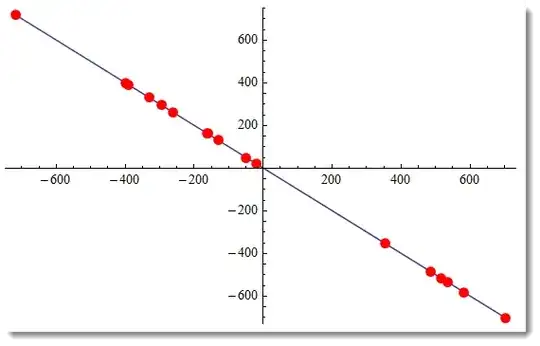
Generally define:

sol[n_] := {x, y} /. FindInstance[x + y == 1, {x, y}, Integers, n]

ListLinePlot[sol[17], Mesh -> All, MeshStyle -> Directive[Red, PointSize[.02]]]

enter image description here

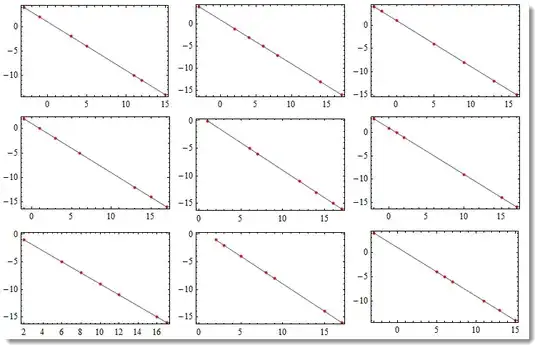
If you would like to control the range of your random solutions and get exact number of solutions you can define a function like:

solr[n_, a_, b_] := {#, First[x /. Solve[x + # == 1]]} & /@ RandomSample[Range[a, b], n]

or if your equation will be always that simple, then

solr[n_, a_, b_] := {#, 1 - #} & /@ RandomSample[Range[a, b], n]

where n < b - a so the usage gives

Partition[Table[

   ListLinePlot[solr[7, -3, 17], Mesh -> All, 
         MeshStyle -> Directive[Red, PointSize[.02]], Frame -> True, Axes -> False]

   , {9}], 3] // Grid

enter image description here

And the simplest case of 3D is

sol3D[n_] := {x, y, z} /. FindInstance[x + y + z == 1, {x, y, z}, Integers, n]

RR = 300; Show[ContourPlot3D[
  x + y + z == 1, {x, -RR, RR}, {y, -RR, RR}, {z, -RR, RR}, MeshStyle -> Opacity[.1], 
  ContourStyle -> Directive[Orange, Opacity[0.8], Specularity[White, 30]]],
 Graphics3D[{Red, PointSize[.02], Point[sol3D[5]]}, PlotRange -> All] ]

enter image description here

Vitaliy Kaurov
  • 73,078
  • 9
  • 204
  • 355
  • Out of curiosity, why does FindInstance return the solutions in the order it does? Why (-168, 169) as the first pair, instead of the more obvious (-1, 2)? – Guillochon Aug 22 '12 at 19:25
  • 1
    @Guillochon In what way is that "obvious"? Ordering coordinates is not the same as ordering numbers and you need some metric (such as distance from origin/angle subtended/ordinate/abscissa, etc.). It looks like it's sorting by the first element, which is also in line with the sorting order for complex numbers (by real part) – rm -rf Aug 22 '12 at 19:57
  • @Guillochon I updated the answer – Vitaliy Kaurov Aug 22 '12 at 20:10
  • 2
    @Guillochon If you want to get different results from the default, you can always change the RandomSeed option of FindInstance[] to a different integer. Compare FindInstance[x + y == 1, {x, y}, Integers, 4, RandomSeed -> 0] with FindInstance[x + y == 1, {x, y}, Integers, 4, RandomSeed -> 5]... – J. M.'s missing motivation Aug 22 '12 at 23:04
  • 1
    @Guillochon Using Solve we can find all solutions and order them as we'd like. See my answer http://mathematica.stackexchange.com/questions/9734/how-to-obtain-a-fixed-number-of-solutions-to-xy-1/9736#9736. – Artes Aug 22 '12 at 23:04
10
FindInstance[x + y == 1, {x, y}, Integers, 4]
{{x -> -168, y -> 169}, {x -> 66, y -> -65}, {x -> 134, y -> -133}, {x -> 199, y -> -198}}

or

Table[ Reduce[x + y == 1, {x, y}, Integers] /. {C[1] -> n}, {n, 4}]
{x == 1 && y == 0, x == 2 && y == -1, x == 3 && y == -2, x == 4 && y == -3}

or

Table[ Solve[x + y == 1, {x, y}, Integers] /. C[1] -> n, {n, 4}]
 {{{x -> 1, y -> 0}}, {{x -> 2, y -> -1}}, {{x -> 3, y -> -2}}, {{x -> 4, y -> -3}}}

We choose Solve to find all solutions in appropriate ranges : in 2D-case we find all integer solutions in the range {-5, 5} :

pt = Flatten[ Table[ Solve[ x + y == 1, {x, y}, Integers] /. C[1] -> n, {n, -5, 5}], 1];

and in 3D-case all solutions in the range {{-4, 4}, {-4, 4}}:

points = Flatten[ Table[ Solve[ x + y + z == 1, {x, y, z}, Integers] /. { C[1]->m, C[2]->k},
                         {m, -4, 4}, {k, -4, 4}], 2]

and a part of the results :

 {{x -> -4, y -> -4, z -> 9}, {x -> -4, y -> -3, z -> 8}, {x -> -4, y -> -2, z -> 7},
  {x -> -4, y -> -1, z -> 6}, {x -> -4, y -> 0, z -> 5}, {x -> -4, y -> 1, z -> 4},...,
  {x -> 4, y -> 2, z -> -5}, {x -> 4, y -> 3, z -> -6}, {x -> 4, y -> 4,   z -> -7}}

Edit

First we consider 2D-case :

Plot[ 1 - x, {x, -6, 6}, PlotStyle -> Thick, AspectRatio -> Automatic, 
                         Epilog -> {Red, PointSize[0.02], Point[pt[[All, All, 2]]]}]

enter image description here

And now the 3D case. We can use Show, Plot3D etc. with appropriate options, e.g. :

Show[
      Plot3D[ 1 - x - y, {x, -5, 5}, {y, -5, 5}, PlotStyle -> Opacity[0.55],
              RegionFunction -> Function[{x, y, z}, -5 < 1 - x - y < 5],
              ColorFunction -> ColorData["SunsetColors"]], 
      Graphics3D[{ Red, PointSize[0.015], Point[points[[All, All, 2]]]}], 
      BoxRatios -> Automatic ]

enter image description here

Artes
  • 57,212
  • 12
  • 157
  • 245
8

For $\sum _{k=1}^M x_k=1$, notice that:

$$\sum _{i=1}^n i-\sum _{j=1}^{M-n} j=1 \Leftrightarrow \sum _{i=1}^n i=1+\sum _{j=1}^{M-n} j=A\text{, (}1\leq n < M\text{)}$$

so IntegerPartitions on A and A-1 can be used to generate the solution set. For large $M$ it should be well efficient.

Take $M=10$ for example:

Module[{M = 10},
 Module[{A = 10, n = #, m = M - #},
     Outer[Join,
      IntegerPartitions[A, {n}],
      -IntegerPartitions[A - 1, {m}],
      1]
     ] & /@ Range[M - 1] //
  Flatten[#, 2] &
 ]

{{10, -1, -1, -1, -1, -1, -1, -1, -1, -1}, {9, 1, -2, -1, -1, -1, -1, -1, -1, -1}, {8, 2, -2, -1, -1, -1, -1, -1, -1, -1}, {7, 3, -2, -1, -1, -1, -1, -1, -1, -1}, {6, 4, -2, -1, -1, -1, -1, -1, -1, -1}, {5, 5, -2, -1, -1, -1, -1, -1, -1, -1}, {8, 1, 1, -3, -1, -1, -1, -1, -1, -1}, {8, 1, 1, -2, -2, -1, -1, -1, -1, -1}, {7, 2, 1, -3, -1, -1, -1, -1, -1, -1}, {7, 2, 1, -2, -2, -1, -1, -1, -1, -1}, <<134>>}

With an arbitrary A large enough, any size of solution set can be obtained.

Edit:

As the previous answers showed, for $M=3$ the solution set can be visualized as points on plane $x+y+z=1$. The following is the correspond graphics for different $A$:

solSet = Table[Module[{M = 3},
    Module[{n = #, m = M - #},
        Outer[Join,
         IntegerPartitions[A, {n}],
         -IntegerPartitions[A - 1, {m}],
         1]
        ] & /@ Range[M - 1] //
     Flatten[#, 2] &
    ], {A, 2, 20}];
Shallow[solSet, {5, 3}]

{{{1, 1, -1}}, {{3, -1, -1}, {2, 1, -2}}, {{4, -2, -1}, {3, 1, -3}, {2, 2, -3}}, <<16>>}

Module[{solSet = solSet, min, max},
 {min, max} = Through[{Min, Max}[Flatten@solSet]];
 Show[
  ContourPlot3D[x + y + z == 1,
   {x, min, max}, {y, min, max}, {z, min, max},
   MeshStyle -> GrayLevel[.9], BoundaryStyle -> GrayLevel[.6],
   ContourStyle -> None, PlotRange -> All, 
   AxesLabel -> (Style[#, 20, Red, Bold] & /@ {x, y, z})],
  Graphics3D[{PointSize[.015],
    MapIndexed[{
       ColorData["Rainbow"][(#2[[1]] - 1)/(Length[solSet] - 1)],
       Point[#1]} &, solSet]
    }, PlotRange -> All] ]
 ]

Mathematica graphics

Same color corresponds to same $A$.

By taking permutations, more solution can be obtained:

Module[{solSet = solSet, min, max},
 {min, max} = Through[{Min, Max}[Flatten@solSet]];
 Show[
  ContourPlot3D[x + y + z == 1,
   {x, min, max}, {y, min, max}, {z, min, max},
   Mesh -> None, BoundaryStyle -> GrayLevel[.6],
   ContourStyle -> None, PlotRange -> All, 
   AxesLabel -> (Style[#, 20, Red, Bold] & /@ {x, y, z})],
  Graphics3D[{PointSize[.011],
    MapIndexed[{
       ColorData["Rainbow"][(#2[[1]] - 1)/(Length[solSet] - 1)],
       Point[Flatten[Permutations /@ #1, 1]]} &, solSet]
    }, PlotRange -> All]
  ]
 ]

Mathematica graphics

Note the blank bands correspond to solutions containing $0$, which won't be considered by IntegerPartitions. (But it should be easy to construct them from solution set for $M=2$.)

Silvia
  • 27,556
  • 3
  • 84
  • 164