6

I have a few KML files that I would like to share with the public.

Google suggests hosting them on Google Drive, but I would prefer a platform that offers more map-oriented features. Datahub does not offer any map-oriented features either.

Accessed via an easily sharable URL, the page must show to the visitor:

  • A preview of the KML file, for instance a dynamic map if there is not too much data, or a static map if there is to much data to show dynamically.
  • Links to map services integrating the data, for instance http://maps.google.com/maps?q=http://example.com/thedata.kml and equivalents with OpenStreetMap, Bing, Wikimapia, etc. See here for more link examples.
  • Statistics: number of points, etc.
  • Buttons to download the files as KML/GPX/OSM formats, whatever the format they have been uploaded with (the platform performs the conversion, server-side)
  • Show license of the file, title, description. Bonus for allowing the public to leave comments about the file. The uploader should be able to choose the license, at least public domain and CC-BY-SA should be available choices.

Must work with 100k+ locations files.
Ideally, The uploader should be able to upload in similar formats like GPX/OSM. Bonus if the platform allows visitors to download a part of the data, for instance only locations in Indonesia.


How it could look like:
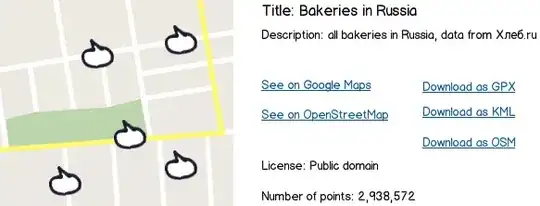
mock up

Nicolas Raoul
  • 8,426
  • 5
  • 28
  • 61
  • What, if any, are your licensing requirements for the data? What area or themes does the data cover? Can you consider contributing the data to platforms that are built to support a particular geographic extent or data theme or do you want to use a general purpose free service? – KPayne Mar 16 '15 at 17:49
  • You may want to look at http://opendata.stackexchange.com/questions/266/a-database-of-open-databases for lists of repos - you can check their functionality against your needs – KPayne Mar 17 '15 at 14:13
  • @user2542: I added details about license in the last bullet. I don't want a tool that restricts users to a particular area or field. All KML files should be considered acceptable. Thanks for the tip! I opened all the search engines at that QA, but unfortunately none knows about a KML hosting platform with preview. – Nicolas Raoul Mar 17 '15 at 15:07

1 Answers1

2

geojson.io supports kml. it also allows you to import to github or gist.github
edit: it doesn't have all of your requirements but the integration into github should allow you to do most except for the gpx
edit:
end results in gists: all of these .geojson maps were rendered via kml files from geojson.io
https://gist.github.com/jalbertbowden

step by step:
download this .zip file containing points for a history map of Hampton, VA:
https://ckannet-storage.commondatastorage.googleapis.com/2015-03-05T21:52:24.450Z/locations-kmz.zip
extract Locations.kml out of the .zip.
go to geojsion.io:
http://geojson.io/
go to open, file, and upload the kml file, which gives us:
http://geojson.io/#map=12/37.0532/-76.3602
you are previewing the data. you can edit it. you can redownload the kml. you can download geojson/topojson/csv/shp as well.
this also provides you with a bloc.ks url for sharing.
click on sharing:
http://bl.ocks.org/d/6dd95a7f0d7d39b1e41a
more preview version but for an audience.
click on save. you have all the format options i've already listed, as well as github/gist. clicking on gist gives you:
https://gist.github.com/jalbertbowden/006bf26bf7e5da3200fd
optionally you can include it in a github repo as well. clicking on github will pull up your github repos and give you a menu from where to save.

albert
  • 11,885
  • 4
  • 30
  • 57
  • I am told by geojson.io: "only GeoJSON files are supported from GitHub" – Nicolas Raoul Mar 17 '15 at 06:42
  • i've never had a problem with it. only thing i've had happen is they're too big to render or too big to edit in gist. just convert it to geojson and save it. thats way better anyways. another plus about geojson.io -> the conversions – albert Mar 17 '15 at 06:44
  • actually i reckon gist is saving geojson too...you can always submit an issue or fork it and change it to save kml – albert Mar 17 '15 at 06:52
  • Your answer says "geojson.io supports kml". Could you please describe in details how you managed to make that website accept a hosted KML file? – Nicolas Raoul Mar 17 '15 at 06:54
  • from the menu click open -> file -> upload the file from your hardrive – albert Mar 17 '15 at 06:55
  • My question is about a KML hosting platform, so having to upload files each time your want to preview them is too big of a stretch. By the way, even that does not work: https://github.com/mapbox/geojson.io/issues/432 – Nicolas Raoul Mar 17 '15 at 07:07
  • geojson.io is a kml hosting platform. i've used it a million times with a million different kml files. also, again, you can fork it to tweak it if you like. your question is incredibly niche and i'm not aware of anything that fulfills it. so again, you can fork it and voila, you have it. – albert Mar 17 '15 at 07:08
  • you also said that you had a few files, so uploading a few files doesn't seem that hard, but that's a personal reflection. i guess uploading a few things is tiresome for you. – albert Mar 17 '15 at 07:09
  • also have you validated that kml? – albert Mar 17 '15 at 07:13
  • that kml file shows two separate errors, one with url and one from direct upload, via kml validator service: http://www.kmlvalidator.com/home.htm i suggest validating it first before you try it – albert Mar 17 '15 at 13:00
  • Note: The KML validator service you link to is broken, it displays java.net.UnknownHostException: dmz-demo-1 – Nicolas Raoul Mar 17 '15 at 14:58
  • yeah i pointed that one out and tried to validate it using the upload, got a different error. idk much about kml, but i know when geojson.io chokes, and it chokes on yours. check out the edit to the answer. those steps totally work – albert Mar 17 '15 at 19:20
  • lastly, i ran Locations.kml through the validator and it completed its report. it threw errors, but it completed. its your file. – albert Mar 17 '15 at 19:59
  • 1
    Thanks for the step-by-step paragraph! The most important question: what is the URL to share? Visitors must be able to both preview and download the file at that URL. – Nicolas Raoul Mar 18 '15 at 04:10
  • its in the nav at the top, more to the right....although its not loading for me at the moment; or rather, i can't login. hope you get use out of it. sorry for getting fussy...i have problems explaining myself. but geojson.io is a great tool – albert Mar 18 '15 at 04:13