93

What's the best way to access a 4GB csv file?

I would like get a 'cut' of this open data set: Full Replacement Monthly NPI File, available here.

Specifically, I want only the rows for hospitals; though, one might want the rows for healthcare clearing houses, or home health agencies, etc.

The unzipped NPI file is 4.8GB, which is too large for my desktop applications. It is an interesting barrier to open data.

Any suggestions?

James Risner
  • 278
  • 1
  • 3
  • 9
user1453
  • 949
  • 1
  • 7
  • 3
  • Have you tried to open the file with the suggested programms from the link (TextPad and UltraEdit). Few weeks before, I open a csv file of 3.5GB with excel. – Tasos Nov 07 '13 at 10:25
  • 11
    Data like this shouts 'database'. Pull it into any RDBMS you have available (they all have tools), 4GB is no issue for them. Drop the columns you don't need or make views to only the required columns. –  Dec 29 '14 at 12:35
  • 1
    There are some good answers regarding python - if you only read one line at a time, you can load any size file. http://stackoverflow.com/a/17444799/2327328 – philshem Dec 31 '14 at 12:11
  • 1
    We frequently use bash or other shells in unix/os x for basic file manipulation. If you only need to subset it, commands like "grep", "cut" and "sed" can get you a long way. If you want to work with it extensively and frequently, a SQL database might be a better shot. I don't know if SQLite would satisfy your requirements, but there are also heavy duty tools like mysql and postgresql that are open source. – respectPotentialEnergy Jan 02 '15 at 13:44
  • This is a perfect use case for Pandas in Python. Check it out! – Blairg23 Jun 09 '16 at 19:40
  • Depending on how often you are doing it, maybe look at a provider for NPPES data like NPIViewer.com. I have seen a lot of organization try to handle it in-house and if you are doing it often it can be much cheaper and easier to subscribe to a place that already has it handled. – Rob Carlon Oct 13 '16 at 17:39
  • hi rob, thanks for the input, but your solution is not an open data solution as it costs money. don't want to discourage you from participating here, your comment is valuable and helpful, it just serves the community better if it were posted as a comment and not an answer. – albert Oct 13 '16 at 18:02
  • I have started working on a desktop app todo just this - handle big CSV files, automatically reload from disk and NOT scroll to the top, basic editing and row based cut and paste....Given that this is 2017 and everything is online, would anyone find this of use? I have tried other tools and they don't this as well, or are difficult to use for data analysts... – DataMania Mar 14 '17 at 22:00
  • the source file URL does not work – aborruso Jan 18 '20 at 07:53
  • Try xsv. A command like xsv select "Healthcare Provider Taxonomy Code_1" inputfile.csv will extract a column of data, much faster than the excellent csvkit. (I don't have enough reputation yet to answer below) – Liam Sep 10 '21 at 15:49

21 Answers21

65

This is the kind of thing that the csvkit was built for:

csvgrep -c "Healthcare Provider Taxonomy Code_1" -r '^282N' npidata_20050523-20131110.csv > hospitals.csv

csvkit is a suite of utilities for converting to and working with CSV, the king of tabular file formats.

A little more efficiently, you could do:

zcat NPPES_Data_Dissemination_Nov_2013.zip | grep 282N | csvgrep -c 48 -r '^282N' > hospitals.csv
fgregg
  • 5,108
  • 16
  • 37
26

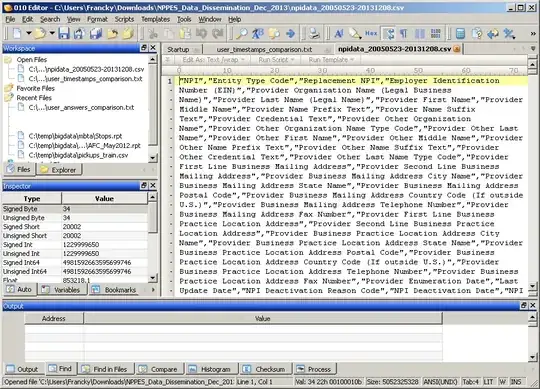
On Windows, SweetScape 010 Editor is the best application I am aware of to open/edit large files (easily up to 25 GB). It took around 10 seconds on my computer to open your 4 GB file (SSD):

enter image description here

More such tools: Text editor to open big (giant, huge, large) text files

Franck Dernoncourt
  • 7,780
  • 9
  • 39
  • 86
  • Can this query rows using criteria? – tbone May 25 '18 at 14:57
  • PSPad is totally free, not crippleware, and supports regex search and replace, shows hidden characters (cuz I get some bad data from customers), opens large files, and much more. I think it can also run Javascript on the current open tab but that requires programming. – Bulrush Sep 06 '18 at 11:28
17

As you're only taking a portion of the file, you may be able to use simple tools to subset it before processing. That may get it down to a reasonable size to work with.

If you're working on a posix (ie, unix-like) system, you can use shell commands to reduce the file:

zcat -cfilename| grep(pattern to match hospitals only)>outputFile

This lets you extract the lines without uncompressing the larger file on disk. (with today's systems, drive speeds are often a limiting factor, so working with the data compressed can be more efficient if you have sufficient CPU).

If it were tab-deliminated, pipe-delimited, or fixed-width, you can also reduce the columns with the unix cut command ... but it's hit-or-miss with CSV, as it'll break horribly if there are commas in strings:

zcat -c(filename)| grep(pattern to match hospitals only) | cut -d, -f(list of fields) >outputFile

Joe
  • 4,445
  • 1
  • 18
  • 40
  • 5
    If you are using Windows, you can install something like http://www.cygwin.com/ and you'll be able to use the commands above (cat, grep, etc) – Jeremiah Orr Nov 13 '13 at 18:58
  • 3
    This is no good when there are new-lines inside cells. Use tools design for CSV. – D Read Nov 27 '13 at 12:47
  • @DRead : quite true. I'd personally argue that if you've got newlines in your cells, CSV might not be the best format to store your data. Unfortunately, we're a bit at the mercy of what other formats people publish their data in. – Joe Nov 27 '13 at 14:06
  • 1
    I think this is a bit of a downside of CSV. However I don't think the existence of new-lines should deter you from CSV as there are usually more important reasons to using it. Would you say the same for data with commas quoted in cells? That makes it a pain for tools like sed and awk doing work on cells, in a similar way. I think we just need to accept that although CSV has many advantages because of its simplicity, its not as simple to parse as many would believe and you need to use tools and libraries. – D Read Nov 28 '13 at 10:38
  • 2
    In addition to your answer, I found this related tutorial http://schoolofdata.org/2013/12/05/working-with-large-text-files-finding-uk-companies-by-postcode-or-business-area/ – Tasos Dec 05 '13 at 11:40
  • See also: Playing With Large (ish) CSV Files, and Using Them as a Database from the Command Line: EDINA OpenURL Logs http://blog.ouseful.info/2011/06/04/playing-with-large-ish-csv-files-and-using-them-as-a-database-edina-openurl-logs/ – psychemedia Jul 29 '14 at 01:10
15

you can connect to the file with sql and run your analysis from there.

i have written extremely detailed r code (r is free and open source) about how to work with the nppes from your laptop here:

http://asdfree.com/national-plan-and-provider-enumeration-system-nppes.html

if you have never used r before, check out http://twotorials.com for a crash course

hope this helps :)

philshem
  • 17,647
  • 7
  • 68
  • 170
Anthony Damico
  • 1,480
  • 10
  • 16
11

Others have mentioned way to pull apart this file incrementally. It seems to me like you are also commenting on use of resources for a large file. For some solutions you can incrementally read the compressed file uncompressing as you go and feed it through the csv module. For example in python with gzip'd input you would do this by:

import csv
import gzip

with gzip.open("test.csv.gz", "r") as f:
     reader = csv.reader(f)
     for row in reader:
        pass  # do something with the row

You could do the same thing for zip archives with zipfile.

If this data is coming from across a network you can pay very little or sometimes get performance improvements by not copying and then uncompressing it. It can cost you less to pull it across the network compressed (smaller) in pieces and operate on it then it does to pull it across in bulk, uncompress it, and then read it. It also doesn't use up local storage resources.

Hornbydd
  • 409
  • 2
  • 10
Michael Hunter
  • 211
  • 1
  • 2
10

There are streaming CSV parsers, that only look at a small window of the file at a time.

Node is a particularly stream-friendly language and ecology, so here a few Node streaming CSV parsers:

https://github.com/voodootikigod/node-csv
https://github.com/koles/ya-csv
https://github.com/lbdremy/node-csv-stream

albert
  • 11,885
  • 4
  • 30
  • 57
Eric Mill
  • 776
  • 4
  • 9
  • 1
    With Node.JS streams it doesn't really matter how big the file is! The streams keep reading and writing from / into buffers. Its like buffering a video on YouTube. – Gaurav Ramanan Dec 23 '14 at 20:42
8

On Windows, there is also a software called Delimit ("Open data files up to 2 billion rows and 2 million columns large!") http://delimitware.com For instance it can split, sort and extract only some rows or columns.

ndujj
  • 181
  • 1
  • 2
7

Load the file into PostgreSQL database table with a Copy statement. This will give you the full capabilities of SQL syntax, plus the ability to index columns for faster access.

For complex queries you have a optimizer that a can figure out the fastest way to access the data. PostgreSQL has smarter I/O than most applications it will detect sequential read access and read-ahead to pre-load data into memory.

Results can be viewed in Excel or other spreadsheets by accessing the data via an ODBC driver.

You can access to PostgreSQL via several Cloud Services like Heroku or AWS. It would be good cloud project to create a new machine instance, install PostgreSQL and copy the data to the instance. Then use the Postgres COPY command to load the data and then access the data with a PostgreSQL client application from your desktop.

Tim Child
  • 501
  • 1
  • 3
  • 5
6

This answer is not really useful for non-programmers, but if could manage some programming in perl, the Parse::CSV module is especially designed for this task.

From the doc:

It provides a flexible and light-weight streaming parser for large, extremely large, or arbitrarily large CSV files.

Perl is usually very good for data mining tasks.

clt60
  • 235
  • 2
  • 9
  • I have used Perl to read 2GB text files before. Usually I use tab-delimited data as I don't need a module to process it. In fact, Perl is so fast reading text files that I convert large XLS files to tab-delimited text files before reading them. Perl can also read line-by-line for ginormous files. But I just read the whole 2GB file into an array at once. – Bulrush Dec 31 '15 at 13:08
5

I have used utilities such as (g)awk to readlarge file such as this record by record. I the extract the required information from each line and write it to an output file. For windows users (g)awk is available in cygwin. I have also used python to achieve the same result. You could implement this process in most programming languages.

user1483
  • 89
  • 1
  • 1
    It's somewhat AWKward when there is a weird character encoding or quoted commas or new-lines in the CSV. Best stick with a CSV-oriented tool. – D Read Nov 27 '13 at 12:44
5

Well, in short, Talend Open Studio for Data Integration is an ETL.

It can be used for many use cases, including data migration, files processing, etc. You can easily build jobs using a visual editor to combine specialized connectors (read CSV files, select rows corresponding to your criteria, write result to one or more files or directly to a database, and more). The possibilities are endless because there are more than 800 connectors.

At the end, TOS generates a java application which can be launched from the designer or for the command line (Windows or Unix).

Hope this helps.

TRF
  • 171
  • 1
  • 1
5

If you're on Windows, I can't sing the praises of LogParser high enough. It allows you to query files in a wide variety of formats (mostly log formats as that's what it was meant for, but XML and CSV are valid). You query the file with a surprisingly complete SQL syntax, and you can even use it to import an entire file directly into an SQL database very easily.

It's extremely fast, too. I've used it to process 5 GB of IIS log files and a query as complex as SELECT DISTINCT cs-username, cs(User-Agent) FROM .\*.log where cs-username is not null took about 2 minutes to complete running on my laptop.

Bacon Bits
  • 151
  • 1
  • 1
4

I recently had to parse the 6GB NPPES file and here is how I did it:

$ wget http://download.cms.gov/nppes/NPPES_Data_Dissemination_July_2017.zip
$ unzip NPPES_Data_Dissemination_July_2017.zip
$ split -l 1000000 npidata_20050523-20170709.csv
$ add headers...
$ python parse.py
$ load *.tab files to the database

The code for the parse.py script used to extract some columns:

import os
import pandas as pd
import csv

files = [
    'xaa.csv',
    'xab.csv',
    'xac.csv',
    'xad.csv',
    'xae.csv',
    'xaf.csv']

usecols = [
    "NPI",
    "Provider Organization Name (Legal Business Name)",
    "Provider Business Mailing Address City Name",
    "Provider Business Mailing Address State Name",
    "Provider Business Mailing Address Postal Code",
    "Provider Business Mailing Address Country Code (If outside U.S.)"]

for f in files:
    print("Parsing file: {}".format(f))
    df = pd.read_csv(f,
                     engine='c',
                     dtype='object',
                     skipinitialspace=True,
                     quoting=csv.QUOTE_ALL,
                     usecols=usecols,
                     nrows=None)
    df.rename(columns={
        'NPI': 'npi',
        'Provider Organization Name (Legal Business Name)': 'business',
        'Provider Business Mailing Address City Name': 'adr_city',
        'Provider Business Mailing Address State Name': 'adr_state',
        'Provider Business Mailing Address Postal Code': 'adr_zip',
        'Provider Business Mailing Address Country Code (If outside U.S.)': 'adr_country',  # noqa
    }, inplace=True)
    out = os.path.join('out', "{}.tab".format(f))
    df.to_csv(out, sep='\t', index=False)
Andrei Sura
  • 141
  • 2
4

I am a big fan of tad which crunches these kind of files easily.

Steven
  • 141
  • 1
  • 1
4

If you are working with Python, there are a couple of options:

Something simple like

with open('in_filepath', 'r') as inf, open('out_filepath', 'w') as outf:
    for line in inf:
        # do some processing, e.g, .split(',')
        if criterion: # check if you want this row
            outf.write(line)

would work, since it reads the file iteratively, not all at once.

Alternatively, there is a csv module in the standard library of Python that works quite similarly:

import csv
with open('my.csv', 'r') as inf, , open('out_filepath', 'w') as outf:
    csvreader = csv.reader(inf, delimiter=',')
    for row in csvreader:
    ...

There is also a new nice Python library called blaze, which is has been designed to work with a large number of large CSV files. Here is a nice tutorial about how to use it for this purpose: http://nbviewer.ipython.org/url/blaze.pydata.org/notebooks/timings-csv.ipynb

  • I also like the python solution, but for working with CSV files, it may be safer to use the 'csv' module - https://docs.python.org/2/library/csv.html. One reason is that without 'csv', splitting on the delimiter doesn't work if the field contains the delimiter. – philshem Dec 31 '14 at 08:49
  • Yes, you are right, in certain cases it might be the better choice! –  Dec 31 '14 at 16:21
3

Assuming that you can uncompress the online archive, your best approach might be to:

  1. split the uncompressed 4GB csv into smaller files and then
  2. extract the information interested,
  3. spool these rows into output-csv files and finally
  4. join those output-csv files back into one csv file for further processing. You can then use this file e.g. with SQL databases, Open-/Libre-/MS-Office, Statistical tools etc.

Depending on the OS you are using, there are a series of open source tools available to split / join large files or tools already installed.

MS Windows: you will have to install a tool or use a script (e.g python) to do the splitting. If you search Google for "splitting csv files" you will find quite a selection.

Alternatively you could also use a live CD/USB stick with e.g. Ubuntu on it (see the Ubuntu web site for how to create one) and then use the approach below.

Linux / Unix: Use the split command: e.g. split -d -l 10000 source.csv tempfile.part.

this will split source.csv into files containing 10'000 lines each and named tempfile.part.00, tempfile.part.01 ...

You can use the join command to join the multiple output files from your selections together into one csv file (either by naming the files and piping them into one file or by joining all files within a folder into one output file - please check the join manual pages or online how to do this in detail).

fpp
  • 321
  • 1
  • 4
  • I haven't used this way before, but I have a question for you. If I use split in Windows or Linux, the split doesn't need to load the whole csv file in RAM? If my file is really big, can split handle it? Thank you in advance. – Tasos Nov 12 '13 at 22:14
  • 'split' is no good if there are carriage returns inside cells. Stick to tools designed for CSV. – D Read Nov 27 '13 at 12:45
2

You can try nitroproc. It's currently a beta version I think, but allows to sort/summarize/filter/etc. It's free.

albert
  • 11,885
  • 4
  • 30
  • 57
bob
  • 21
  • 1
1

I've had good luck in R (without resorting to fancy packages) of reading CSVs up to and beyond that size. The nice thing about getting it in RAM, if you can swing it, is very fast manipulation.

0

If you want to do some processing on a large csv file, the best option is to read the file as chunks, process them one by one, and save the output to disk (using pandas for example).

If you want to explore the file and you are looking for free tools, you can use Power Query add-in for Excel or glogg log explorer.

0

If you only want to be able to read / query the data, you could use:

  • csvs-to-sqlite to convert import the CSV file into a SQLite database. You can do this as a mapping into a single database table (for example: csvs-to-sqlite myfile.csv mydatabase.db), or you can use the csvs-to-sqlite tool to split the data into separate tables automatically linked by foreign key relationships;
  • query the SQLite database directly, or publish a simple HTML form that supports faceted and/or form driven searching / filtering as well as a form that lets you enter and run arbitrary read-only SQL queries, usingdatasette. For example, datasette serve -p 8899 mydatabase.db to serve the datasette browser on localhost port 8899.

As an added benefit, the datasette service also provides an API that allows you to run arbitrary SQL queries on the data via a simple URL and retrieve the data as JSON.

A query can also be used to export just the data you want as a smaller CSV file (datasette - CSV export).

psychemedia
  • 266
  • 1
  • 2
0

Gigasheet, which is relatively new, now allows you to upload and work with a 1 billion row CSV file in a browser-based, excel-like interface. The full details are here: https://www.gigasheet.co/post/open-large-csv-file, and nice video showing the interaction is here: https://www.youtube.com/watch?v=g0ZC73oi-WM.

It's pretty straight-forward. You'll need to create a (free) account at gigasheet.co, after which you can upload your file and interact with it immediately.

Disclosure: Since posting this answer, I joined the Gigasheet team