1

I just wanted to ask some advices. I have tried everything I could find, including :

  • /boot/config.txt add Line dtoverlay=w1-gpio,gpiopin=4
  • Update and Upgrade
  • Updating firmware
  • Buying new Sensors.
  • Tried Testing GPIO4 (Pin 7)
  • sudo modprobe w1-gpio && sudo modprobe w1_therm (always present)

I just cannot seem to get these sensors to pic up at all

I have rechecked my wiring and all seems Fine. was following this (Guide)

I tried testing GPIO4 with an LED and Python.. but I cannot seem to get it to switch state to .HIGH (Possibly Faulty GPIO pin?)/(Locked by Kernel?)

Any Assistance would be appreciated.

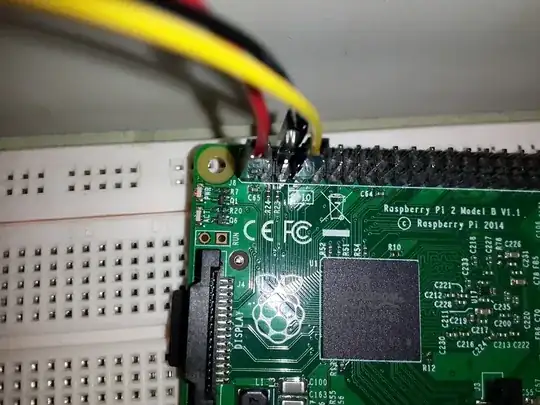
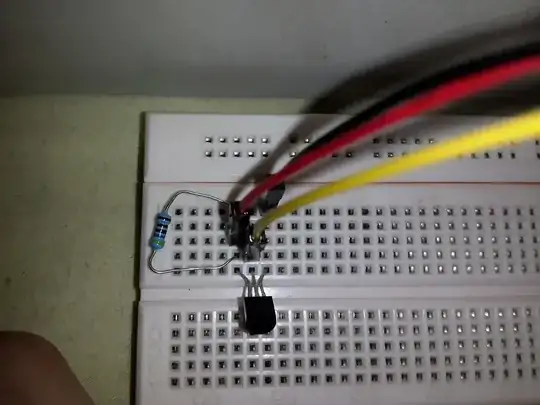
Images of Connections

  1. Connection to Raspberry Pi GPIOs

    Pin Connections on Raspberry Pi

  2. Breadboard Connections and layout

Bread board layout

  1. Different Angle as to see the Resistors Placement
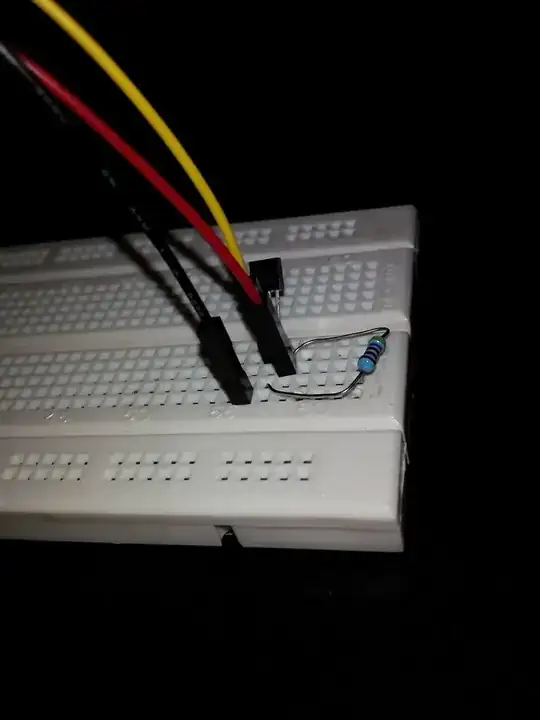
Different Angle on breadboard

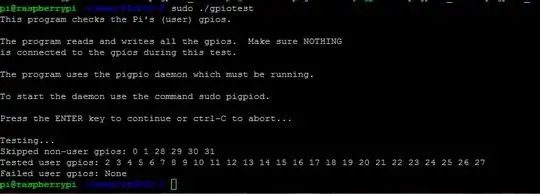
  1. gpiotest Results enter image description here
  • Could you post a photo of your set-up and could you detail the connections you have made between the Pi and the sensor(s). – joan Apr 28 '15 at 15:24
  • I will post Pictures now – Dean Retic Esterhuizen Apr 28 '15 at 15:55
  • Image of Breadboard Connections link
    Image of GPIO pins link Image of Breadboard from the back Link
    – Dean Retic Esterhuizen Apr 28 '15 at 16:02
  • Could you edit your post and add those photos? It's more useful for subsequent readers. Also could you describe the connections you have made? It is easier to check a written description against the photos. – joan Apr 28 '15 at 16:09
  • As far as I can tell from the photos the connections look okay. One end of the resistor is connected to 3V3. Is the other connected to the data output pin? – joan Apr 28 '15 at 16:49
  • correct. the other end is connected to the data(yellow) – Dean Retic Esterhuizen Apr 28 '15 at 16:50
  • Okay, try to check the gpio4. It should normally read high because of the data line pull-up. Try my test at http://elinux.org/R-Pi_Troubleshooting#Testing with the wire removed from gpio4 and preferably with w1-therm and w1-gpio disabled with sudo rmmod. – joan Apr 28 '15 at 17:00
  • Im trying to test the GPIOs with your Program... Sorry Im still quite new to linux.. its giving an Error on Line 2

    gpiotest.sh: line 2: syntax error near unexpected token (' gpiotest.sh: line 2:skipped="" tested="" failed="" usage() {'

    – Dean Retic Esterhuizen Apr 28 '15 at 17:38
  • How are you starting the script? If it's called gpiotest and made executable with chmod +x gpiotest then ./gpiotest should run the script in a terminal window. Alternatively typing source gpiotest should also work. – joan Apr 28 '15 at 17:52
  • I am running it with sudo ./gpiotest. – Dean Retic Esterhuizen Apr 28 '15 at 17:59
  • You don't need the sudo but it shouldn't do any harm. The first five lines should be #!/bin/bash | | skipped="" | tested="" | failed="" where I have used | to indicate new line. – joan Apr 28 '15 at 18:05
  • working.. I installed it incorrectly.. (My own fault) it returned with: Failed user gpios: None. I have Added a Picture of the Output – Dean Retic Esterhuizen Apr 28 '15 at 18:16
  • by Working i mean the gpiotest bash ran successfully. Still No Luck with the Sensors – Dean Retic Esterhuizen Apr 28 '15 at 18:56
  • So the gpio(s) are ok. Rewire and reboot to get a clean state. lsmod should show w1-therm and w1-gpio loaded. Check for entries in /sys/bus/w1/devices. The sensor should have an entry starting 28. Could you confirm the value of the resistor? It should be around 5000 ohms. – joan Apr 28 '15 at 18:58
  • its a 4k7 Resistor.. Just tested with Multiplier and I am Definitely getting 4700. Unfortunately no Sensor picking up yet lsmods does list w1-therm and w1-gpio – Dean Retic Esterhuizen Apr 28 '15 at 19:05
  • You appear to have done everything correctly. There should be activity from w1-therm on the gpio. Another of my tools is piscope. It needs to run under the graphical environment on the Pi. But it should show activity on gpio4 every minute or so. The screen stays blank until a gpio changes state. You can confirm piscope is working by entering the following command from the command line: pigs w 5 0 mils 500 w 5 1 (write 0 to gpio 5, delay 500ms, write 1 to gpio5). – joan Apr 28 '15 at 19:24
  • thank joan.. I will quickly test that out. this is very frustrating.. – Dean Retic Esterhuizen Apr 28 '15 at 19:34
  • the piscope is running.. there a single line on almost all the gpios... most of them are green.. including the gpio4.. I will look at it for a bit.. should the graph grow – Dean Retic Esterhuizen Apr 28 '15 at 19:53
  • The screen only updates when there is activity. You can use the up and down arrow keys to zoom the time-scale in and out. There should be activity on gpio 4 at least once a minute. I'd buzz through your wires with your meter. Perhaps one has a break. It must be a bad connection (unless your sensor is hot to the touch in which case it is back to front). – joan Apr 28 '15 at 19:57
  • ok so when my circuit is on the gpio4 is grey.. when nothing is connected the gpio4 pin line is green. – Dean Retic Esterhuizen Apr 28 '15 at 20:04
  • Correction.. Circuit is connected and theres just a solid green line.. I did see one blimp. tough.. but im not sure what caused that.. – Dean Retic Esterhuizen Apr 28 '15 at 20:16
  • OK I checked the circuit trough with a Multimeter. The Values for the sensor are as Follow. 3v3 to ground: 3.3v | Data to Ground 3.28v. It also seems like gpio4 is getting 3.28v from the data of the sensor – Dean Retic Esterhuizen Apr 28 '15 at 20:36
  • I've just set one up. piscope webm video and piscope png. /boot/config.txt dtoverlay=w1-gpio,gpiopin=4. I'm at a loss. You seem to be doing everything correctly. – joan Apr 28 '15 at 20:41
  • Possibly. I keep mine reasonably up to date. I'm using a B+. uname -a shows 3.18.11+ #776. cat /etc/os-release shows I'm using Raspbian jessie. You are probably using wheezy but that should make no difference. One duff sensor? Not several though. I'd take it all apart. Leave it a day, then try again. – joan Apr 28 '15 at 20:48
  • agreed. I will give it a rest once more. might help.. and yes I am using weezy. (noobs) fitting.. :) – Dean Retic Esterhuizen Apr 28 '15 at 20:50

1 Answers1

1

This happened to me today, after few hours I found the answer. :)

Add this line to /boot/config.txt:

device_tree=

Then restart the Pi. Hope this will fix for you too.

Ghanima
  • 15,837
  • 15
  • 61
  • 119
makaveli
  • 26
  • 1