3

I am trying to prototype a circuit involving an Arduino nano, using a raspberry pi (on which I am typing this question). I have connected the nano to a 9V DC power supply via its Vin pin, with GND connected to the power supply ground.

I can program the arduino and have a simple blinking LED test circuit. But when I plug in both the USB cable and the 9V supply, the screen connected to the raspberry pi (through its HDMI port) goes dark. Sometimes it flashes back on, but it's unstable.

The raspberry pi doesn't actually reset itself and the OS still carries on functioning, with network, USB etc. running normally. It just seems to be the screen / graphics that is affected. Unplugging either the USB port or the 9V supply, restores the pi to stability.

As you can imagine, this makes it quite difficult to prototype circuits which draw a significant amount of current.

Has anybody experienced this before and is it a known issue?

Edit: the schematic of what I'm attempting to do is like so:

schematic

simulate this circuit – Schematic created using CircuitLab

Fela Maslen
  • 141
  • 5
  • Is it a clone Nano? I’ve had clones with issues when Vin isn’t closer to 5-6V, and after that, I’ve probably never used anything else. – Dave Newton Sep 01 '21 at 23:17
  • Yep it's a cheap clone. I'm wondering if there's something missing on the board. I thought the Vin spec was 7-12V? –  Sep 01 '21 at 23:22
  • 1
    I just tried it with 6V, and got the same result. So I'm not sure that's the issue. –  Sep 01 '21 at 23:24
  • Hm, I don’t remember the differences I’ve seen, but I know there are sometimes differences in isolation and regulation. Are there any other connections between the RPi and Nano? – Dave Newton Sep 01 '21 at 23:30
  • If you have a connectivity meter, like a multimeter, check the ground connections of all power sources, including the AC wall power protection line. (Of course while anything is disconnected!) There might be a ground loop or induced AC somewhere. What happens if you turn around one or another AC plug (if that's possible in your country)? –  Sep 02 '21 at 07:59
  • Nope, no other connections between the devices. Yeah I think migrating this to raspberrypi stack exchange might help @Juraj –  Sep 02 '21 at 10:21
  • 1
    @thebusybee I can't turn round the AC plug as it's a UK plug. What I could potentially try is a 9V voltage regulator after the transformer - I have a few which are meant to arrive in the post soon. –  Sep 02 '21 at 10:22
  • I would stop what you are doing and provide a diagram showing the power and other connections between power, the Pi, and the Arduino. – joan Sep 02 '21 at 13:03

2 Answers2

2

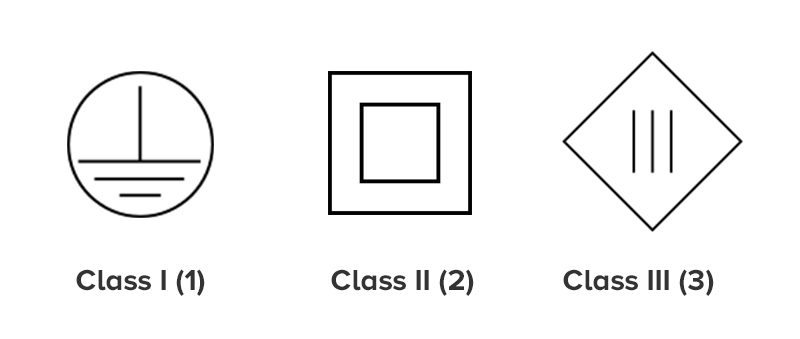
Get a better power supply for the Arduino, preferably a Class I (with a ground terminal). Your current PSU either doesn't have proper Y-capacitors filtering switching noise (sometimes there's just one such cap in cheap devices, sometimes none at all), or those caps let too much mains current through. Reversing the mains plug of the PSU might help, but a properly designed PSU should work with both polarities.

Also, putting all equipment involved (the Pi, the Arduino and the screen) on the same circuit breaker should reduce the noise. Plug them all in a single multi-plug extender just to test whether that's the case.

The Pi power supply might be at fault as well.

Dmitry Grigoryev
  • 27,928
  • 6
  • 53
  • 144
  • I've tried with multiple PSUs, you reckon they're all dud? Also, reversing AC polarity isn't an option since the plug design doesn't allow it (UK plug). I have in addition tried adding filtering caps on my breadboard where the PSU comes in, to no effect. – Fela Maslen Sep 03 '21 at 10:24
  • @FelaMaslen Do your power supplies also have a ground connector? Which class are they? – Dmitry Grigoryev Sep 03 '21 at 10:29
  • @FelaMaslen Also, is all equipment involved (the Pi, the Arduino and the screen) on the same circuit breaker? Could you plug them all in a single multi-plug extender just to be sure? – Dmitry Grigoryev Sep 03 '21 at 10:39
  • They are all on the same multi plug extender. They're not earthed (plastic earth pin) and I'm guessing are of the cheap variety. Edit: I don't see why they need to be earthed - isn't this the job of the rectifier diodes? – Fela Maslen Sep 03 '21 at 10:45
  • 1
    Update: stupid me. I had connected the power supplies to a separate 3 gang extension without noticing the Pi was on a different one. facepalm. Having them all on the same extension lead fixes the problem. Edit: interestingly, without a 9V voltage regulator after the PSU, the screen turns off, then back on (and seemingly stable). So I guess there are some issues there too. – Fela Maslen Sep 03 '21 at 15:22
1

I realised that by plugging all three of the Pi, monitor and external PSU into the same extension lead, the issue goes away. So I think it has something to do with noise between the power sockets.

Fela Maslen
  • 141
  • 5