1

I have a attached a RF Transceiver to GPIO 24 and a receiver to GPIO 26.

I setup a program:

import RPi.GPIO as GPIO

# to use Raspberry Pi board pin numbers
GPIO.setmode(GPIO.BOARD)

# set up the GPIO channels - one input and one output
GPIO.setup(26, GPIO.IN)
GPIO.setup(24, GPIO.OUT)

GPIO.output(24, GPIO.HIGH)
input_value = GPIO.input(26)
print input_value
GPIO.output(24, GPIO.LOW)
input_value = GPIO.input(26)
print input_value
GPIO.output(24, GPIO.HIGH)
input_value = GPIO.input(26)
print input_value
GPIO.output(24, GPIO.LOW)
input_value = GPIO.input(26)
print input_value
GPIO.output(24, GPIO.HIGH)
input_value = GPIO.input(26)
print input_value

When I run the program I get random output and an area:

pi@webserver ~/projects $ sudo python rf.py
rf.py:8: RuntimeWarning: This channel is already in use, continuing anyway.  Use GPIO.setwarnings(False) to disable warnings.
  GPIO.setup(24, GPIO.OUT)
1
1
1
1
0
pi@webserver ~/projects $ sudo python rf.py
rf.py:8: RuntimeWarning: This channel is already in use, continuing anyway.  Use GPIO.setwarnings(False) to disable warnings.
  GPIO.setup(24, GPIO.OUT)
1
1
0
0
0

Any help would be greatly appreciated, i'm sure its some stupid thing i'm doing.

kolin
  • 950
  • 2
  • 12
  • 25
Trent
  • 11
  • 3
  • Just found out its still random without changing my RF Transceiver output, I don't think it is working. Any ideas? Sorry i'm new to this. – Trent Jun 03 '13 at 05:44
  • I changed to pins 16tx and 18rx and noticed when I set tx to 1 most consistently the values are 1. However, when I set the values to 0 theres long bursts of 1s and 0s. – Trent Jun 03 '13 at 06:14
  • Make sure you've disabled the tty on the serial pins? – recantha Jun 03 '13 at 08:13
  • How do I disable tty? Also, for my learning/curiosity's sake what does this do? – Trent Jun 03 '13 at 13:20

2 Answers2

1

You don't state what kind of rx/tx modules your using, but I suspect that they are something like these: 433Mhz RF Transmitter Module + Receiver Module Link Kit. These inexpensive modules are widely used in wireless thermometers, car keys, doorbells, etc. The receivers all have one key annoying attribute: they automatically ramp up the receive gain to return occasional 1 bits, even when there is no signal.

This might seem like a bug, but it's actually a feature. All of these modules are designed for use with Manchester Coding (PDF data sheet from Atmel). You have to make your data into packets, usually of the form:

  • header: a few 01 transitions to get the receiver's gain circuitry set up.
  • address: (optional) a 4-bit (or so) code to identify different packet types, intended recipients, etc.
  • data: up to a couple of bytes of data. These unlicensed small transmitters aren't designed for long transmissions, especially since there may be many users on the same channel.
  • trailer: a couple of 01 or 10 transitions to tell the receiver we're done.

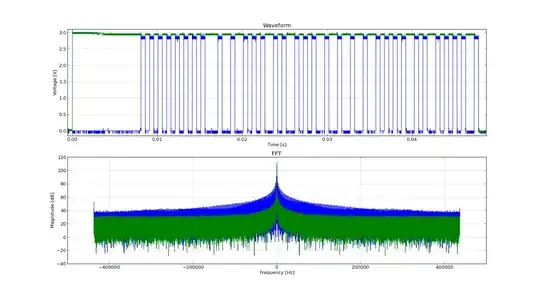
The upper blue trace shown below is a fairly typical Manchester Encoded packet. The header, at least, is easy to make out:

Manchester encoded packet read from oscilloscope

I don't know if there are Python libraries to specifically encode/decode Manchester data for the Raspberry Pi. It needs some fairly careful real-time signalling to work.

You can't just send these modules character data and expect success, unfortunately.

scruss
  • 9,068
  • 1
  • 24
  • 35
0

Well, I was able to get almost perfect output by implementing a lot of error detection.

I need to do some more severe testing but so far so good.

Program is:

def testing():
 i = 0
 test = 0
 while i != 1000:
  input_value = GPIO.input(18)
  test += input_value
  i += 1

 if test <= 960:
  return 0
 else:
  return 1
def fin():
 test1 = testing2()
 test2 = testing2()

 if test1 == test2:
  return test1
 else:
  return fin()
def testing2():
 t1 = 0
 t1 += testing()
 t1 += testing()
 t1 += testing()
 t1 += testing()

 if t1 <= 2:
  value = 0
 else:
  value = 1
 if value == value2:
  return value
 else:
  return testing()


 # set up the GPIO channels - one input and one output
GPIO.setup(18, GPIO.IN)
GPIO.setup(16, GPIO.OUT)
GPIO.output(16, 0)
value = fin()
print value
Trent
  • 11
  • 3