I want to run a application before my windows tablet go to sleep/hibernate mode when I hit power button. Actually it should be triggered before entering sleep/hibernate mode but I'm ok if hooks power button.
Asked
Active
Viewed 748 times
1

-
Would it be okay, to disable the powerbutton, and use a script that triggers the scheduled task (or script) and put your windows to sleep at the end of that script? Putting your windows to sleep would then require you to launch that script, which you can pin to your taskbar next to the start menu if you wanted. – LPChip Apr 26 '16 at 09:11
-
Wow that's awesome! But is there any possibility that I can run any script or application when hitting power button? I'm still used to push that side button for maybe just turning off the monitor. – user3819226 Apr 26 '16 at 09:19
-
Not sure if that is possible, thats why I asked if this alternative would be possible. By disabling the powerbutton, it would just have no effect when pressing it. The first 10 times you will automatically press it, then think, oh yeah... and do it the other way. Not optimal, but at least that works. I'll wait answering this one because it may very well be possible, but I lack that experience. – LPChip Apr 26 '16 at 09:56
1 Answers
0
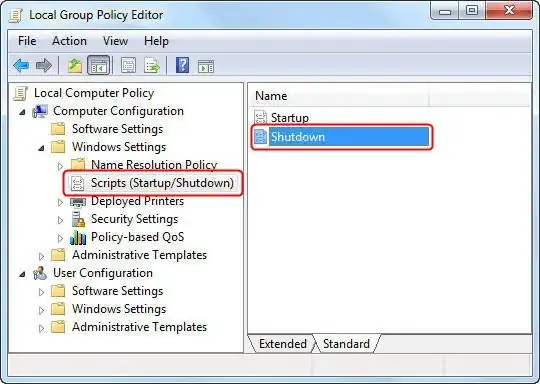
You can create a local computer policy on Windows. See the TechNet at http://technet.microsoft.com/en-us/magazine/dd630947
- Run
gpedit.mscto open the Group Policy Editor, - Navigate to Computer Configuration | Windows Settings | Scripts (Startup/Shutdown).


-
I don't have gpedit.msc since I'm using home edition of windows8.1 – user3819226 Apr 26 '16 at 10:09
-
Here is the answer, http://www.askvg.com/how-to-enable-group-policy-editor-gpedit-msc-in-windows-7-home-premium-home-basic-and-starter-editions/ – manjesh23 Apr 26 '16 at 10:10
-
One more link: https://technet.microsoft.com/en-us/library/cc731745.aspx?f=255&MSPPError=-2147217396 – manjesh23 Apr 26 '16 at 10:12
-
Trying now. Thanks. But I doubt if this works with sleep. I set my power button to sleep instead of shutdown. – user3819226 Apr 26 '16 at 10:20
-
-
Windows Starter Edition, Home and Home Premium do not include gpedit.msc. Instructions to install it are in my answer Windows Starter Edition, Home and Home Premium do not include gpedit, how do I install it? – DavidPostill Apr 26 '16 at 13:57