0

I was involved in a flurry of activity and created a system folder without knowing exactly what I was doing.

It is now a ghost folder. If I try to open it by any method, precisely nothing happens. If I double click it the context menu appears.

If I select "open" from the context menu, nothing happens at all. The screen does not change at all. there is no feedback from the system and there are no error messages or any other kind of messages. It behaves as if I had not clicked the mouse at all and as if I had not pressed any keys at all.

If I select "properties" from the context menu, the panel that is displayed has two tabs, "general" and "customize" and both are entirely empty.
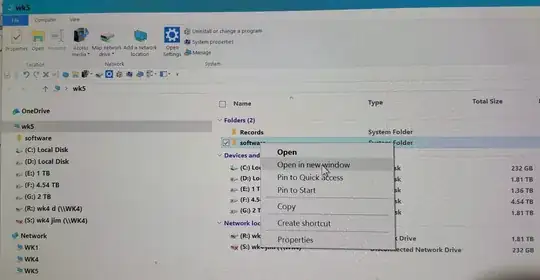
Screenshot

gronostaj
  • 57,004
  • I urge you to proceed with caution, but if you modify the target folder in the following procedure you should be able to delete it: How to force the deletion of a locked file that has no locking handle on Windows? – Run5k Mar 01 '17 at 13:08
  • I carefully read your reply and I am optimistic about it. The idea that I can easily delete even a system folder and, in fact, any object residing on my windows 10 disk by reverting to good old dos (I grew up using dos in the early 1980s) is an idea that is familiar to me. Retrieving a disk letter from the fdisk program, and then simply deleting either a file or a folder – TheStarVoyager Mar 01 '17 at 14:32
  • is a procedure that will take some time and will require extreme caution to perform safely and correctly. I will send you feedback regarding the results after I do this. I appreciate your time and effort. Thank you. James – TheStarVoyager Mar 01 '17 at 14:45

0 Answers0