0

I just got a new larger external hard drive and transferred all the files from my old drive to the new one.

When I was checking the used space to make sure everything transferred, I found that the new drive was about 70gb larger than the old one, despite being entirely empty previous to backing up the old drive onto it.

Upon further investigation I found that while every file said it was the same size, the "__ space on disk" did not match the files byte size. Here's an example
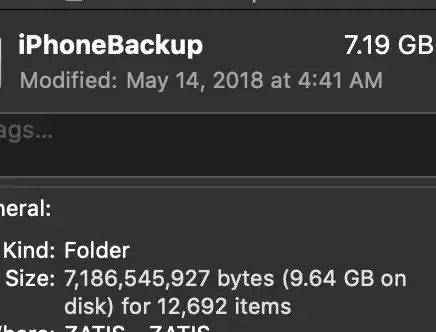
properties

Tech specs:

Old Drive: seagate 1 TB HFS+ format 8,03.7 GB used
New Drive: seagate 4 TB exfat format 8,71.0 GB used

I formatted the new one with exfat so it would work with both mac and pc. Is the extra used space caused by the difference in format?

Xen2050
  • 13,991
zander
  • 101

1 Answers1

1

This is likely due to a difference in sector/block size on the disk... Which is probably due to the change in disk format from HFS+ to ExFAT.

Drives can only store a single file in a sector, with larger files spanning many sectors. Files that are smaller than a sector still occupy that sector, which means they use more space on the disk than their actual file size.

Stese
  • 1,284
  • is there a way to change the sector/block size or is there any way to have the drive reorganize itself so that it uses the space more efficiently? The wasted space is even larger than i thought initially, clocking in at a whopping 130GB of wasted space – zander Nov 07 '18 at 09:42
  • to a degree, yes, some formats allow the changing the default sector size, depending on the OS etc. Don't forget that you'll also be seeing difference from 'reported' sizes between 'bits' and 'bytes'. See this document for a full write up on the issue. https://www.lifewire.com/drive-storage-capacities-833435 – Stese Nov 07 '18 at 09:50