I have installed Microsoft Office 2016 on my PC, but the Help option appears to not be working or accessible. How do I activate or use the Help functionality with Microsoft Office 2016 applications?
Asked
Active
Viewed 1,517 times
0

-
You should be able to repair Office from Control Panel > Programs and features. – harrymc Apr 01 '19 at 15:13
-
Do you mean you cannot click Help option? Or you cannot find the Help option? – Lee Apr 02 '19 at 09:41
-
As @Lee notes, please clarify what you mean by "the Help Option" is not working. Use the EDIT button to make your question more clear. – music2myear Apr 02 '19 at 15:28
1 Answers
1
Using Microsoft Office Help functionality
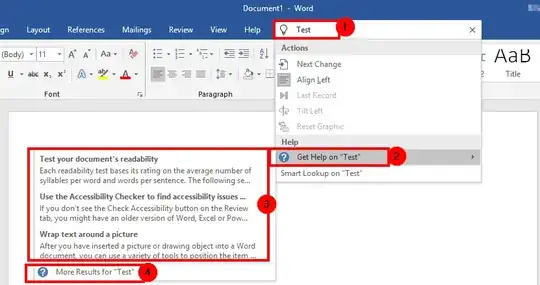
Open a Microsoft Word or Excel document or create an empty or blank document and then up top above the toolbar area click on the light bulb icon.

Start typing in whatever you need help with and then select the Get Help on option from the drop down menu to to see a quick note context menu for the item. If that's not enough then you can select the More Results for option to get more detail on the searched criteria.
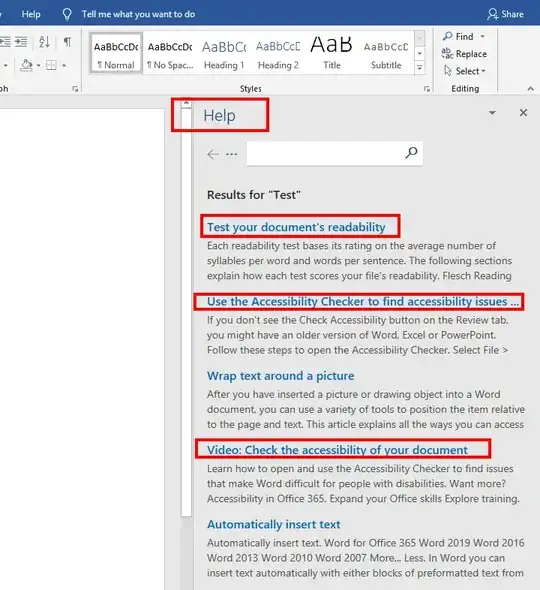
If you select the More Results for option then you will see a Help menu pop up on the left side of the screen at which point you can click on various links it provides on the searched criteria.


Making Microsoft Office Help functionality more easily accessible
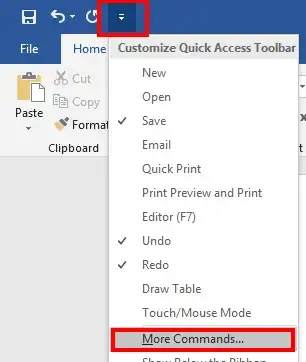
From the upper left side above the toolbar area click on the Customize Quick Access Toolbar option, and then select the More Commands... option from the dropdown menue.
From the Choose command from option select All Commands and then from the commands beneath scroll to find Help with the blue question mark icon and highlight it and then press Add | OK.
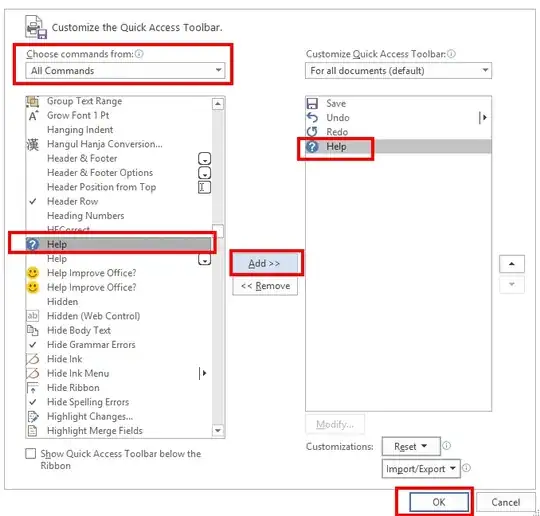
Now you will have a new question mark circle
?button to press in the upper left side area above the toolbar which when selected will open the Help search functionality of the Microsoft Office application.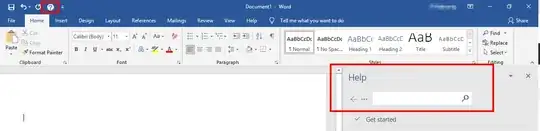


Vomit IT - Chunky Mess Style
- 40,973