There is no way, as far as I know, to modify the user interface of Adobe Acrobat Pro.
The only solution that I see is to create a shortcut to a macro that will do the
required 8 clicks for you. This assumes that the Adobe window is always
displayed at the same position on the screen, so that the clicks are always
on the same well-defined spots.
Required tools that need to be installed:
The procedure is divided into two parts.
Part 1 : Record the clicks
- Run Pulover’s Macro Creator
Set the menu Macro > Recording Options as below, to record only clicks
(Keystrokes are incidental):
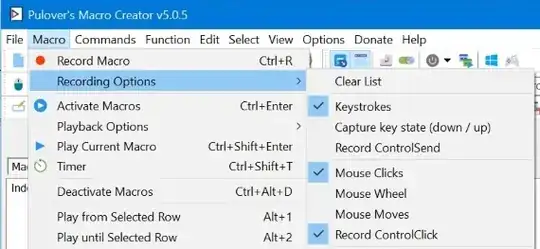
Start recording using menu Macro > Record Macro
- Ensure that Acrobat is the front windows
- Click F9 to start recording
- Click in Acrobat on the Color button, then on "Other Color...", your
custom color and finally on OK
- Click F9 again to stop recording
- Click in the traybar on the icon of Pulover’s Macro Creator to open its window
- You will see the AutoHotkey commands in the right-hand pane, so click in it
- Press Ctrl+A to select everything
- Press Ctrl+C to copy the text to the clipboard
Part 2 : Create the macro
- Use Notepad or another editor to create a text file named
something.ahk
Add a first line for the shortcut key, paste the above text after it,
and terminate with a return command. My macro looked like this, where I used
F12 as the shortcut key:
F12::
Click, 1353, 414 Left, , Down
Sleep, 10
Click, 1352, 415 Left, , Up
Sleep, 10
Click, 1403, 587 Left, , Down
Sleep, 10
Click, 105, 146 Left, , Up
Sleep, 10
Click, 37, 382 Left, , Down
Sleep, 10
Click, 37, 382 Left, , Up
Sleep, 10
Click, 98, 476 Left, , Down
Sleep, 10
Click, 98, 476 Left, , Up
return
Double-click the .ahk file to start it executing. It will create a green "H"
icon in the traybar that you can right-click and select Exit to stop.
If you always want this script to execute, copy it to the user Startup folder at
C:\Users\<user name>\AppData\Roaming\Microsoft\Windows\Start Menu\Programs\Startup.
While this script is running, pressing F12 will do the 8 required
clicks automatically.
For more information see this AutoHotkey documentation :


