I've realised I can't type some non-ASCII characters in the PowerShell console, all of which work fine in good old cmd.exe and should be supported by the code pages involved (it's a Spanish Windows edition with Spanish as only keyboard layout):
If I type
€it prints?. When I hit enter I can see a normally looking euro sign in the error message: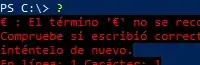
If I type
Áit doesn't print anything at all but I can printájust fine. Similarly, I can type lowercaseñbut not uppercaseÑ.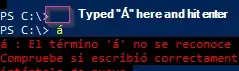
Interestingly, if I use clipboard to paste those chars I can see some of them:
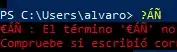
I happens in every Windows 10 PCs I've tried, with every TTF font I've tried.
Console code page is 850:

Both [System.Console]::InputEncoding and [System.Console]::OutputEncoding show the same output:
IsSingleByte      : True
BodyName          : ibm850
EncodingName      : Europa occidental (DOS)
HeaderName        : ibm850
WebName           : ibm850
WindowsCodePage   : 1252
IsBrowserDisplay  : False
IsBrowserSave     : False
IsMailNewsDisplay : False
IsMailNewsSave    : False
EncoderFallback   : System.Text.InternalEncoderBestFitFallback
DecoderFallback   : System.Text.InternalDecoderBestFitFallback
IsReadOnly        : True
CodePage          : 850
Any idea of where to start looking?

$OutputEncoding,[System.Console]::OutputEncodingand[System.Console]::InputEncoding? – JosefZ Dec 03 '19 at 20:00$OutputEncodingshowsCodePage: 20127(us-ascii)? Try changing it as$OutputEncoding = [System.Console]::OutputEncoding. – JosefZ Dec 04 '19 at 17:47US-ASCII(is that meant to be the default?). But changing it to match[System.Console]::OutputEncodingdoesn't change anything and there doesn't seem to be a similarly named$InputEncoding. – Álvaro González Dec 04 '19 at 17:52Ácan be typed but€cannot. I have a strong feeling that it has never really worked at 100% but I didn't notice until I tried to set my full name in git credentials. Oh well... – Álvaro González Dec 05 '19 at 08:29Alt+xmethod work? For instance,Á=Alt+0193=Alt+181,á=Alt+0225=Alt+160,Ñ=Alt+0209=Alt+165andñ=Alt+0241=Alt+164in your locale CP850/ACP1252. – JosefZ Dec 05 '19 at 10:06