I have a Windows 10 Desktop PC I built recently with all new parts, Windows is fully updated, as are all drivers, BIOS, etc. I had a problem with my PC waking up from sleep randomly at night, and then staying on all night, so I disabled all possible wake timers, which seems to have fixed that issue; however, now the PC stays asleep until I press a key on my keyboard.
- My PC does not go to sleep automatically by itself based on the timer I set in Power Settings (presumably this is why it would stay up all night after automatically waking up with the previous issue above)
- When I try specific programs to make only the monitors go to sleep, such as Turn off LCD and NirCmd, the monitors turn off for 1 second, then turn back on, so that is perhaps a clue
I've tried virtually everything [screenshots below] and nothing makes my PC go to sleep automatically when idle, including disabling all Wake Armed devices in Device Manager, which didn't fix it either, so I only left the Keyboard enabled to ensure I can wake my PC when I manually put it to sleep. I do not want to reset anything as it's taken me a long time to get my PC configured just right and fix the issue of my PC waking randomly from sleep.
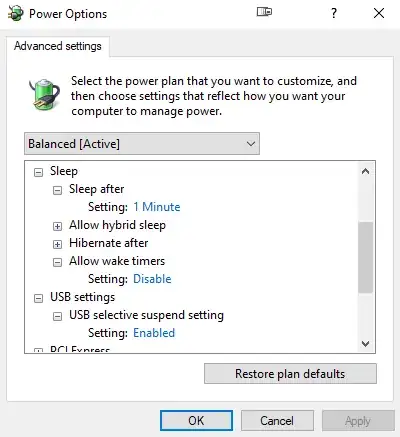
- Advanced Power Settings:
- Power Troubleshooting Results:

- Group Policy Sleep Settings set to ensure automatic sleep:

powercfg:devicequery wake_armed:HID Keyboard Device (003) HID Keyboard Device (004)-energy: 14 Errors, 9 Warnings, 58 Informational (rebooted, didn't touch anything)-requests:DISPLAY: None.SYSTEM: None.
AWAYMODE: None.
EXECUTION: None.
PERFBOOST: None.
ACTIVELOCKSCREEN: None.



What else can I try to find out what in the world is keeping my PC from sleeping automatically and fix this issue, considering powercfg -requests returns everything as none?
FINAL UPDATE: With the help of a combination of everyone's suggestions (see my answer below), I was able to find the culprit: Creative Pebble V3 external speakers connected via USB-C. I updated its Firmware and it resolved the problem.


powercfg -requestsshows everything as "none". That answer you linked to does mention something interesting, that programs can "Call SetThreadExecutionState periodically to reset the idle time", but it doesn't answer or explain how to check for that. Any ideas? – ProgrammerGirl Mar 15 '21 at 17:20powercfg -energyafter restarting my PC and not touching anything: https://i.imgur.com/hYc8VEo.png – ProgrammerGirl Mar 18 '21 at 08:26powercfg devicequery wake_armed. I then re-enabled only my keyboard to ensure I can wake my PC when manually putting it to sleep. – ProgrammerGirl Mar 18 '21 at 08:29powercfg -energy. The image is not helpful. – harrymc Mar 18 '21 at 08:59taskschd.msc] and Event Viewer should provide some information [eventvwr.msc]. A task is also likely why the PC was waking in the middle of the night and not resuming sleep after the task finished. – JW0914 Mar 18 '21 at 12:13