0

I have a 2TB external hard drive from Seagate that will not show up on Windows 10, but it will on Mac OS. I have followed the steps on Seagate's website, in particular populating the disk and noted the disk number (3). Then under Disk management I have found the following
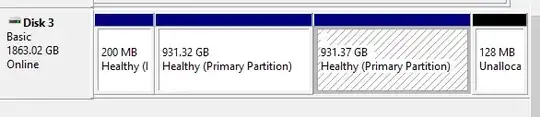
the following.

Are the 2TB too big for the disk and is there a way to resolve this?

EDIT: The drive is formatted APFS, which is not supported by Windows 10.

Hennes
  • 65,142
psie
  • 101
  • 2
    How is it formatted? Windows cannot read HFS+ or APFS without 3rd party software support. Check on the Mac - Get Info on the mounted volume. – Tetsujin Apr 26 '21 at 11:40
  • If it shows up in Disk Management but not in File Explorer, it's likely formatted for Mac. – MetalMikester Apr 26 '21 at 11:41
  • Assign letters to the disks. It seems that you have not done it yet. – Reddy Lutonadio Apr 26 '21 at 11:41
  • 1
    Don't do anything to it if it's HFS+ or APFS - Windows is likely to break something. Check it on the Mac first. – Tetsujin Apr 26 '21 at 11:42
  • Thanks for the quick replies. Indeed, the formatting is APFS. I will edit this in the post and accept any answer that gives or links to a possible solution. – psie Apr 26 '21 at 11:43
  • Of the suggestions on the link, I'd go for Paragon, but that's merely one opinion. – Tetsujin Apr 26 '21 at 11:51
  • Or reformat it to exFAT? – psie Apr 26 '21 at 11:53
  • You could. It would be cross-platform to an extent, as both can read/write it natively. ExFAT doesn't support file permissions properly though. – Tetsujin Apr 26 '21 at 11:56

0 Answers0