I need advice how to make proper ssh connections.
My network:
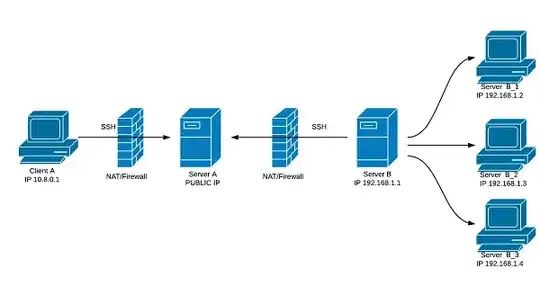
I want to be able to view web server content from devices B_1, B_2, B_3 using FF with SOCKS configured on Client A. Note that firewall doesn't allow incoming connections, and that cannot be changed.
I can achieve now something similar by opening single tunnel for each machine (B_1,B_2,B_3), and browse content by typing http://localhost:5678 in FF, without SOCKS on Client A
On Server B -> B_1
ssh -f -n -T -R5678:192.168.1.2:80 user@serverA
On Client A
ssh -L 5678:localhost:5678 user@serverA
I think i need to use ssh -D on server B to be able to connect to machines B_1,B_2,B_3, just typing IP address in FF with SOCKS set up localhost:5678 on Client A, but i'm doing something wrong, because I can't get it to work.
Any help will be appreciated :)


BtoCbecause there is a firewall between that doesn't allow incoming connections toCthat's why I need to initialize ssh connection fromCtoBand somewhere here addssh -DOr maybe there is another method to achieve my goal. – Hubert Von Süßer Busarzt Jun 28 '21 at 11:13ssh f -n -D 5432:localhost ssh -f -n -T -R5432:localhost:5432 user@serverAon B
– Hubert Von Süßer Busarzt Jun 28 '21 at 11:20ssh -L 55432:localhost:5432 user@serverAssh -Dmust be run on the machine that you choose asB(in the context of my linked answer) and it must connect toC(possibly via a tunnel; in your case obligatorily, I think). The command really defines what machine isBand what isC. – Kamil Maciorowski Jun 28 '21 at 11:29