My Text files (.txt) are not opening. Instead, they are printing as the default command when I double-click on any file.
I realized that the print command is default now and open is not the default command.
How do i change it back?
My Text files (.txt) are not opening. Instead, they are printing as the default command when I double-click on any file.
I realized that the print command is default now and open is not the default command.
How do i change it back?


Open up a folder and then go to the menu:
Tools > Folder Options > File Types
Go down to the TXT extension and then click the Advanced button for the Edit File Type dialog:
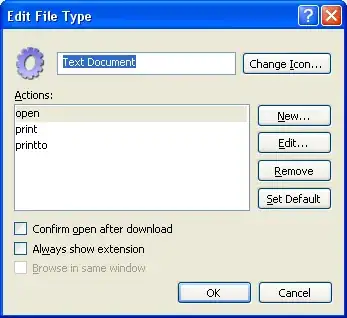
To create a new
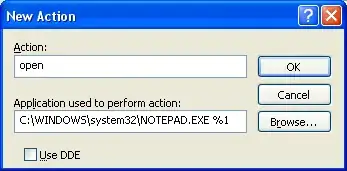
openaction, take the following steps:
- Click New. A New Action dialog will pop up
- For Action, enter
open- For Application used to perform action, enter
"C:\WINDOWS\system32\NOTEPAD.EXE %1"- Click OK
(Adjust the program file path as necessary if you prefer opening with another text editor.)
In the Edit File Type dialog:
This should now set back the default action of double-clicking on a .txt to open instead of printing.
You cloud try to right-click on it in a Windows explorer and check if the popup menu entry "right click on it" is there.
If it is, you should then be able to select a program, use Notepad and select "always use this".

Otherwise, there are some ways to restore default association in Windows XP