When I right click inside a folder in Windows Explorer, there is an option called "AMD Software: Adrenalin Edition":
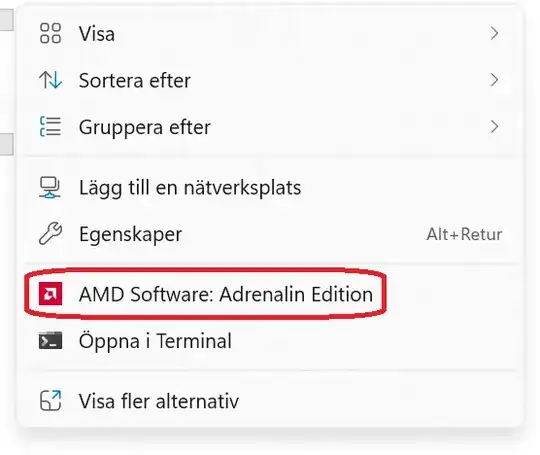
(This option only appears when I right click on an empty space inside the folder I'm already viewing, not when I right click on another folder.)
I never use this option, so I would like to remove it.
I searched Google for how to remove it and I found a few suggestions, but none of them worked for me. I found this which suggests adding {FDADFEE3-02D1-4E7C-A511-380F4C98D73B} to HKEY_LOCAL_MACHINE\SOFTWARE\Microsoft\Windows\CurrentVersion\Shell Extensions\Blocked, and I found this which suggests removing the registry key HKEY_LOCAL_MACHINE\SOFTWARE\Classes\Directory\background\shellex\ContextMenuHandlers\ACE (which does exist in my case). I tried both of those suggestions and restarted my computer after trying each of them, but none of them helped.
I also tried searching for how to remove the "Open in Terminal" option (not because I want to remove it, but because the same method might be able to be used to remove the AMD Software one), and I found this which suggests adding {9F156763-7844-4DC4-B2B1-901F640F5155} to HKEY_LOCAL_MACHINE\SOFTWARE\Microsoft\Windows\CurrentVersion\Shell Extensions\Blocked, and when I did that I succeeded in removing "Open in Terminal". So it seems like the issue is that the GUID I found online for AMD Software isn't the correct one. I tried finding the correct GUID by searching in the registry and I found several candidates:
{4d36e968-e325-11ce-bfc1-08002be10318}{73E37D3D-1A2F-11EE-AF0E-806E6F6E6963}{4242B984-6C36-4FC8-8626-DE5E8B11886D}{A2A630D5-036F-4539-BD99-7923AD830433}{FDADFEE3-02D1-4E7C-A511-380F4C98D73B}(I found this one online here, but it's not present anywhere in my registry)
I tried adding each of these to HKEY_LOCAL_MACHINE\SOFTWARE\Microsoft\Windows\CurrentVersion\Shell Extensions\Blocked, but none of them worked. I also tried finding the GUID in PowerShell as explained here, but I didn't find anything using that method. So I guess one thing that could help me solve my issue would be if I could find the correct GUID somewhere, but I don't know where else to look.
How can I remove this option from the Windows Explorer context menu? Finding the correct GUID to put in HKEY_LOCAL_MACHINE\SOFTWARE\Microsoft\Windows\CurrentVersion\Shell Extensions\Blocked would probably be helpful in achieving this, but I'm open to other solutions as well.


HKEY_CLASSES_ROOT\*\shellex\ContextMenuHandlersor the other paths listed here (different from what you tried): https://superuser.com/questions/5011/how-to-remove-items-from-the-right-click-context-menu-in-windows. There should be a key whose name exactly matches the AMD context menu entry. You only need to restart theWindows Explorerprocess (in task manager) after trying something, not the whole computer. – Cpt.Whale Sep 25 '23 at 16:36HKEY_LOCAL_MACHINE\SOFTWARE\Classes\Directory\background\shellex\ContextMenuHandlers\ACEas I mentioned in my question, but I deleted that one and it didn't solve the issue. – Donald Duck Sep 25 '23 at 19:51reg add "HKLM\SOFTWARE\Microsoft\Windows\CurrentVersion\Shell Extensions\Blocked" /v "{FDADFEE3-02D1-4E7C-A511-380F4C98D73B}" /t REG_SZ /d ""and reboot (link). – harrymc Mar 07 '24 at 17:51