2

(This is a question about using XCA, not openssl, and this is my motivation)

I created CA, Server, and Client certificates:

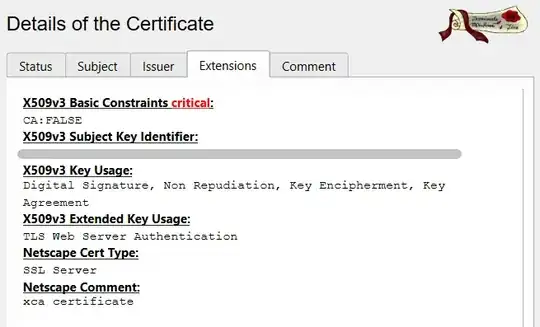
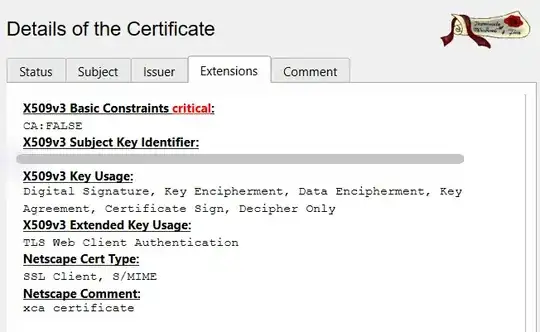
  • Within XCA, do I need to create these certificates differently?
  • Does each certificate have an exact required list of Key Usage & Extended Key Usage (e.g. all the necessary with no extra)?
    • The client certificate has Key Usage Certificate Sign and it doesn't look good.


Steps performed:

  1. I installed XCA from the Microsoft Store:
  2. I read the Creating certificates with XCA from Fortinet and created:
    Screenshot1

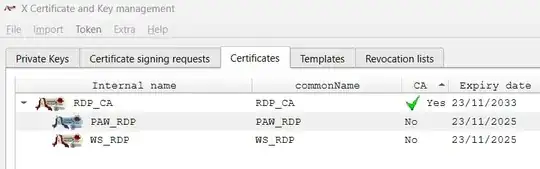
    1. CA: RDP_CA

    2. IPSec Server: WS_RDP
      The workstation I want to access by RDP
      Screenshot2

    3. IPSec Client: PAW_RDP
      The only privileged client that should not be denied
      Screenshot2

Amit
  • 260

1 Answers1

2

I found the way:

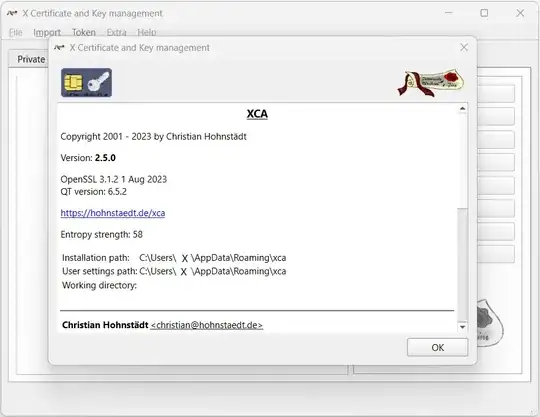
  1. Install XCA from Windows Store:
    (as of 24/11/2023, v2.5.0 uses OpenSSL v3.1.2.1 from August 2023)
    Screenshot1

  2. Prepare a clean USB Stick for XCA databaseRun XCA

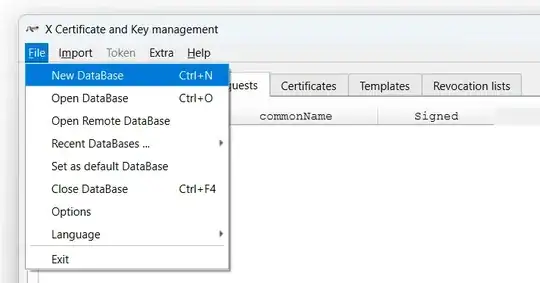
  3. Create a new database on the USB Stick: Home.xcd
    The database is password protected, so it is necessary to choose one for future use
    Screenshot2

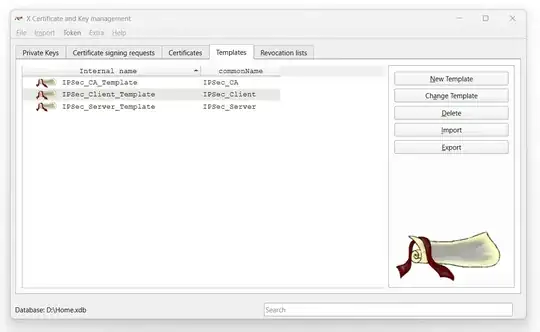
  4. Tab: Templates
    XCA has four default templates for any arbitrary, non-specific use case

    1. [default] Empty template
    2. [default] CA
    3. [default] TLS_Client
    4. [default] TLS_Server

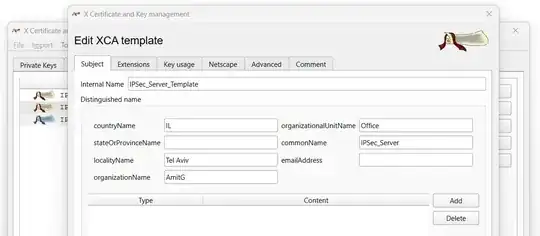
  5. New tepmlate & Change templateEdit XCA template dialog
    For IPSec certificates, I generated three new templates

    1. IPSec_CA_Template (inherited from 4.2)
    2. IPSec_Client_Template (inherited from 4.3)
    3. IPSec_Server_Template (inherited from 4.4)
      Screenshot3

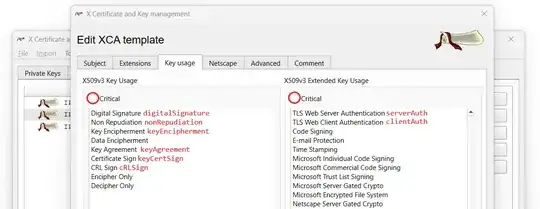
  6. Tab: Key Usage
    Select Key Usage (KU), Extended KU (EKU), and critical (optional)
    enter image description here

    1. CA:

      keyUsage=critical,digitalSignature, keyCertSign, cRLSign
      
    2. Client:

      keyUsage=critical,digitalSignature, keyEncipherment
      extendedKeyUsage=critical,clientAuth
      
    3. Server:

      keyUsage=critical,digitalSignature, keyEncipherment, keyAgreement
      extendedKeyUsage=critical,serverAuth
      

  7. Tab: Subject
    Screenshot5

  8. Tab: Netscape
    Unselected all and deleted the comment


Once the customized templates are ready - This is the start point, for any new certificate


Create New Certificate
I adhered to the Creating certificates with XCA manual of Fortinet for the creation of the certificates but with the customized templates from section 5. Since the customized templates contain all the data, including Subject and Extensions, it is necessary to click Apply All instead of Apply Extensions as written in the manual. Example for Server Certificate:
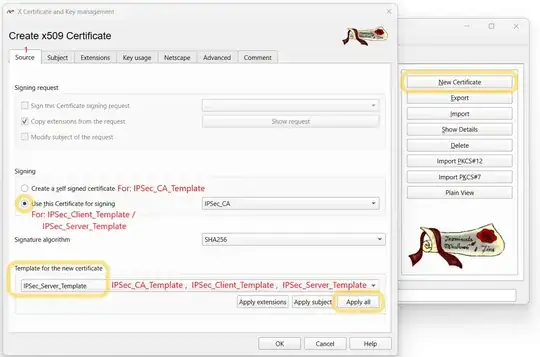
enter image description here


[For Client / Server certificate. Not for CA]
(2nd thing after tab Source) The only thing that is not in the template is the X509v3 Subject Alternative Name. It should be entered specifically with the hostname and the domain of the entity for whom the certificate is issued.
Since it is a DHCP-enabled environment, fixed IPs are not assumed, and instead, a hostname.domain syntax is used. Refer to the appendix for information about configuring local-domain.
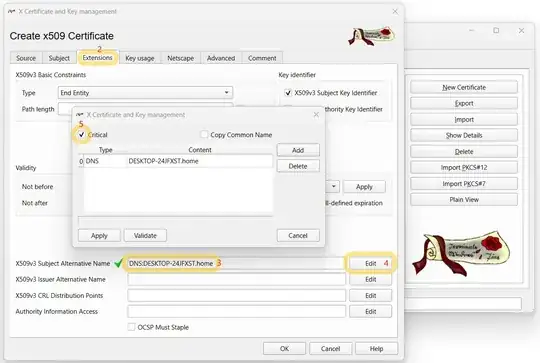
enter image description here


Resultant V3 Profiles:
Here are the X509v3 extensions (in compare with this reference)

  • CA: (The reference has also: authorityKeyIdentifier)

    basicConstraints=critical,CA:TRUE
    keyUsage=critical,digitalSignature, keyCertSign, cRLSign
    subjectKeyIdentifier=hash
    
  • Client: (The reference has also: authorityKeyIdentifier, nonrepudiation (KU))

    subjectAltName=critical,DNS:DESKTOP-KGXWQ2R.home
    extendedKeyUsage=critical,clientAuth
    keyUsage=critical,digitalSignature, keyEncipherment
    subjectKeyIdentifier=hash
    basicConstraints=critical,CA:FALSE
    
  • Server: (The reference has also: authorityKeyIdentifier, nonRepudiation(KU))

    subjectAltName=critical,DNS:DESKTOP-24JFXST.home
    extendedKeyUsage=critical,serverAuth
    keyUsage=critical,digitalSignature, keyEncipherment, keyAgreement
    subjectKeyIdentifier=hash
    basicConstraints=critical,CA:FALSE
    
  • Based on the comments below, authorityKeyIdentifier "is usually not mandatory" and nonRepudiation "is not used for any network protocol".


Appendix: Local Domain

For the local domain home I had to configure my router (that accepts on that field only a-z and - chars):
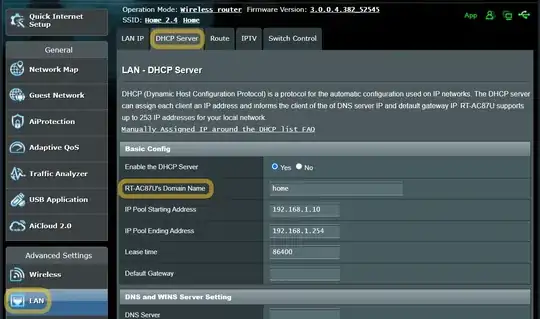
enter image description here


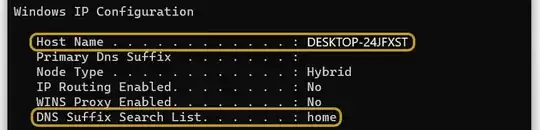
To verify whether the computer is within the home local domain, open cmd.exe and enter:

ipconfig /all

As desired: enter image description here
Amit
  • 260
  • EKUs serverAuth identifies a server as a server and server only, whereas clientAuth identifies a client as a client and client only - not specifying those EKUs allows a MITM attack to occur. I user Sophos UTM and haven't used Fortinet, but this is standard across VPN server and client certs. If the firewall appliance is also decrypting and re-encrypting packets for packet inspection, the main appliance CA likely also requires DNS 127.0.0.1 in the SAN [subjectAltName] profile. – JW0914 Nov 24 '23 at 19:39
  • @JW0914: A client won't be able to impersonate the server regardless of EKUs, because the client's certificate has a subjectAltName that does not match the server's name. It's only OpenVPN where certificate name checking is left as an afterthought – usually not the case for IPsec. – u1686_grawity Nov 25 '23 at 11:37
  • @u1686_grawity , at this moment, only my Server certificate has a subjectAltName and I am not sure that I determined it properly: The IPs are dynamic, no domain, etc. What is the proper values for subjectAltName on each certificate? – Amit Nov 25 '23 at 12:12
  • @Amit In general, a server's SAN should have its IP and/or DNS (please see 2.2 - email shouldn't be specified on a server cert), whether local or FQDN. It will always have a local domain name of <hostname>.<localdomain>, where the hostname is from the machine running the server and local domain being set by the router – JW0914 Nov 25 '23 at 12:16
  • @u1686_grawity , see my answer Resultant V3 Profiles: Are the missing items important? Are there extensions that it is better to remove? ...for IPSec purpose. – Amit Nov 25 '23 at 14:35
  • 2
    I'm not 100% sure about what Windows' IPsec implementations need (I've mostly dealt with RouterOS and strongSwan), but: 1) CAs do not use subjectAltName at all (instead subjectKeyIdentifier is their "alternate" way). 2) For hosts, subjectAltName=email:... (which would be completely wrong for a TLS server) is not particularly right for an IPsec host either; it should probably be a DNS: or IP: type name (or both). 3) nonRepudiation KU is only relevant to document signing; it is not used for any network protocol (IPsec would primarily use digitalSignature, I believe). – u1686_grawity Nov 25 '23 at 14:45
  • 2
  • authorityKeyIdentifier is usually not mandatory – it's an alternative way to link the certificate to its issuer (child aKI = parent sKI); if it's omitted, the traditional process (child 'Issuer' field = parent 'Subject' field) will be used, which is perfectly fine as long as you keep CA 'Subject' unique (i.e. as long as you don't re-use the same 'Subject' for a new CA with a new keypair).
  • – u1686_grawity Nov 25 '23 at 14:48
  • @u1686_grawity Router OSes do make use of a SAN for the main CA of the firewall appliance. For example, Sophos UTM requires the loopback IP to be specified in a SAN for its master CA, as it's required when using transparent packet inspection where the firewall appliance decrypts SSL/TLS packets, scans them, then re-encypts them with the appliance's master CA, forwarding them on to the arbitrary host. This came up because the OP referenced Fortinet, implying this was being setup on a firewall appliance. – JW0914 Nov 25 '23 at 18:53
  • @JW0914: Hmm, that...doesn't quite make sense for TLS in general, I guess it's a Sophos-specific thing? Given that it's transparent inspection, the TLS client wouldn't be expecting to see the appliance's IP in certs – it would still be expecting to see a SAN that matches the original URL. – u1686_grawity Nov 26 '23 at 21:31
  • @u1686_grawity It's because Sophos UTM's web filtering is able to modify and remove information from packets based on regex rules configured in the WebUI (it's an enterprise-level UTM router OS), so it has to re-sign modified packets with the UTM's master CA - I can't recall the specific reason the loopback IP has to be in that CA's SAN, but it has to do with web filtering IIRC – JW0914 Dec 09 '23 at 18:06
  • @JW0914: That still makes zero sense. Doesn't matter what the web filter is doing – the HTTPS client isn't going to care about the filter's own IP in the SAN, especially when it doesn't even know that filtering is done. – u1686_grawity Dec 09 '23 at 19:16
  • @u1686_grawity This was stated clearly somewhere on Sophos' site prior to them completely redoing their site several years back, and I can no longer find it; eventually we'll have an answer though: What is the purpose of the loopback IP in one of the UTM CA's SAN? – JW0914 Dec 12 '23 at 13:44