0

I have an SD card which I use in Canon EOS 700D camera. I cannot delete the files! I checked the basic things I know the operating system is using for this purpose:

  1. The physical lock on the side of the SD card is not locked (it is shifted to the "upward" position).

  2. The read-only attribute of the individual files was not set.

  3. I notice that there is a read-only attribute set for directories - see this screenshot: enter image description here
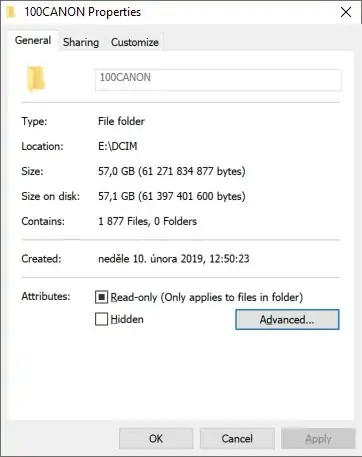
    When I turn it off, it gives an error "media is write protected":
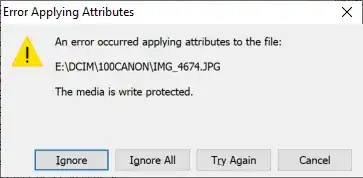
    enter image description here

    What is this "write protection", what mechanism is behind it, where it is driven from? I click "ignore" and finally can delete the files. However, eject (unmount) the SD card and mount it again, it is set again!

  4. I run cmd as Administrator, and run diskpart in it, it says "Current Read-only State : Yes", but I can't seem to turn it off:

    Microsoft Windows [Version 10.0.19045.3693]
    (c) Microsoft Corporation. All rights reserved.
    

    C:\WINDOWS\system32>diskpart

    Microsoft DiskPart version 10.0.19041.3636

    Copyright (C) Microsoft Corporation. On computer: LAPTOP-SAAK4JMO

    DISKPART> list disk

    Disk ### Status Size Free Dyn Gpt


    Disk 0 Online 953 GB 0 B * Disk 1 Online 59 GB 1024 KB Disk 2 No Media 0 B 0 B

    DISKPART> select disk 1

    Disk 1 is now the selected disk.

    DISKPART> attributes disk Current Read-only State : Yes Read-only : No Boot Disk : No Pagefile Disk : No Hibernation File Disk : No Crashdump Disk : No Clustered Disk : No

    DISKPART> attributes disk clear readonly

    Disk attributes cleared successfully.

    DISKPART> attributes disk Current Read-only State : Yes Read-only : No Boot Disk : No Pagefile Disk : No Hibernation File Disk : No Crashdump Disk : No Clustered Disk : No

    DISKPART>

    Why wasn't dispart able to set the Current Read-only State to No?

  5. Further information from the diskpart on the volume, as suggested here, says that the volume's status is "healthy", and shows no read-only flag:

    DISKPART> list volume
    

    Volume ### Ltr Label Fs Type Size Status Info


    Volume 0 C WINDOWS NTFS Partition 120 GB Healthy Boot Volume 1 D DATA NTFS Partition 814 GB Healthy Pagefile Volume 2 SYSTEM FAT32 Partition 100 MB Healthy System Volume 3 WINPE FAT32 Partition 512 MB Healthy Hidden Volume 4 Onekey NTFS Partition 18 GB Healthy Hidden Volume 5 WinRE NTFS Partition 1024 MB Healthy Hidden Volume 6 E Nový svazek exFAT Removable 59 GB Healthy Volume 7 F Removable 0 B No Media

    DISKPART> select volume 6

    Volume 6 is the selected volume.

    DISKPART> detail volume

    Disk ### Status Size Free Dyn Gpt


    • Disk 1 Online 59 GB 1024 KB

    Read-only : No Hidden : No No Default Drive Letter: No Shadow Copy : No Offline : No BitLocker Encrypted : No Installable : Yes

    Volume Capacity : 59 GB Volume Free Space : 2504 MB

  6. The HKEY_LOCAL_MACHINE\System\CurrentControlSet\Control\StorageDevicePolicies registry key doesn't exist.

MAIN OVERALL QUESTION: I am totally confused why and how is this possible? What particular mechanism of the Windows operating system is doing this? Is it somewhere on the SD card filesystem (the card has exFAT filesystem)? Is it a standard mechanism of that particular filesystem? If not, why does Windows respect that?

Giacomo1968
  • 55,001
Tomas
  • 7,399
  • 3
    The SD card could have failed. Many go read-only when they go bad so that you can copy data off them before replacing them. This happens in the controller on the card. – Mokubai Dec 31 '23 at 12:14
  • @Mokubai thanks. 1) The system literally recognizes that there is write protection. So no matter the original cause, it must have been set somehow and must work somehow. That's what I am asking. 2) How do I recognize whether the cause of it is that the card went bad? 3) Seems unlikely because other card is doing the same. It is more likely that it is the Canon Camera doing this protection from deletion, however, I am asking and looking for a solution from the PC/Windows/filesystem perspective. – Tomas Dec 31 '23 at 12:18
  • 1
    Then it sounds like you need to try it in a card reader away from the camera to prove whether it is the card or camera. – Mokubai Dec 31 '23 at 12:20
  • @Tomas, the probability camera set SD to R/O is minimal. As you get explained this is (with high probability) prefailed card. Copy the files and replace it with new card, do not forget these cards are consumables. – Romeo Ninov Dec 31 '23 at 12:27
  • [ I click "ignore" and finally can delete the files] does not sound plausible to me... Is the write-protect switch fully in the correct position? If I remember correctly, it's read by a sensor inside your reader (not by the card itself). Does this happen with a different reader? – u1686_grawity Dec 31 '23 at 12:27
  • @Tomas, moreover seems like you use this card as long term storage which is NOT advisable! This card is created five years ago and seems like never formatted. – Romeo Ninov Dec 31 '23 at 12:31
  • @Tetsujin thanks for the link, but it doesn't answer my question. I have tried some of the solutions proposed here but it failed (added them as points 5. and 6. to my question). I would appreciate if we can keep my question open with the particularities of my report. Thanks! – Tomas Dec 31 '23 at 12:58
  • @Mokubai I am indeed using a USB card reader to connect this SD card to PC. I am not doing it via camera. At this moment, I don't have a different card reader to try. However, the card reader is generally working fine, I don't expect problem there. – Tomas Dec 31 '23 at 13:05
  • If you do ignore the warning and delete a file, does that file reappear when you eject and reinsert the card? – Mokubai Dec 31 '23 at 13:26
  • @Mokubai no, the deleted files do not reappear. – Tomas Dec 31 '23 at 13:34
  • @Testujin I asked you to not close this question, to keep the particularities of my situation, and I told you it doesn't answer it!!! I invested so much time and effort in formulating it! Thanks for wasting all my efforts to get help. Really helps to make this a great site! – Tomas Dec 31 '23 at 14:33
  • @harrymc same to you. You could use the question closing for people who don't take the effort, who don't look at those similar questions. Wasn't my case. – Tomas Dec 31 '23 at 14:35
  • @Tomas question closure requires three votes ... also, you cannot assume that either of these people voted to close ... if you do not agree with a closure, then update your question with an explanation why it should be reopened and request it to be reopened – jsotola Dec 31 '23 at 22:13
  • @jsotola in this case the question was closed by someone with a gold tag badge in the windows tag which requires only a single vote. Since my questions had been answered I was not convinced it was exactly the same problem hence I had not applied a vote which in my case as a moderator would also be a single binding vote. – Mokubai Dec 31 '23 at 22:43
  • @Mokubai it still comes down to the fact that questions are not closed on a whim, and have a mechanism for reopening – jsotola Jan 01 '24 at 05:36

0 Answers0