2

I've tried using VirtualBox, but the only option it gives me is Mac OS X Server. When I try to boot using my 10.4 disk, I get some vague message about startup.nsh, then a Shell> prompt, so I assume it won't work. Does Parallels or VMWare Fusion support running 10.5 on 10.6 as a VM?

Update:

Turns out the disk was damaged. If VirtualBox cannot find a valid disc, it will start the EFI utility. After using a new disc that is verified as working, I found that it worked with the "Mac OS X Server" option in the latest VirtualBox.

Nick Bolton
  • 3,400
  • Hmm, maybe this will do it? http://www.sysprobs.com/install-mac-os-1055-leopard-virtualbox-314-installation-dvd – Nick Bolton Oct 02 '10 at 14:23

2 Answers2

2

VritualBox supports OS X guests inofficially and only on OS X hosts. But the EULA states:

A. Single Use License. Subject to the terms and conditions of this License, unless you have purchased a Family Pack or Upgrade license for the Apple Software, you are granted a limited non-exclusive license to install, use and run one (1) copy of the Apple Software on a single Apple-branded computer at a time. You agree not to install, use or run the Apple Software on any non-Apple-branded computer, or to enable others to do so. This License does not allow the Apple Software to exist on more than one computer at a time, and you may not make the Apple Software available over a network where it could be used by multiple computers at the same time.

I tested it: Install Virtualbox, insert your disc and create a new VM - works like a charm!

[edit] i changed my answer do reflect the actual EULA terms (which still don't apply in some countries like Germany)

[edit2] Here are some screenshots:

The first one shows Snow Leopard (MacBook Installation DVD) in VirtualBox 3.2-BETA1. The second one shows the same virtual machine (created in BETA1) running under 3.2.8 and booting from a Leopard Upgrade DVD.

Creating an OS X Server VM (without altering any other settings!) worked fine for me, too! I didn't complete the install, though. My 10.5 Insallation DVD requires 10.4 to be installed and i didn't have enough time to install 10.6 either.
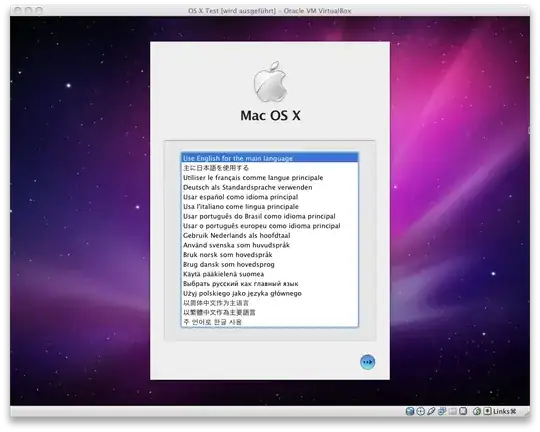
Booting Snow Leopard (MacBook Mid 2010 Install Disc, Virtualbox 3.2-BETA1) Booting Leopard (Leopard Upgrade DVD), Virtualbox 3.2.whateverthecurrentversionis

lajuette
  • 4,732
  • Which VM type did you choose? I chose Mac OS X Server and had no success. Is your disk for the desktop or server version? – Nick Bolton Oct 03 '10 at 21:58
  • By the way, if I choose "Mac OS X Server" and disable the EFI option, then insert my Mac OS X 10.5 disk (not server), it reads the disk for a second, then I see "FATAL: No bootable medium found! System halted." – Nick Bolton Oct 03 '10 at 22:15
  • Hm: back then i installed Snow Leopard in VirtualBox 3.2 because of this article: http://bit.ly/9kkzvm Sadly the link in the article is no longer valid! Maybe you should try the OSW edition (but i'm sure i used the "normal" version) – lajuette Oct 04 '10 at 05:15
  • Here's a link to the beta, try it out: http://download.virtualbox.org/virtualbox/3.2.0_BETA1/ I don't know why they removed the feature. I have to look at this when i got more time. – lajuette Oct 04 '10 at 05:18
  • Question: Is your 10.5 Disk for a PPC- or Intel-Mac? – lajuette Oct 04 '10 at 16:04
  • The DVD is for Intel Mac - I also tried using the Snow Leopard disk (which works fine for my Intel Mac mini). I will try VirtualBox beta tonight. – Nick Bolton Oct 04 '10 at 16:56
  • BTW - Second image link is broken. – Nick Bolton Oct 04 '10 at 16:57
  • Also, did you have the option for "Mac OS X" (desktop) as well as "Mac OS X Server"? I guess I'll find out tonight :) – Nick Bolton Oct 04 '10 at 16:58
  • BETA 1 has an option for "Mac OS X [with and w/o(64 Bit)]". The current version 3.2.8 only offers "Mac OS X Server [with and w/o(64 Bit)]". But i started the Leopard installer on 3.2.8 (i.e. in a "Server"-VM). About the image: it shows up for me... URL: http://i.imgur.com/hvPIj.png - 1st Image: http://i.imgur.com/Q3ctv.png – lajuette Oct 04 '10 at 17:31
  • With 3.2.8 did you need to disable the EFI option? – Nick Bolton Oct 04 '10 at 17:40
  • no. I did the following: Create new Machine. Type: OS X Server (no 64 Bit). Click "next" until the setup is finished. Then start it. The machine will ask for a bootable disk, since it's the first start of the newly created machine. "insert" the OS X Disk Image/DVD. Boot and install. Remember to format the disk using the installer's Disk Utility before installing! – lajuette Oct 04 '10 at 17:46
  • What's your Host's OS? I'm running Snow Leopard 10.6.4 – lajuette Oct 04 '10 at 17:50
  • My host is 10.6.4 also (on Mac mini 32-bit). Using the Snow Leopard DVD with BETA1 I've finally managed to get to the Welcome screen - hurrah! The text displayed before that was a little scary, something about a BUG (I guess an assertation failed). However, I haven't tried to fully install yet so I might be speaking too soon. Also, I had to change the LAN mode from NAT to Bridged (because of some VirtualBox network error code). I have also tried using the Macbook 10.5 CDs but this brings me to the EFI shell; I guess the disk isn't supported? – Nick Bolton Oct 04 '10 at 19:00
  • Correction, not a CD, it's a DVD "hardware bundle" -- "not to be sold separately". – Nick Bolton Oct 04 '10 at 19:05
  • It depends: What kind of MacBook do you have? Maybe it's a 64 Bit MacBook? I.e. 64 Bit installation DVDs. I don't know if you can run a 64 Bit guest on a 32 host (i have doubts!) – lajuette Oct 04 '10 at 19:42
  • About the text you saw before the welcome screen: That's normal. I had a lot of output, too (see new screen shot) – lajuette Oct 04 '10 at 19:43
  • sorry, uploading fails. but the text is normal. – lajuette Oct 04 '10 at 19:49
1

VMware Fusion, Parallels, & VirtualBox only officially support Mac OS X Server 10.5 and 10.6. The problem is is that the Mac OS X EULA states that Mac OS X may not be virtualized.

Madison S
  • 1,480