Where's the About screen in Office 2010 apps? The one with the Product ID and other info.
Asked
Active
Viewed 4,623 times
7

-
1The very fact this question exists shows how much of a usability fail the new Office Effluent UI is. – Lunatik Jul 04 '12 at 06:11
3 Answers
8
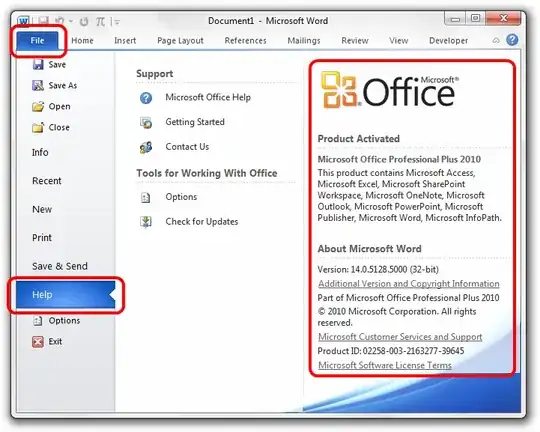
Click File > Help in any Office application. The About info is on the right side of that screen.

nhinkle
- 37,390
-
-
1Haha, thanks. As they say, a picture's worth 1000 words, so I figured this would make it a bit more clear :) – nhinkle Dec 02 '10 at 06:47
-
3
On the upper left side the blue Microsoft button (File) -> then look at the left side for "Help". If you hit help the informations you want appear.

zzeroo
- 528
2
While the information supplied is accurate, it does not go far enough. If you want to view the "About" screen typical of previous versions of Office, you need to go one step further.
Once at the "Product Activation" screen, go to the "About Microsoft" section & click on the link to: "Additional Version and Copyright Information".
That will get you the about screen you are you are looking for.

Richard
- 21