7

I need to move a 420GB unallocated space, buried in an extended partition, to the beginning of the disk.

Is there a way to do this using GParted?

Here is the current 'fdisk -l' snapshot:

Disk /dev/sda: 500.1 GB, 500107862016 bytes
255 heads, 63 sectors/track, 60801 cylinders
Units = cylinders of 16065 * 512 = 8225280 bytes
Disk identifier: 0x0c85ac80

   Device Boot      Start         End      Blocks   Id  System
/dev/sda1   *           1        1992    16000708+  83  Linux
/dev/sda2            1993       60801   472383292+   5  Extended
/dev/sda5            1993        3984    16000708+  83  Linux
/dev/sda6           58810       60801    16000708+  82  Linux swap / Solaris

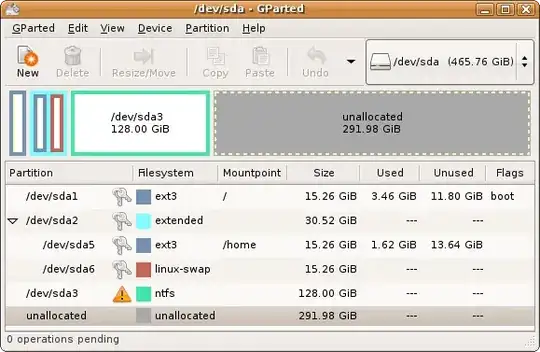
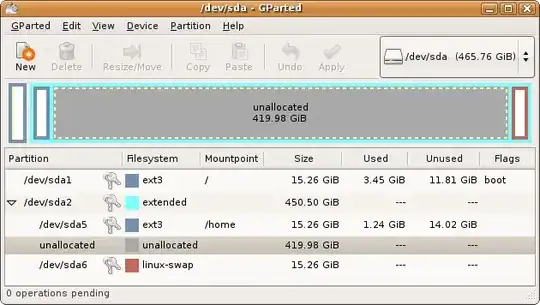
And in Gparted, it looks like this:
alt text

Unfortunately, when I select the unallocated space, the only operation available form the 'Partition' menu is 'New'.

Is it really impossible to move this partition?

If it is, how do I do this in Gparted?

2 Answers2

6

Instead of trying to move the unallocated space, you should move partition(s) which are in the wrong place — in your example you need to move at least sda5 to the end of the free space, then you would be able to move the start of the extended partition. Then you can try to move sda1 if it is really required (but note that it might require reinstallation of the bootloader due to absolute sector numbers embedded in boot sectors, so don't touch it unless it's really necessary).

  • Thank you very much and +1. I am writing this message from that Ubuntu system so I need to reboot using the Live CD to start implementing the steps you outlined. I will later update how it went. – Android Eve Dec 12 '10 at 17:03
  • Intermediate update (posting from a different computer): I decided to implement the above in stages, performing sanity check after each stage. Stage #1 (moving sda5 to the end of the free space) is still in progress... I didn't realize it would so long (~60 minute) to move a 16GB partition. – Android Eve Dec 12 '10 at 18:37
  • Update: The entire system froze, while at 11GB out of 16GB... This is horrible. What do I do now? – Android Eve Dec 12 '10 at 18:45
  • Is the system really frozen (e.g., mouse cursor not moving), or just gparted is not responding? If just gparted is frozen, try to run dmesg from another terminal — maybe there are some errors there. – Sergey Vlasov Dec 12 '10 at 18:50
  • 1
    And if you had already rebooted the system, boot from LiveCD and check the fdisk -l output — there is a change that gparted did not change it before hanging; then your data should still be there, because the new sda5 location at the end of free space does not overlap the original location. (Moving a partition to an overlapping location is much more dangerous.) – Sergey Vlasov Dec 12 '10 at 18:56
  • Sigh of relief: The system was really frozen and I had to do a hard reset. Fortunately, the partition table remained somehow unmodified (it's very interesting to know how GParted does that) so when I rebooted (not through the LiveCD) everything was the same, as if I never started the partition move. I am now afraid to use GParted from the LiveCD again, because it has this tendency to freeze. It doesn't freeze when booting from the HDD. This is strange. I tried using GParted from the HDD but it won't let me unmount sda5... I don't really know how to proceed. Fresh install? – Android Eve Dec 12 '10 at 19:09
  • Update: I am downloading right now gparted-live-0.7.0-4.iso, as the Ubuntu 8.04.4 64-bit LiveCD seems to be iffy... I hope that this 120MB CD (vs. the 700MB Ubuntu CD) will prove to be more stable. – Android Eve Dec 12 '10 at 19:24
  • 1
    You should try to find out why GParted froze. It might be due to flaky hardware (then the installed OS would probably freeze under load too), some bug in your Ubuntu version (this might be fixed by updates), or a problem specific to Live CD environment (such as memory shortage). You can try SystemRescueCD, which requires less memory than a full Ubuntu LiveCD. Also run smartctl -HA -l error /dev/sda to make sure your HDD is OK (there should be no errors, and ideally zero reallocated and pending sectors). – Sergey Vlasov Dec 12 '10 at 19:24
  • I booted with the gparted-live-0.7.0-4.iso, and ran 'smartctl -HA -l error /dev/sda' -- no errors. :) However, when I invoked GParted, the partition map looked slightly different: There was a 2.5GiB unallocated space at the end of the disk (after /dev/sda6). I proceeded anyway, but GParted reported an error. This GParted looked different for some reason (older?). I am going to try the SystemRescueCD you suggested. – Android Eve Dec 12 '10 at 20:05
  • 1
    This is strange; you should also compare the fdisk -l output with the snapshot you saved in the question. The unallocated space at the end may appear due to different HPA handling (e.g., Gigabyte motherboards tend to place a BIOS copy for recovery there), but given your disk size there may be at most several megabytes hidden there, not GiB. And, BTW, GParted there is newer, not older. – Sergey Vlasov Dec 12 '10 at 20:13
  • The output of 'fdisk -l' before & after is identical. I am still waiting for systemrescuecd-x86-1.6.4.iso download to complete. I will report back progress, as I hope documenting my ordeal can help others in the future. – Android Eve Dec 12 '10 at 20:26
  • 1
    If you wrote “2.5GiB” instead of “2.5MiB”, then probably the newer GParted is just reporting the partial cylinder at the end of disk (recent versions of partitioning utilities do not try to align partitions to fictitious ”cylinders” for DOS compatibility, instead aligning to 1MiB boundaries for compatibility with 4K-sector hard disks and SSD drives; Microsoft systems since Vista use 1MiB alignment too). – Sergey Vlasov Dec 12 '10 at 20:43
  • @Sergey thanks again and once again your were right: Indeed I should have written 2.5MiB. I decided to tackle the problem and solve the mystery, as this seems a lesson worth learning. The SystemRescueCD has the latest stable GParted (0.7.0) whereas my Ubuntu 8.0.4 64-bit LiveCD has GParted 0.3.5. Perhaps this could explain some of the discrepancies. However, I still would like to know how to solve the problem. This new GParted displays a new "device" which seems to be a combination of the 2 drives I have in the system: /dev/mapper/isw_bfahhabcbd_Volume0 and displays a warning. – Android Eve Dec 12 '10 at 23:18
  • Ah! I managed to capture the error that fails the sda5 move. Partition Check is comprised of 2 steps: (1) calibrate /dev/sda5 (2) e2fsck -f -y -v /dev/sda5 . The 1st step succeeds but the 2nd one fails with "e2fsck: Device or resource busy while trying to open /dev/sda5" -- How is this possible? I booted from the rescue CD and running everything from RAM... perhaps this is due to the failed 1st move? Also, the libparted log in the terminal issues "Could not stat device /dev/md/Volume0 - No such file or directory." -- How do I get out of this lock? – Android Eve Dec 12 '10 at 23:28
  • I found a description of a similar problem at http://www.linuxquestions.org/questions/linux-newbie-8/file-system-superblock-corrupted-648174/ and I tried 'fsck -y -t ext3 /dev/sda5' but got the same error message. – Android Eve Dec 12 '10 at 23:41
  • Unbelievable! Success! I managed to finally move sda5 to the end of free space (just before sda6 (linux-swap) partition, which essentially moves the unallocated 420GiB to the beginning of sda2 (extended). Here is how I did that: (1) I suspected incompatibility between GParted 0.7.0 and 0.3.5 (2) I insisted on using the Ubuntu 8.04 64-bit LiveCD that matches my system (3) I booted the LiveCD into "safe graphics mode" which gave me a 800x600 display but did NOT freeze the system. (4) The move completed in 10 minutes only! :) – Android Eve Dec 13 '10 at 01:42
  • -1 because the answer doesn't bother telling me how to move anything at all. – Tomáš Zato Mar 23 '16 at 12:01
1

OK, here is the final verdict: It seems that on Ubuntu 8.0.4 64-bit, using GPart 0.3.5 (or parted) that comes with it, it is impossible to move the extended partition sda2.

When I tried 'resize 467335733760 500105249279', parted refused to perform the operation, claiming the the partition can't have end before start!

So, here is what I did (using GParted 0.3.5):

  1. swapoff for sda6
  2. move sda5 back to the beginning of sda2
  3. move sda6 (swap) right after sda5
  4. resize sda2 to sda5+sda6

I tried moving sda2 to the end but GParted 0.3.5 won't let me! So, my current partitioning snapshot is as follows:


alt text

Note that emphasize GParted version (0.3.5) since this is what comes with the Ubuntu 8.0.4.4 64-bit LiveCD, which is the only one that works with the existing sda configuration, as both the SystemRescueCD and the GPartedLiveCD fail fsck with the false message "Device or resource busy while trying to open /dev/sda5".

  • 2
    Please note the "edit" link underneath your post, and that we're not a forum. As posts might not appear in the order in which they were created, adding multiple "anwers" is not working too well here. Thanks! – Arjan Dec 13 '10 at 18:20