I am trying to change the default interface language (menus, buttons, shortcuts etc) of MS Office 2010. I find it very annoying that they have made up ad.hoc. Swedish names for loads of things making searching for something you have a problem with a nightmare.
Also, the Swedish version have non-industry-standard-shortcut-keys, for instance:
- Lets say you want to make the text bold. Ctrl + B? You would have guessed wrong: Ctrl + F
- You want to find a word in your text? Ctrl + F? Oh no thats right, that made the text bold...
Ghaa! This drives me crazy. Anyway, moving on to my problem.
This problem could be fixed in two ways, right?
- Change the global language settings in "Language Settings"
- Change the shortcut keys.
Ok, fine. This is a screenshot of the "Language Settings":
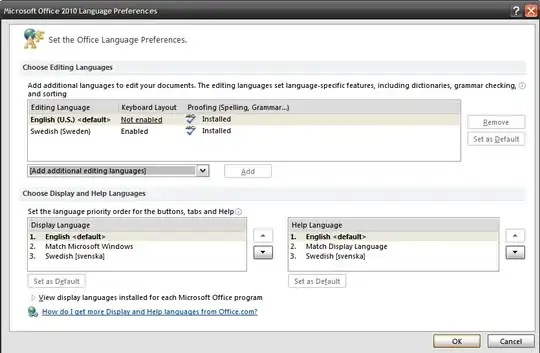
opening up Word...:

It's still in Swedish! And my custom shortcuts are gone (see the mouse hover over the bold button) Ghaa.
EDIT: Actually - the only language installed might actually be Swedish. Pressing the text on the bottom of the first screenshot, I'm transfered to a "Microsoft Language Pack" page, the English language pack is... $30. Well. No. I wont pay that to get the default language. Stupid.


