2

I've been checking the internet for answers to missing space in Windows 7 (Professional 32bit) but most are slightly different from mine.

My C:\ drive has about 56GB. Current disk space is about 5.58GB.

The files in my C:\ drive occupies about 23GB. I have about 32GB of space that is unknown. I have used WinDirStat to identify the unknown space but I can't delete or fix it, even with WinDirStat.

I've disabled synchronization. deleted restore points and disabled restoration. There's no backup copies. I've reduced shadow copies to minimal space allocation. I've deleted hibernation file too. Performed system cleanup. I did chkdsk. Defragmentation. etc

What should I do?
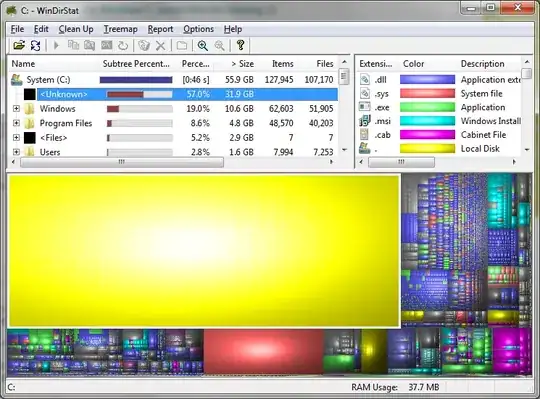
enter image description here

Chenmunka
  • 3,228

3 Answers3

2

Found the problem after searching more sites and tried check on my laptop's restore and backup. I have been checking windows 7 backup, restore points, shadowcopy except my laptop's (Lenovo) backup.

It came default with the backup scheduled to run and dump the file on your C:drive, taking up the entire drive.

Thank you all.

1

Run a chkdsk /f on the hard drive, then try windirstat again.

Skip the bad sector scanning option.

http://www.howtogeek.com/howto/windows-vista/guide-to-using-check-disk-in-windows-vista/

Moab
  • 58,308
0

In my case, it seems to have been System Restore reserved space even if System Restore was supposed to be off. I tried toggling System Restore to On and then Off again, and it still didn't free up the unknown missing space.

Finally, a reboot did the trick! Hope this helps people out there...

andz
  • 201